

ON1 Photo RAW 2027 Guided tour Step 1 of 5
Welcome to the Edit Modules
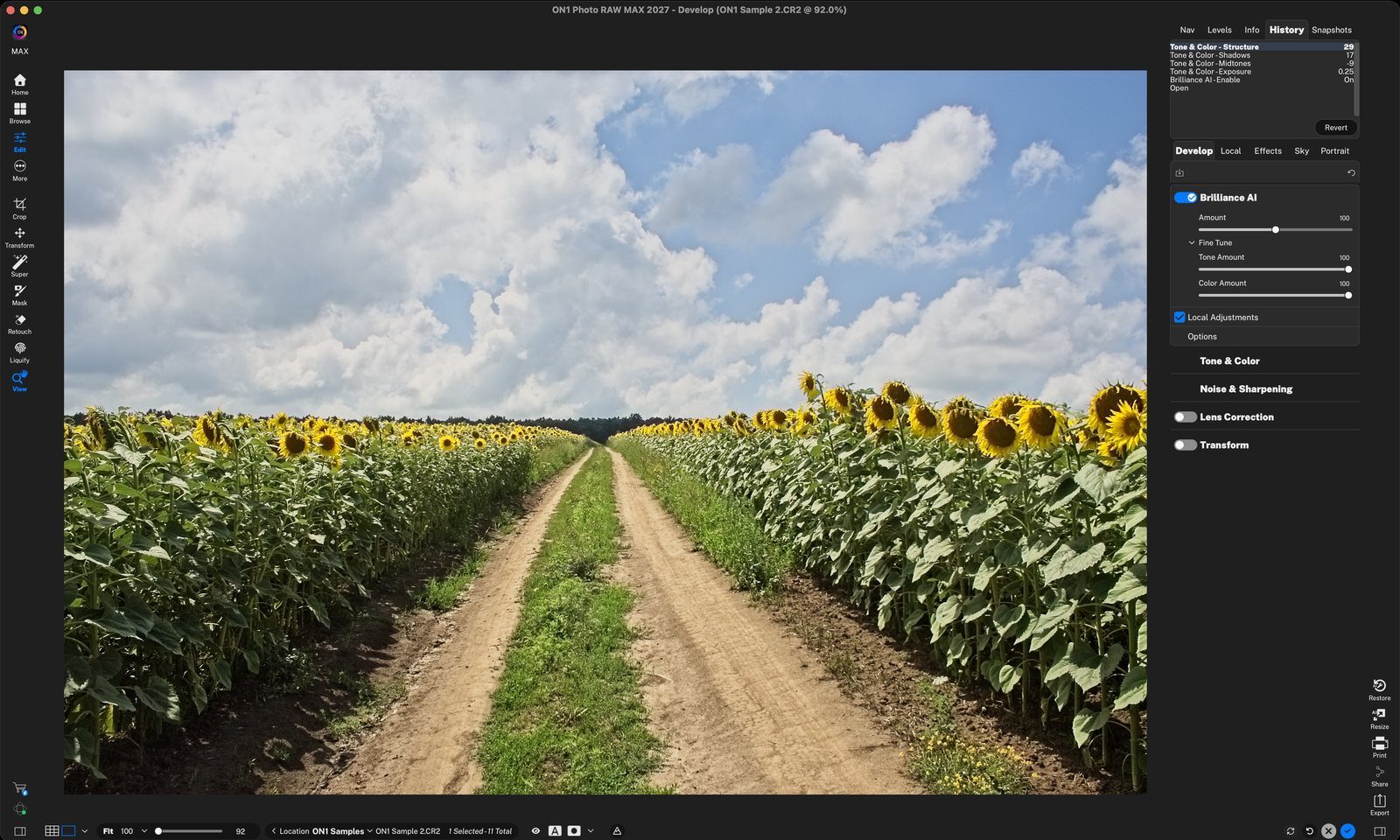
The Edit modules are where you make your photos look their best. You're on the Develop tab, the place to start every edit. Begin with Brilliance AI for a quick, smart starting point.
Tone & Color
Tone & Color holds the core adjustments for every photo: the camera profile, then sliders for tone, structure and color. Brilliance AI sets these for you, and you can change any of them.
All the Tools You Need
All of the editing tools are in the Tool Well on the left. When you select a tool, its options appear in the Tool Options Bar at the top of the preview area.
More Control
Edit goes beyond the basics. Use these other tabs to add local adjustments and special-effects filters, replace skies, and retouch portraits.
Non-Destructive
Photo RAW is non-destructive, which means every edit can be undone or adjusted later. The History pane lists your edits.
Note: History is cleared when you return to Browse. To keep a version permanently, use Snapshots. Click anywhere to finish
Tour complete
You walked through Develop: Brilliance AI, Tone & Color, the Tool Well, the Edit tabs and History.
- 1Brilliance AI
- 2Amount and Fine Tune
- 1Tone
- 2Structure
- 3Color
- 1Tool Well
- 1Edit tabs
- 1History