

 ON1 Photo RAW
Comparison Guide

ON1 NoNoise AI vs. Topaz Photo: Which Noise Reduction Tool Is Right for You?
If high-ISO grain or low light threatens an otherwise great shot, these are the two names photographers search for first. Compare AI models, workflow, and price between NoNoise AI, newly rebuilt with ON1's biggest noise reduction upgrade yet, and Topaz Photo. Try the full version of NoNoise AI free for 30 days.
Free 30-Day Trial • One-Time Purchase Available • 21 Years, Photographer First
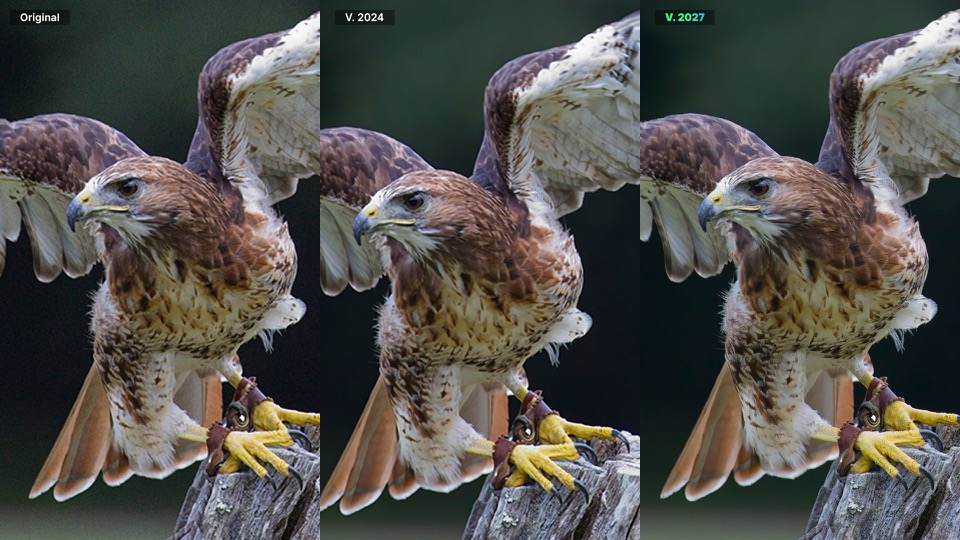
Original vs. Previous NoNoise AI vs. Latest NoNoise AI
At a Glance
Quick Comparison: NoNoise AI vs. Topaz Photo
Where the two tools actually differ, before the detail: how you pay for them, how they approach noise, and how much of the result you get to control.
| Feature | ON1 NoNoise AI | Topaz Photo |
|---|---|---|
| Pricing Model | One-time purchase ($69.99), or included with an ON1 Photo Studio subscription | Subscription only ($199/yr upfront, $25/mo on the annual plan, or $39/mo month-to-month) |
| Perpetual License | Yes | Not offered |
| Core Strength | Subject-aware noise reduction inside a full editor | Dedicated denoise, sharpen, and upscale point tool |
| Noise Reduction Approach | 6 subject-specific AI models (General, Ultra High ISO, Astro, People, Wildlife, Film) | Single “Wonder” model (denoise + sharpen + upscale) |
| Manual Control | Luminance, Enhance Detail, Color, and Micro Sharpening sliders | Automated one-click, limited manual adjustment |
| Editing Environment | Standalone app or plugin for Photoshop, Lightroom Classic, Photoshop Elements, Affinity Photo, Apple Photos, and Corel PaintShop Pro | Standalone app or plugin for Photoshop, Lightroom Classic, and other editors |
| Rendering | Local processing | Local + optional cloud rendering |
| Platforms | macOS and Windows | macOS and Windows |
What's New
Six AI Models Built Around What You Shoot
NoNoise AI starts by asking what kind of photo you're working on, instead of running one model across everything.
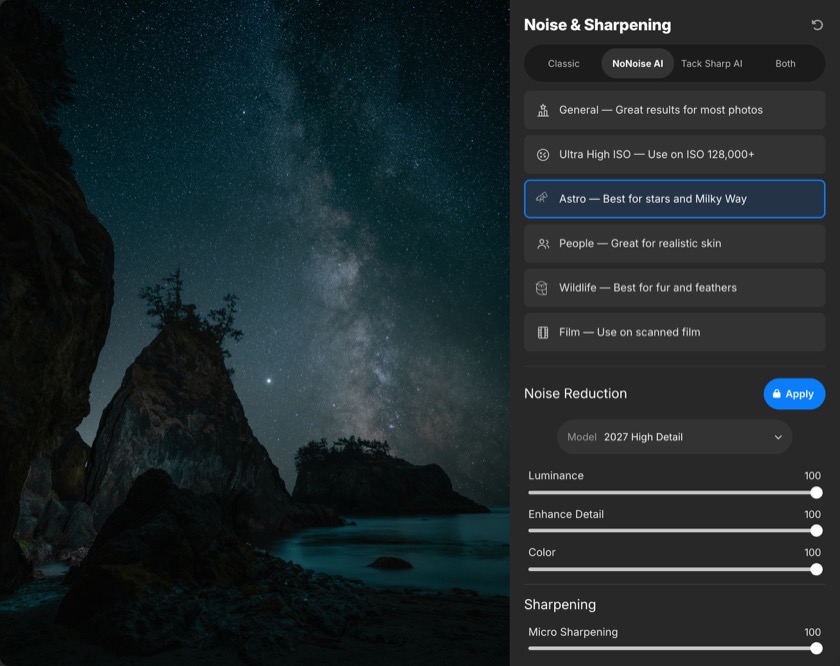
The NoNoise AI Workspace
A Model Tuned to the Subject, Not to Everything
General, Ultra High ISO, Astro, People, Wildlife, and Film each apply a model tuned to that specific subject, so star points, feathers, skin, and film grain are treated differently instead of getting the same one-size-fits-all pass.
Pick the model that matches your shot, then fine-tune Luminance, Enhance Detail, Color, and Micro Sharpening if you want to push the result further. Topaz Photo runs its single Wonder model on every image regardless of what you shot.
What's New in the Latest NoNoise AI
- Rebuilt noise reduction models that keep more real detail at any ISO.
- Model Selector: choose General, Ultra High ISO, Astro, People, Wildlife, or Film for the subject in front of you.
- Retrained TackSharp AI to recover sharpness without dragging noise back in.
- Faster AI inference engine on Windows, with native support for Windows on ARM.
Head to Head
How Each Editor Handles Noise Reduction
Both clean up a noisy frame. They disagree about how much of that decision should be yours.
ON1: AI Models Built Around What You Shoot
NoNoise AI starts by asking what kind of photo you're working on. Pick Astro and the model protects star points and Milky Way structure instead of smoothing them into mush. Pick Wildlife and it holds onto individual feather barbs and strands of fur.
From there, Luminance, Enhance Detail, and Color sliders let you push the automated result further in either direction.
Topaz: One Model, Broader Scope
Topaz Photo takes a different approach with its Wonder model, combining denoising, sharpening, and upscaling into a single automated pass. That's useful when you need all three fixes on one image.
It also means less room to fine-tune any one step, and reviewers have noted the tradeoff: less manual control in exchange for speed and simplicity.
Technology
Purpose-Built AI Models vs. One Combined Model
Both lean on AI. The difference is whether the model knows what it's looking at.
ON1's AI: Built for Precision
NoNoise AI uses a model matched to the subject instead of one generic pass. The Apply and Adjust workflow shows you that result first, then lets you switch to manual mode and dial in Luminance, Color, and Detail exactly where you want them.
Most processing runs locally, on your machine, and the AI inference engine was rebuilt to use vendor-specific hardware acceleration, including native support for Windows on ARM, so a folder of high-ISO shots processes faster on current Windows hardware without giving up that subject-specific accuracy.
Topaz's AI: One Model for Every Photo
Topaz cites speeds up to 100x faster than its first-generation diffusion models. That same model runs on every photo regardless of subject, so a concert shot and a Milky Way shot get the same processing instead of one tuned to each.
Topaz Photo runs locally by default, with unlimited cloud rendering available if you want to offload processing, and some users have reported the local models are demanding on older machines.
Workflow
One App vs. One Job
Where each tool sits in the rest of your editing.
ON1: Masking, Layers, and Batch Processing Built In
Masking now works like layers: combine multiple noise reduction results and mask between them, so a bird's eye gets sharpened while the noisy background stays smooth, in the same image.
Point NoNoise AI at a folder, or trigger it directly from Lightroom Classic, and it works through a whole shoot instead of one file at a time, whether you run it standalone or as a plugin.
Topaz: A Focused Tool for a Specific Job
Topaz Photo is built to do one thing well: clean up, sharpen, and upscale a photo.
It doesn't include layers, masking, a DAM, or an effects library, so it's one stop in a longer workflow rather than the whole workflow.
Cost of Ownership
Own It Once vs. Pay Every Month
Both tools can produce clean results. Each costs you differently over time.
ON1 NoNoise AI
$69.99 one-time
- Own it outright, no renewal to track.
- Also included in ON1 Photo Studio ($179.99/yr for ON1's full software bundle), never required.
- Free 30-day trial, plus a 30-day money-back guarantee.
- No cloud lock-in, no data mining.
Topaz Photo
$199 / year, paid upfront
- $25/mo on the annual plan, or $39/mo month-to-month.
- No one-time or perpetual license currently offered.
- Pro tier is $599/yr; Topaz Studio bundle is $399/yr.
- Local rendering plus optional unlimited cloud.
- Refund window: 2 days.
Worth Knowing
If you've used Topaz in the past and remember it as a one-time purchase, that has changed: Topaz Photo is subscription-only. At $199/year, its cheapest rate, three years of Topaz costs $597, more than eight times what NoNoise AI costs to own outright.
Real-World Proof
Built for Wildlife, Astro, and Every High-ISO Shot In Between
The mistake most general-purpose denoise tools make on textured subjects is smoothing them flat.
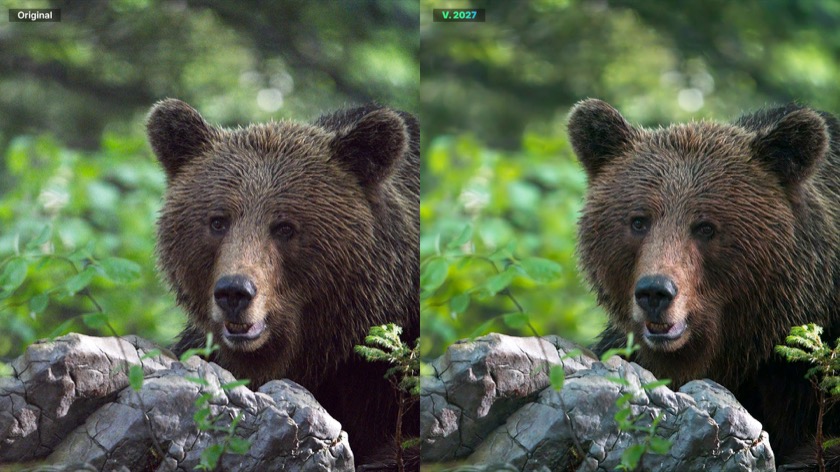
Original vs. NoNoise AI
The Wildlife Model, on a Real Frame
The Wildlife model is tuned to hold onto individual strands of fur and feather barbs instead of smoothing them into a soft blur.
That is the whole argument for subject-specific models: a bear's coat, a Milky Way core, and a portrait's skin all fail in different ways under a single general-purpose pass, and each one gets its own model here.
Which One Is Right for You?
Choose the Tool That Matches How You Work
Neither tool wins every category. The split comes down to how you want to pay and how much control you want.
Choose ON1 NoNoise AI if you:
- Want to own your noise reduction software outright instead of renting it.
- Shoot wildlife, astro, portraits, or other subjects where a subject-specific AI model beats a general one.
- Already have a primary editor, like Lightroom, Photoshop, or Affinity Photo, and want noise reduction that plugs directly into it, or want it as a standalone app.
- Want manual control available when the automated result needs a push.
Choose Topaz Photo if you:
- Want denoising, sharpening, and upscaling handled in a single automated pass.
- Are comfortable paying a recurring subscription for a dedicated point tool.
- Already have a primary editor and need a plugin or standalone pass.
- Prefer a hands-off, one-click result over slider-level control.
The Final Verdict
Rent a Point Tool, or Finally Own Your Noise Reduction
Topaz Photo is a capable, automated specialist that now requires an ongoing subscription with no way to buy it outright.
NoNoise AI gives you subject-specific AI models, manual controls when you want them, and a one-time purchase option. Use it on its own as a standalone app, or inside the editor you already use for everything else.
Cleaner Detail in Every Shot. Try NoNoise AI Free.
Try the full version free for 30 days on your own high-ISO shots, as a standalone app or inside Lightroom and Photoshop. Then own it with a one-time purchase.
- 30-day money-back guarantee
- One-time purchase available
- No cloud lock-in
Frequently Asked Questions
The latest NoNoise AI brings rebuilt noise reduction models, a Model Selector with six subject-specific AI models, a retrained TackSharp AI for deblurring, and a faster AI inference engine on Windows, including native Windows on ARM support.
No. NoNoise AI is available as a one-time purchase. If you'd rather subscribe, it's also included in ON1 Photo Studio, ON1's full software bundle, but a subscription is never required.
Not currently. Topaz Photo comes only as a subscription, starting at $199/year if paid upfront. If you're used to Topaz as a one-time purchase, that pricing model has changed.
That's what the Model Selector is for. General, Ultra High ISO, Astro, People, Wildlife, and Film each apply an AI model tuned to what that kind of image needs.
NoNoise AI works as a standalone app and as a plugin, saving a fully editable DNG that sends straight back into Lightroom, Photoshop, or Affinity Photo, so it fits into whatever workflow you already use.
Yes. You can download a free 30-day trial of the full version, standalone or as a plugin. If you buy and it's not the right fit, ON1's 30-day money-back guarantee covers you.
It's a paid upgrade. Existing ON1 customers can sign in on the NoNoise AI store page to see their upgrade price.
ON1's 30-day money-back guarantee covers it. If it's not the right fit, you get a full refund, no questions asked.