

ON1 vs Topaz: Which AI Photo Editing Tools Are Right for You in 2026?
ON1 Photo RAW and Topaz Labs solve different problems. ON1 is a full RAW editor, with organizing, masking, layers, and effects built into one app you buy once. Topaz sells separate, narrower AI tools, like Photo AI and Gigapixel AI, each built for one job: noise reduction, sharpening, or upscaling. For a single program that edits a photo start to finish, ON1 is the better fit. For best-in-class upscaling or noise removal layered on top of an editor you already use, Topaz’s specialized tools still lead there.
If you shoot RAW and your Lightroom or Photoshop workflow already includes one or two Topaz apps like Photo AI, Gigapixel AI, DeNoise AI, or Sharpen AI, you’ve wondered whether consolidating into a single app is worth it. ON1 Photo RAW and Topaz’s tools solve overlapping problems, noise, sharpening, upscaling, in different ways. One is a full RAW editor and photo organizer with those capabilities built in. The other is a set of specialized plugins designed to slot into an existing Adobe-centric workflow. This guide compares them feature by feature so you can decide which approach, or which combination, fits how you shoot and edit.
What Topaz Labs Offers
Topaz Labs builds AI image-enhancement tools around specific tasks: noise, sharpening, upscaling. As of 2026, the lineup is Topaz Photo (rebranded from Topaz Photo AI), which combines denoise, sharpen, and upscale tools into one app, and Topaz Gigapixel (rebranded from Gigapixel AI), a separate app for large-scale upscaling. Topaz no longer sells DeNoise AI and Sharpen AI as standalone apps; that functionality now lives inside Topaz Photo. None of Topaz’s apps is a RAW editor or a photo organizer. They run as standalone apps or as plugins inside Lightroom, Photoshop, or Capture One, working on files you’ve already imported, culled, and organized elsewhere.
A Topaz-based workflow still needs Lightroom (or another catalog/DAM) for library management and RAW development. Topaz handles one enhancement step, then hands the file back.
What ON1 Photo RAW Includes Instead
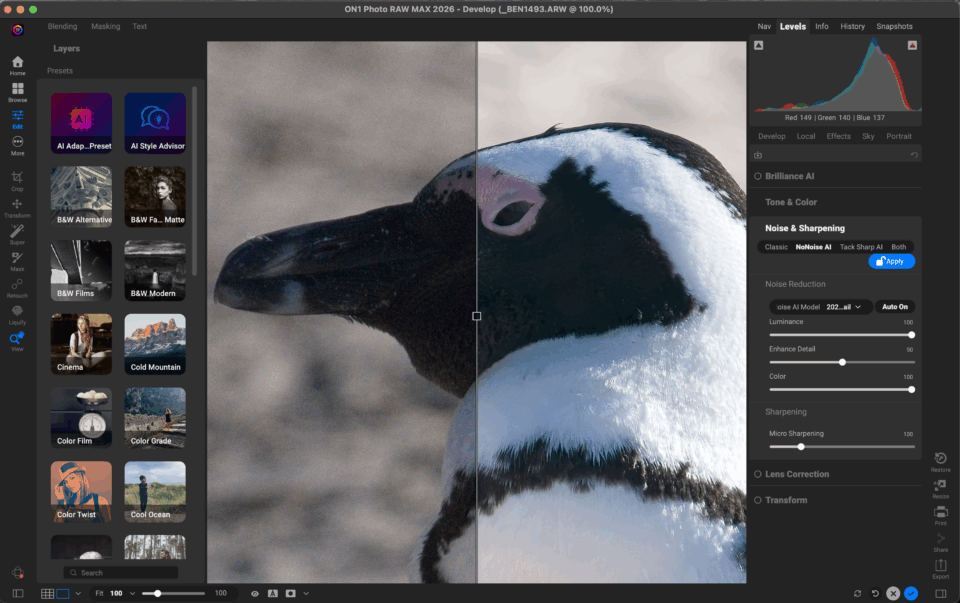
ON1 Photo RAW bundles the same categories, noise reduction (NoNoise AI), sharpening (TackSharp AI), and upscaling (Resize AI 2026), inside a full RAW processor. There’s no plugin round-trip. You import, cull, and browse your shoot in ON1’s built-in photo browser, develop the RAW file, and apply NoNoise AI, TackSharp AI, or Resize AI 2026 in the same session, alongside non-destructive layers and masking for further retouching.
The standard ON1 Photo RAW license includes all of it; none of it sits behind a higher tier. Photo RAW MAX adds two things: direct plugin support for Photoshop and Lightroom, and Restore AI for photo restoration. Consider it if you want a foot in an Adobe-centric workflow.
Because ON1 combines organizing and enhancement in one app, you don’t export to a plugin and re-import the result, and you don’t track a separate license for each capability.
Feature-by-Feature Comparison
| Feature | ON1 Photo RAW | Topaz |
|---|---|---|
| Noise reduction | NoNoise AI, built in | Topaz Photo; DeNoise AI no longer sold separately |
| Sharpening | TackSharp AI, built in | Topaz Photo; Sharpen AI no longer sold separately |
| Upscaling | Resize AI 2026, built in | Topaz Gigapixel, separate app/license |
| Full RAW editor | ✅ | ❌ |
| Photo organizing / DAM | ✅ | ❌ |
| Layers | ✅ | ❌ |
| Plugin vs. standalone | Standalone, all-in-one app | Both: standalone or plugin |
| Pricing model | One-time license option or subscription | Subscription only, |
Pricing: Per-Tool Add-Ons vs. One Purchase
Because Topaz sells noise reduction, sharpening, and upscaling as separate, overlapping products, photographers who want all three capabilities end up licensing more than one Topaz app, commonly Topaz Photo plus Topaz Gigapixel for large-scale upscaling.
ON1 Photo RAW includes NoNoise AI, TackSharp AI, and Resize AI 2026 in a single license, with a one-time-purchase option alongside its subscription plan. Weigh the number of separate Topaz licenses you’d need against ON1’s single bundled price. (Photo RAW MAX keeps that same one-license model and adds Photoshop/Lightroom plugin support plus Restore AI.)
As of August 2026, Topaz Photo runs $199/year (about $17/month billed annually, or $39/month billed month-to-month), and Topaz Gigapixel runs $149/year (about $12/month billed annually, or $29/month billed month-to-month). That’s roughly $348/year for the two apps separately. Topaz also sells an all-apps “Topaz Studio” bundle, covering Photo, Gigapixel, and its video, mobile, and web tools, for $399/year. Topaz no longer offers a perpetual license on any product; every tier, including single-app plans, is subscription-only. Compare that ongoing subscription against ON1 Photo RAW’s one-time-purchase option, or its own subscription tier.
Who Should Choose Topaz vs. ON1
If you’re happy with your Lightroom or Capture One catalog and want a best-in-class point tool for noise, sharpening, or upscaling to slot into it, Topaz’s specialized apps fit that role.
If you want fewer apps in your workflow, organizing, RAW development, layers, and AI enhancement in one place, or don’t want to manage licenses for multiple point tools, ON1 Photo RAW covers the same ground.
How to Switch from a Topaz + Lightroom Workflow to ON1
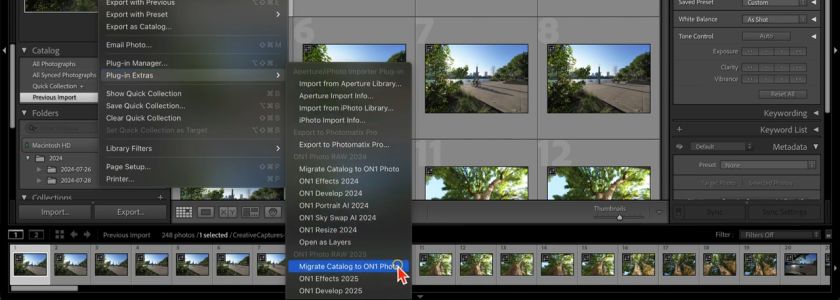
Moving from a Lightroom-plus-Topaz-plugins setup to ON1 Photo RAW means relocating your catalog and re-creating any Topaz-specific presets as ON1 AI Adaptive Presets. ON1’s Lightroom Migration Assistant imports your existing Lightroom catalog, including its folder structure, ratings, keywords, and, where supported, develop settings, into ON1 Photo RAW. You’re not starting your organizing from zero.
From there, NoNoise AI, TackSharp AI, and Resize AI 2026 replace the equivalent Topaz plugin steps inside the same session, instead of a separate export and re-import.
See our full Lightroom migration guide here.
Frequently Asked Questions
Is ON1 as good as Topaz for noise reduction? Both tools run current-generation AI denoise models and produce strong results on noisy RAW files. Which one looks cleaner varies by camera, ISO, and subject matter. Skip the spec-sheet comparison: run the same RAW file through NoNoise AI and Topaz Photo’s denoise tool at 100%, and judge fine-detail retention against noise removal for your own gear.
Do I still need Topaz if I use ON1 Photo RAW? For most photographers, no. NoNoise AI, TackSharp AI, and Resize AI 2026 cover the same noise reduction, sharpening, and upscaling use cases inside the same app you use to develop and organize your RAW files.
Does ON1 replace Topaz Gigapixel? Resize AI 2026 uses diffusion-based upscaling built into ON1 Photo RAW, targeting the same large-scale enlargement use case as Topaz Gigapixel, without a separate app or export step.
Is Topaz a subscription? Yes. As of 2026, every Topaz product (Topaz Photo, Topaz Gigapixel, and the all-apps Topaz Studio bundle) is subscription-only, with no perpetual license option. Personal-tier pricing starts around $12–$17/month when billed annually (higher for month-to-month billing or the Pro tier).
Please review our privacy policy for information about how we use the data we collect.