

ON1 Photo RAW 2027 Guided tour Step 1 of 5
Open Portrait AI
Portrait AI is the fastest way to retouch the faces in your photos. Open a portrait in Edit, then click the Portrait tab.
Auto Face Detection
Portrait AI finds each face for you and shows a thumbnail of it here. Each face gets its own settings.
Smooth the Skin
Drag the Retouching slider in the Skin section to smooth the skin. For more control, adjust the Detail and Smoothing sliders to taste.
Brighten the Eyes
Make the eyes stand out without changing the rest of the face.
Finish the Smile
Whiten teeth and adjust lip color, then apply the retouch. Every setting stays editable for each face.
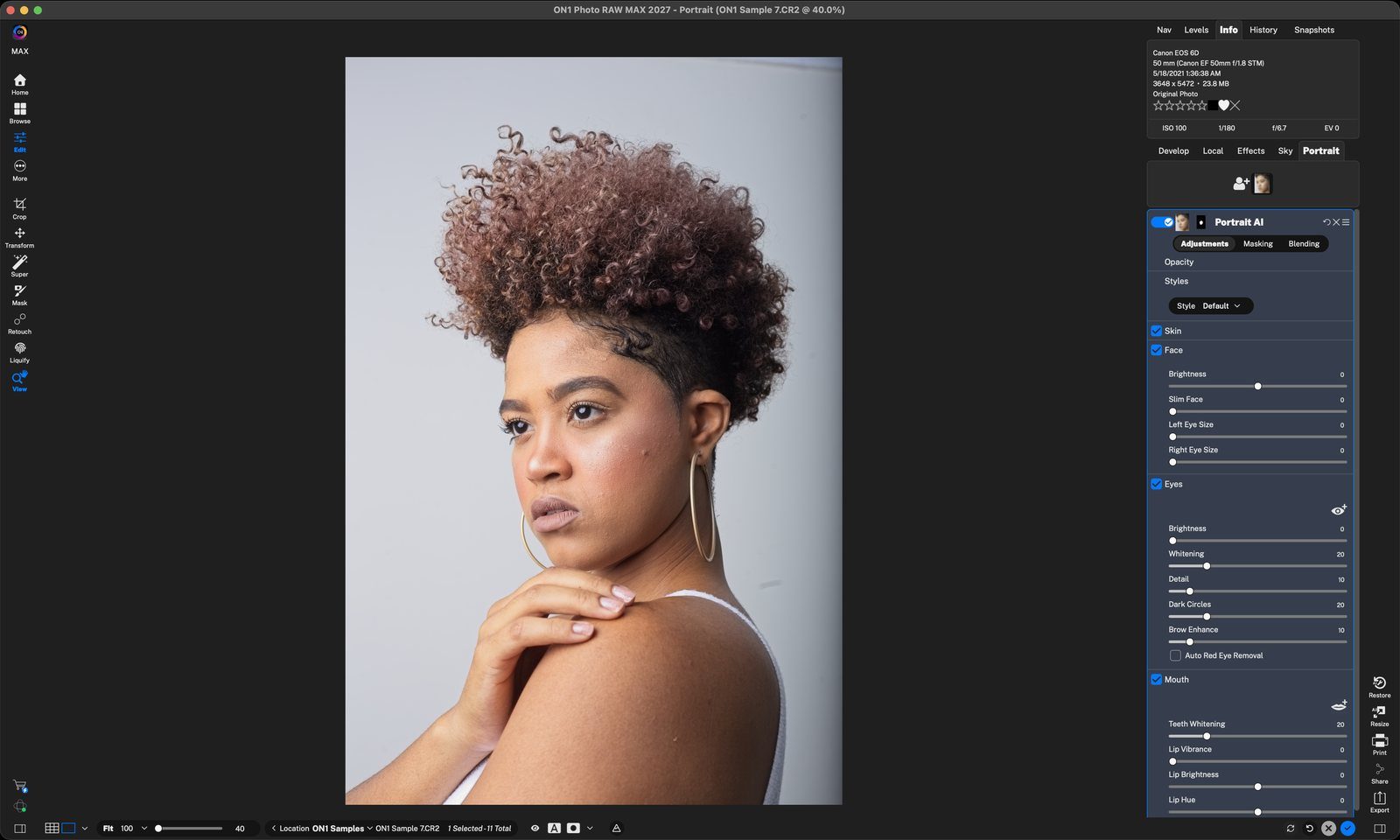
Portrait tabClick Portrait to open Portrait AI. Click anywhere to continue
Detected facePortrait AI finds each face automatically. If a face is missed, click Add Face (the person icon with +) and fit the box around it. Click anywhere to continue
RetouchingPortrait AI sets a starting amount. Use the sliders to smooth skin, reduce blemishes and shine, and adjust texture. Click anywhere to continue
Refine the eye selection firstClick the eye icon to show the eye outlines on the photo. Drag the points to fit each eye, then adjust the sliders. Click anywhere to continue
EyesBrightness and Whitening open up the eyes. Dark Circles lightens under the eyes, and Brow Enhance defines the brows. Click anywhere to continue
Refine the mouth selection firstClick the lips icon to show the mouth outline on the photo. Drag the points to fit the lips, then adjust the sliders. Click anywhere to continue
MouthTeeth Whitening brightens the smile. Lip Vibrance, Brightness and Hue adjust lip color. Click anywhere to continue
DoneClick the blue check to apply the retouch. Click anywhere to finish
Tour complete
You walked through Portrait AI: detect a face, smooth the skin, brighten and refine the eyes, and finish the smile.
Go deeper
- 1Portrait tab
- 1Detected face
- 1Retouching
- 1Refine eyes
- 2Eye sliders
- 1Refine mouth
- 2Mouth
- 3Done