

ON1 Photo RAW 2027 Guided tour Step 1 of 4
Rate, label and like from the Photo menu
Select a photo in Browse, then open the Photo menu. Rating, Color and Like each open a submenu.
Or click right on the thumbnail
Move the mouse over any thumbnail and its controls appear. Click to apply them straight to that photo.
Or press a key
The fastest way to cull: select a photo and press a key.
Turn on Auto Advance
With Auto Advance on, Browse moves to the next photo each time you apply a rating or a color label.
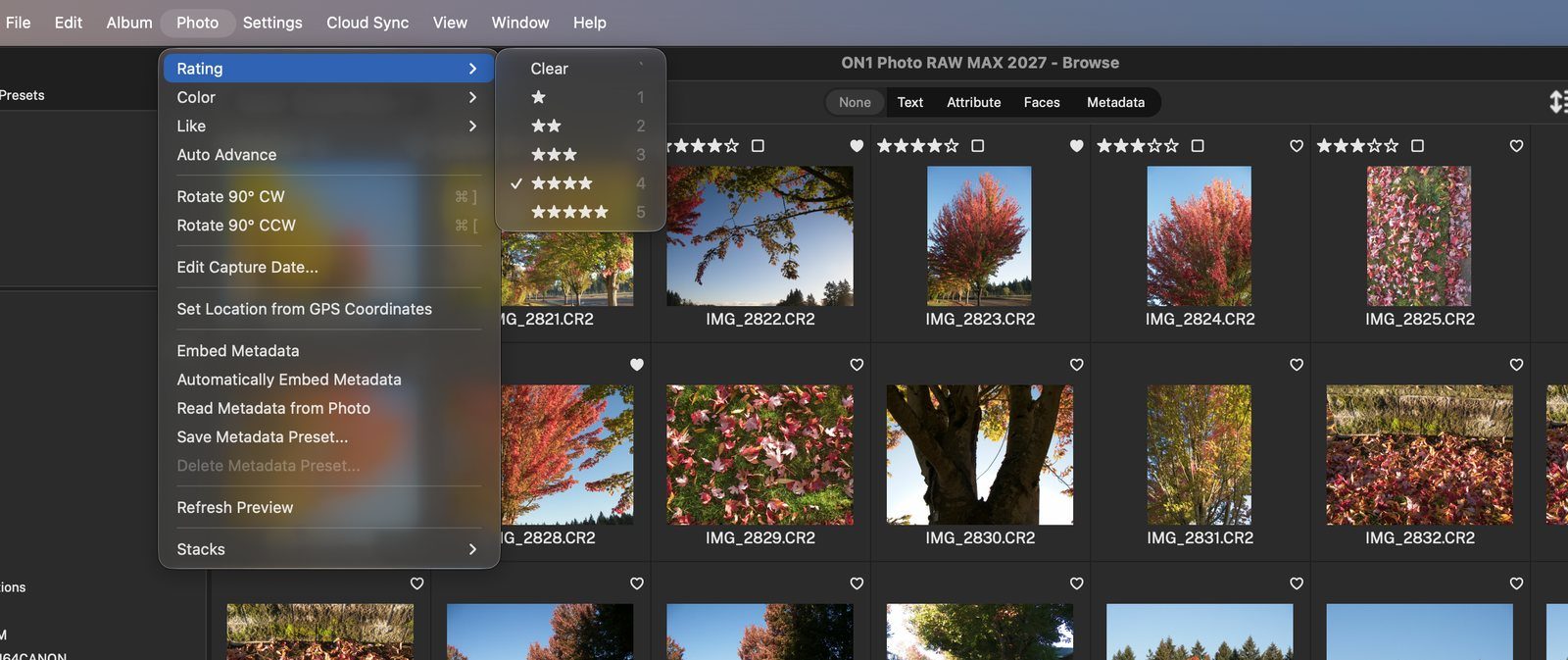
Ratingsets 1 to 5 stars. Color adds a Red, Yellow, Green, Blue or Purple label. Like marks it liked or disliked. Each choice lists its shortcut key. Click anywhere to continue
Click to applyClick a star to rate, the square to add a color label, or the heart to like the photo. Click anywhere to continue
1 to 5stars, 6 to 0 color labels, P like, X dislike, U clear. Click anywhere to continue
Auto AdvanceChoose it from the Photo menu to switch it on. Click anywhere to continue
Keep goingPress a key such as 4 or 8 on IMG_2822, and the selection jumps to IMG_2823, ready for the next one. Click anywhere to finish
Tour complete
You can now rate, label and like photos three ways, and Auto Advance keeps you moving through a shoot.
- 1Rating, Color and Like
- 1Stars, label and heart
- 1Shortcut keys
- 1Auto Advance
- 2Selected photo