

ON1 Photo RAW 2027 Guided tour Step 1 of 6
Open the Filter Menu
Filters narrow the grid to just the photos you want to see, based on the stars, likes and color labels you've given them. Nothing is deleted or moved.
Choose a Filter
The menu lists ready-made filters for ratings and likes, plus saved searches.
See Your Liked Photos
The grid now shows only liked photos, and the filter bar opens so you can see and change the rules.
Add a Color Label
Combine filters to narrow things down further. Each one you add must also match.
Filter by Attribute
Use the Attribute bar on its own for quick filters by rating, likes or color label.
Sort the Results
Sorting changes the order of the photos in the grid, with or without a filter.
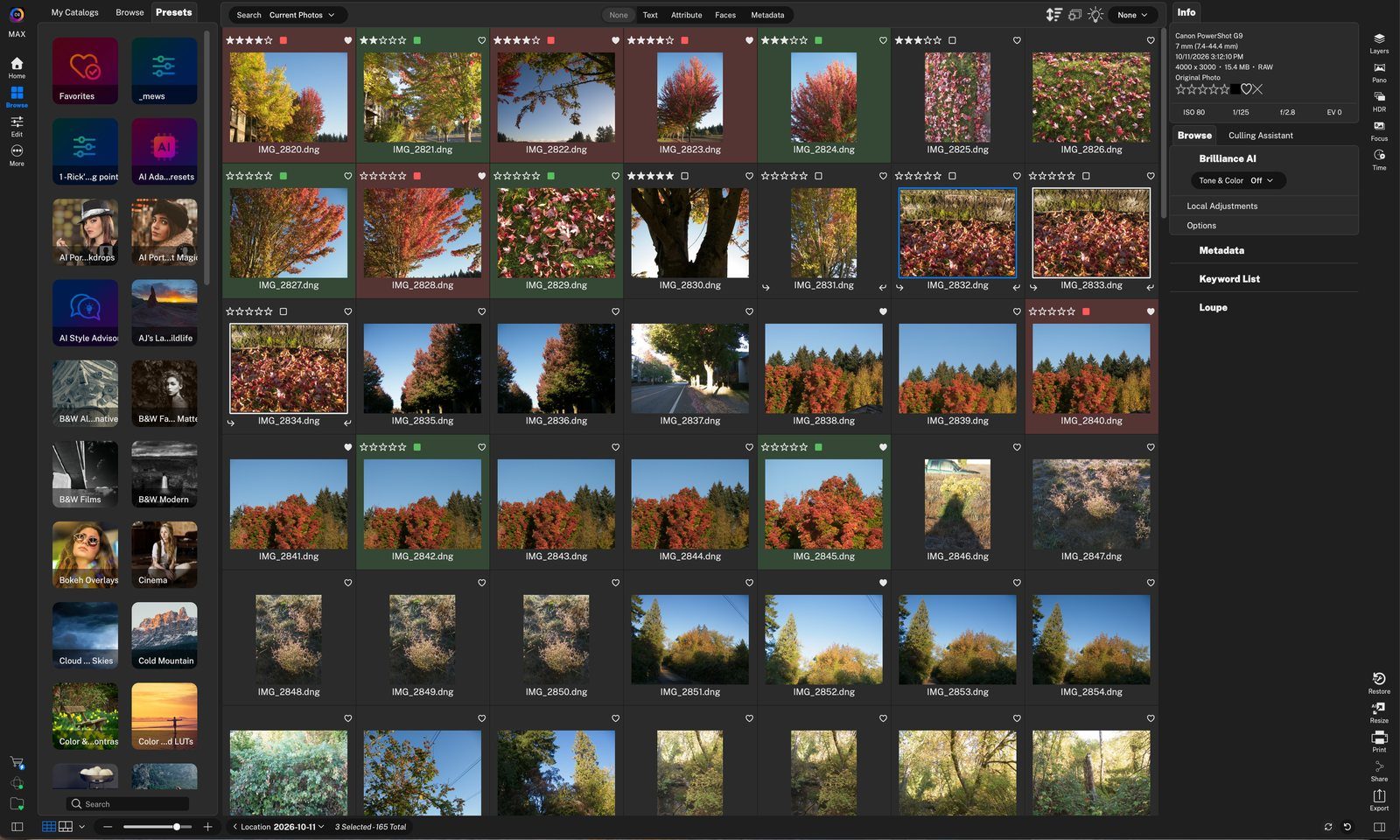
Filter menuClick the menu at the top right of the grid (it says None when no filter is on). Click anywhere to continue
Filter by starsPick a star filter, like five stars, to show only photos rated that high. Click anywhere to continue
Filter - LikedChoose Filter - Liked to show only the photos you've marked with a heart. Click anywhere to continue
Filter onThe menu shows the active filter. Choose None here to see all photos again. Click anywhere to continue
Attribute barFilter by liked, disliked or rejected, by star rating, or by color label. The filled heart means Liked is on. Click anywhere to continue
Search rulesThe Metadata bar shows the rule behind the filter: Likes is liked. Click anywhere to continue
Photo count16 of 165 photos match. Click anywhere to continue
Add a color labelClick the green swatch to show only liked photos that also have a green label. Click anywhere to continue
Narrower resultsNow 6 photos match: liked and green. Click anywhere to continue
AttributeClick Attribute in the filter bar to open the Attribute bar. Click anywhere to continue
Star ratingClick a star to show photos rated at least that many stars. Click anywhere to continue
Color labelsClick more than one label to see them together. Here red and green show 20 photos. Click anywhere to continue
Edits and TypeNarrow the results by edit status or by file type. Click anywhere to continue
Sort menuClick the sort icon to order photos by date, file name, rating, color, liked and more. Click anywhere to continue
Liked firstChoose Liked and Descending to put your liked photos at the top of the grid. Click anywhere to finish
Tour complete
You filtered by stars, likes and color labels, and sorted liked photos to the top.
- 1Filter menu
- 1Star filters
- 2Filter - Liked
- 1Filter name
- 2Attribute bar
- 3Search rule
- 4Photo count
- 1Green label
- 2Fewer matches
- 1Attribute
- 2Stars
- 3Color labels
- 4Edits and Type
- 1Sort menu
- 2Liked, Descending