
 ON1 NoNoise AI
AI Noise Reduction Software for Photos
Cleaner detail in every shot. NoNoise AI 2027 is here.
The AI models behind NoNoise AI have been rebuilt from the ground up to remove more noise and recover more sharpness, with fewer artifacts than ever. Try it free on your own photos, or buy it once and own it outright.
Original
NoNoise AI 2027
Removing Noise Shouldn't Cost You the Detail
As you push ISO higher for a fast shutter, grain will start to appear in your photos. Most noise reduction software tools trade grain for a soft, painterly look. NoNoise AI removes the grain and keeps the photo looking sharper and more natural, especially in the fine detail, even at a high ISO.
That's what makes ON1 NoNoise AI the best noise reduction software for photos you shoot. Get noise-free photos without sacrificing detail, whether you're working on wildlife, night skies, events or people.
What's New in NoNoise AI 2027?
The AI inside NoNoise AI just got a lot smarter and faster.
See More Real Detail at Any ISO
The rebuilt noise reduction models separate grain from genuine texture more accurately than ever, so fine detail like feathers, fabric and stars holds up even at your highest ISO settings.
Original
NoNoise AI 2027
Recover Sharpness Without Dragging Noise Back In
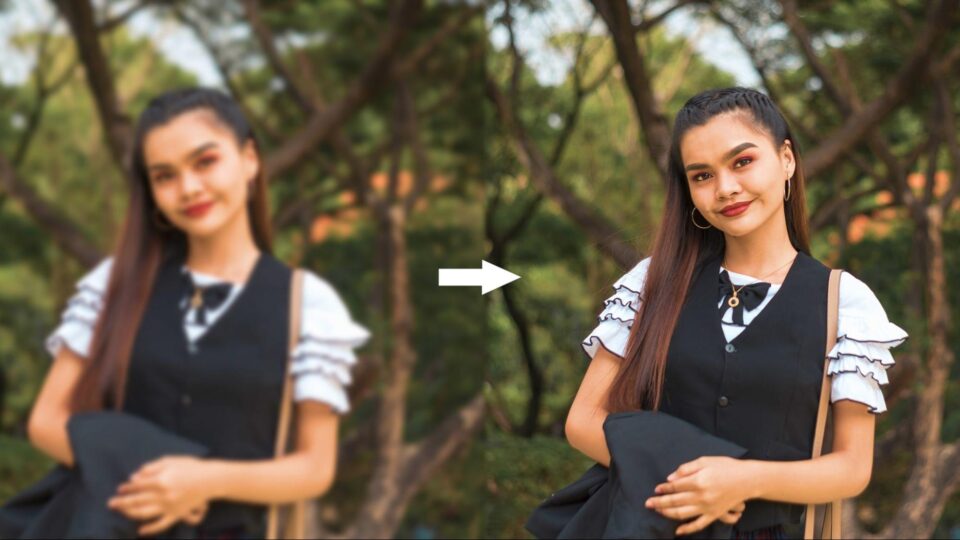
The deblurring AI behind TackSharp AI has been retrained to correct focus and camera shake while introducing less noise and fewer artifacts in the process. Shots you'd have written off as too soft are worth a second look.
Before
TackSharp AI
Pick the AI Model Built for Your Subject
NoNoise AI has built up a range of specialized noise reduction models over time, and the new selector puts them within one click. Choose the model tuned for wildlife, people, astrophotography, or scanned film, and let the tool match your subject instead of you guessing at settings.
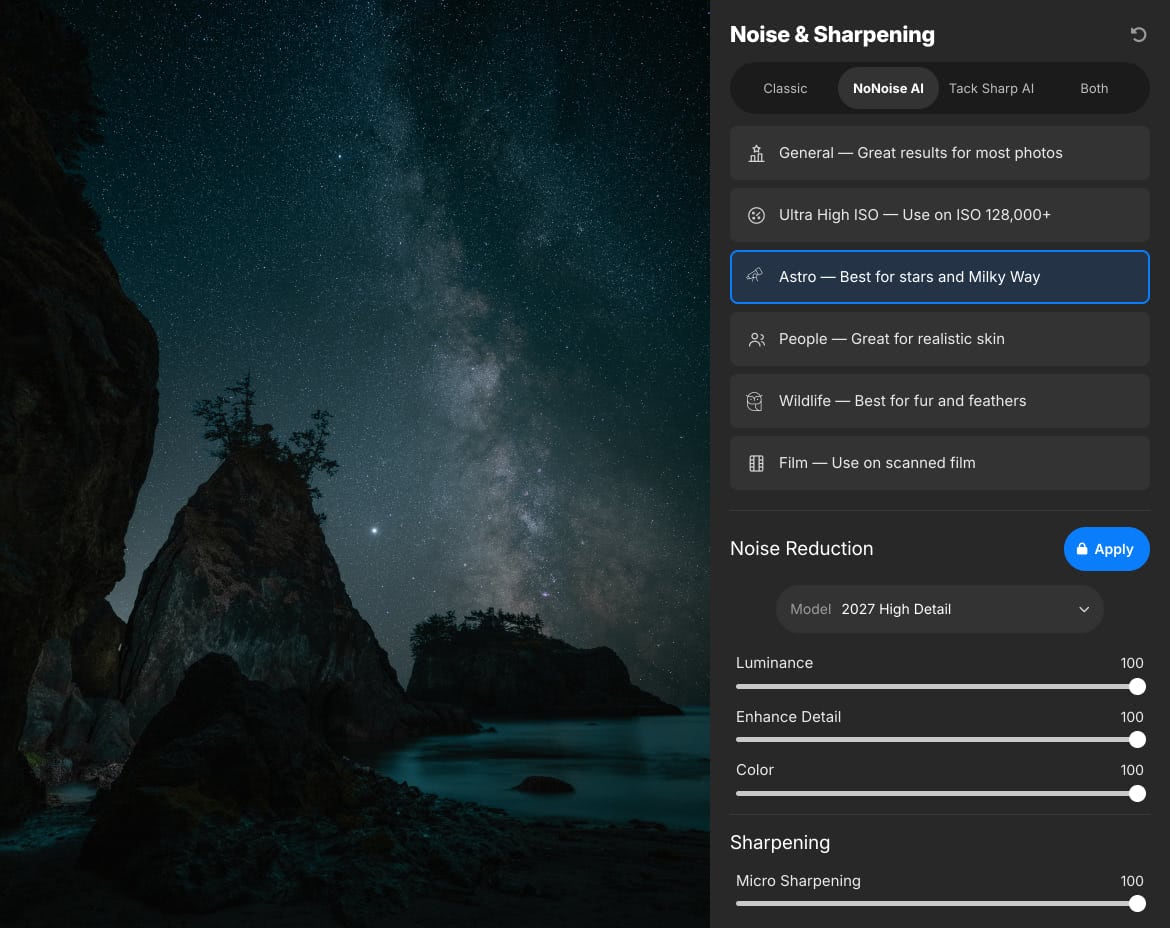
Why NoNoise AI Keeps the Detail Other Tools Lose
Two pieces of ON1 technology do the work that sliders can't.
Starts From Your Raw Data
NoNoise AI processes your raw photos with ON1's raw engine, demosaicing each image from its raw data. Then it determines the correct amount of noise reduction for that specific photo, so every shot gets the cleanup it needs instead of a one-size-fits-all setting.
Progressive Sharpening
ON1's exclusive Progressive Sharpening adjusts the amount of sharpening based on the size of the detail. Fine textures get a lift, larger edges get more defined, and you won't see halos or crunchy artifacts that come from other sharpening methods.
The Noise Goes. The Detail Stays.
Ultra high-ISO shots, run through the rebuilt NoNoise AI and TackSharp AI models side by side, so you can see exactly how much fine detail is maintained.
How Do You Want to Use NoNoise AI?
Run NoNoise AI 2027 on its own, as a plugin inside the editor you already use, or built right into ON1 Photo RAW. No need to change how you work to get cleaner files.
Standalone App
Open, clean up and save without launching anything else.
Plugin
Send photos straight from your current editor and back again.
Built Into Photo RAW
Already included if you edit in ON1 Photo RAW or Photo RAW MAX.
Works as a plugin with
Opens the files you shoot
Saves as DNG so your cleaned-up raw keeps its full tonal and color range for editing anywhere.
See the Difference on Your Own Photos
Download the free 30-day trial and run NoNoise AI 2027 on your noisiest shots. If it doesn't rescue at least a few images you'd already given up on, you've lost nothing.
Download the Trial
Get the full version of NoNoise AI 2027, free for 30 days.
Try Your Toughest Shots
Use it standalone or as a plugin in the editor you already use.
Buy When You're Ready
Own it outright with a one-time purchase, or get it with ON1 Photo Studio.
Photographers ON1
Trusted by Photographers Who Already Rely on NoNoise AI
ON1 Photo RAW is the best package for Wildlife. Easy file-handling, most natural denoising, fairest price and best support. I tested all the competitors, but I recommend definitely ON1 Photo RAW.
Jack
Pretty darn good at what it does. Look out DX0! Keep up the great work on this.
Christopher
Having come from many years of Lightroom use there was some initial doubts but gradually working with the included lessons and videos I am extremely satisfied and impressed with the program now, and have recently removed LR completely. I would highly recommend this software for anyone looking for something similar to LR, I'm very impressed with ON1.
Alan
Super program removes all noise in one click.
Bent
One of the best software i have been using for very long time, reliable, consistent, innovative, and for a very good price functionality ratio.
Jorge
I love the product, it's fabulous. I am still only getting to know about the products' attributes, but the one I am familiar with are sensational. So glad to have it. It works so well with Lightroom.
Vivion
Special Offer Ends October 15
Get NoNoise AI 2027 Today Launch Special - Save 25% Now
Rescue the high-ISO and low-light shots you used to delete. 2027 removes noise and restores sharpness in your photos, using AI models matched to your subject, whether it's wildlife, people, astro, or scanned film, so you keep the fine detail.
Choose the Photo Studio subscription to get everything: Photo RAW MAX with five activations, every individual app and plugin, all future upgrades, 1 TB of Cloud Sync, and ongoing access to ON1 Plus.

NoNoise AI 2027
One-Time Purchase
Price shown for general site visitors. Signed-in existing customers may see a different, personalized price.
- Rebuilt noise reduction & TackSharp AI models for cleaner detail, plus a new model selector
- Works as a standalone app and as a plugin for Adobe
- One-time purchase, yours to keep. Not a subscription

ON1 Photo Studio
Yearly Subscription
Get NoNoise AI 2027 now as part of ON1 Photo Studio, and get Photo RAW MAX today with all future upgrades.
- Every ON1 app and tool, always up to date
- All updates and upgrades included
- All future ON1 software tools included
- Cancel anytime
Standard cancellation/refund policy applies.
Frequently Asked Questions
Rebuilt AI noise reduction models that separate grain from real texture more accurately, a retrained TackSharp AI deblurring model that adds less noise and fewer artifacts, a new model selector for wildlife, people, astrophotography and scanned film, and a faster AI inference engine on Windows.
Yes. NoNoise AI 2027 is available as a free 30-day trial. It works as a standalone app and as a plugin, so you can test it on your own photos before you buy. Download the free trial.
Your download link was emailed to you on launch day. You can also download NoNoise AI 2027 anytime from your ON1 account.
NoNoise AI 2027 is a perpetual license. It's a one-time purchase with no subscription and no recurring fee, so you buy it once and own it outright. If you'd rather have every ON1 app, NoNoise AI is also included with an ON1 Photo Studio subscription.
NoNoise AI 2027 is a paid upgrade. Existing NoNoise AI owners can sign in to see their upgrade pricing.
Both. Use NoNoise AI 2027 as a standalone app, or as a plugin in Adobe Photoshop, Lightroom Classic, Photoshop Elements, Affinity Photo, Apple Photos or Corel PaintShop Pro.
Yes. NoNoise AI's noise reduction is built into ON1 Photo RAW and Photo RAW MAX, so you don't need a separate purchase if you already own Photo RAW.
It opens raw files from more than 800 cameras, plus DNG, JPG, TIFF and PNG. It can save your results as DNG files, so your cleaned-up raw keeps its full tonal and color range for further editing.
The AI inference engine improvement is a Windows-specific gain in this release. Mac users still get the improved noise reduction and TackSharp AI models, the new model selector, and every other improvement on this page.
Yes. Every purchase is covered by our 30-day money-back guarantee. Contact us within 30 days of receiving NoNoise AI 2027 for a full refund. If you pre-ordered, your 30 days started on launch day, October 1.
Is Your Computer Ready for NoNoise AI?
NoNoise AI 2027 runs on Mac and Windows. Here's what you need, and what we recommend for the fastest results.
Minimum |
Recommended |
|
|---|---|---|
| Operating System |
(Current maintenance releases, 64 bit only) |
(Current maintenance releases, 64 bit only) |
| Processor |
macOS:
Windows:
|
macOS:
Windows:
|
| RAM |
8 GB (16 GB if shared with the GPU) |
32+ GB |
| Hard Drive |
6 GB for installation |
|
| Graphics |
macOS:
Windows:
|
macOS:
Windows:
|
| Plugin Hosts |
Photoshop CC, Photoshop Elements 2020+, Lightroom Classic, Apple Photos, Affinity Photo, Corel PaintShop Pro |
|
| Internet |
A high-speed internet connection and active account for installation, ON1 Cloud Sync, activation, auto-update checking, content downloads, and tutorials. |
|
| Supported Options |
|
|
| Supported Languages |
English, German, Spanish, French, Japanese, Korean, Simplified Chinese, Russian, Portuguese, Italian, Dutch |
|
The ON1 Guarantee
Your Trust is Our Foundation
Every purchase is protected. Every photo is yours. No games, no surprises.


Cleaner Detail in Every Shot. Get NoNoise AI 2027 Today.
Rescue the high-ISO shots you'd already given up on.
- 30-Day Money-Back Guarantee
- No Subscription Required
- Mac & Windows