

ON1 Photo RAW 2027 Guided tour Step 1 of 5
Grid view: press G
Grid view shows the whole folder as thumbnails. It is the best view for scanning a shoot and picking photos.
Filmstrip view: press F
Filmstrip view shows the selected photo in main preview window, with the rest of the folder in a strip along the bottom.
Compare view: press C
Compare view puts several similar photos side by side so you can pick the best one.
Zoom in on all of them at once
To compare fine detail, zoom in. With Lock Pan & Zoom on, every pane zooms and pans together.
Fit view: press E
Fit view shows one photo as large as possible, without the filmstrip, for a closer look.
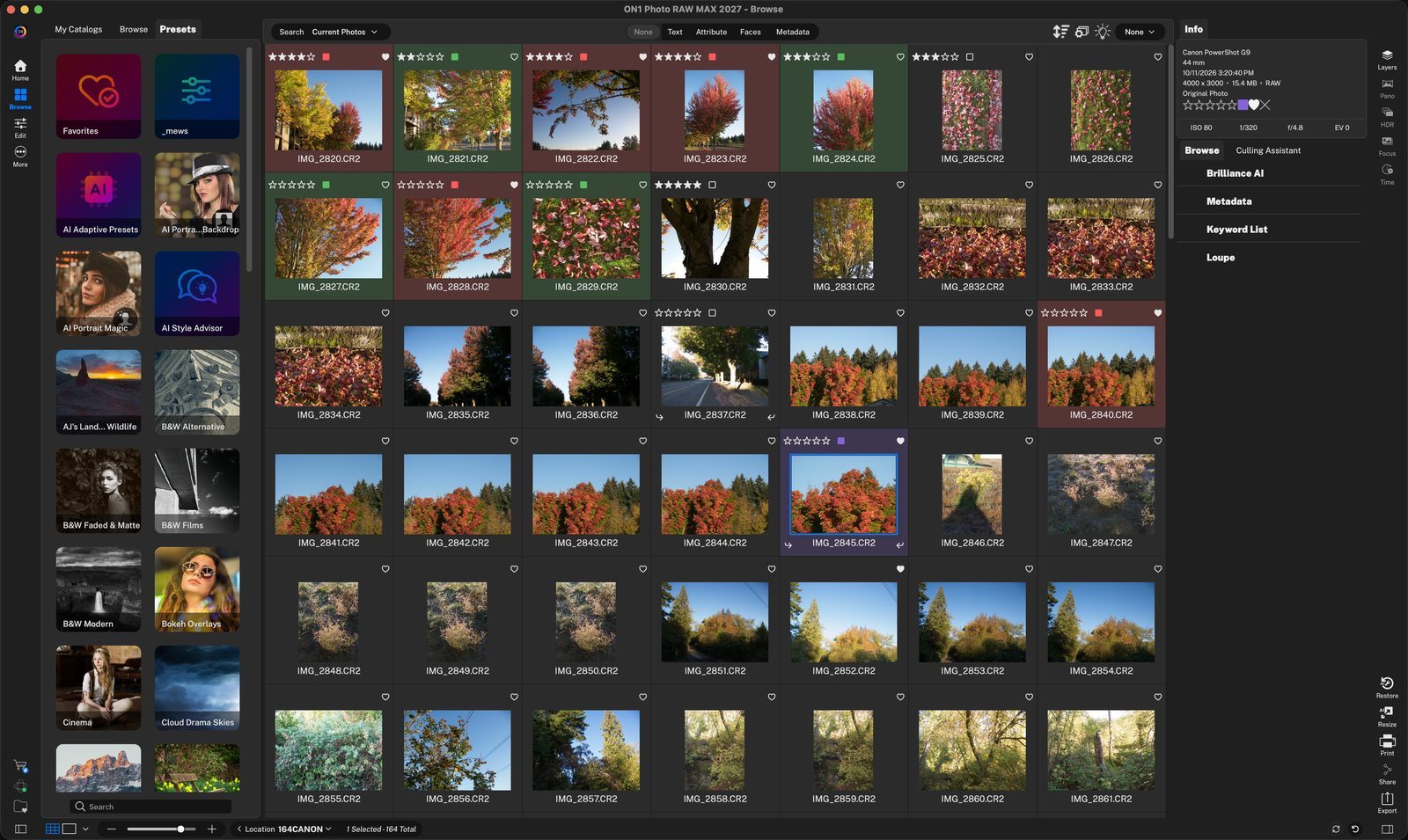
View buttonsSwitch between Grid, Filmstrip and the other views here, or press G for Grid view at any time. Click anywhere to continue
Thumbnail sizeDrag the slider to make thumbnails bigger or smaller. Click anywhere to continue
The selected file in filmstrip view is shown in the main preview area. Click anywhere to continue
FilmstripClick any thumbnail, or use the arrow keys, to move through the folder. Click anywhere to continue
Select the photosCmd-click or Shift-click thumbnails in the filmstrip, then press C. Here four photos are selected. Click anywhere to continue
Active photoThe blue outline marks the active photo. Click another photo to make it active. Click anywhere to continue
Lock Pan & ZoomCheck this so all panes follow when you zoom or drag one of them. Click anywhere to continue
Match Allsets every pane to the same zoom and position as the active photo. Click anywhere to continue
One photo, full sizePress E to see the selected photo fit to the window. Press G, F or C to switch back. Click anywhere to continue
ZoomFit shows the whole photo. Choose 100 or drag the slider to zoom in. Click anywhere to finish
Tour complete
Remember the keys: G for Grid, F for Filmstrip, C for Compare and E for Fit.
- 1View buttons
- 2Thumbnail size
- 1Selected file in Filmstrip view.
- 2Filmstrip
- 1Selected photos
- 2Active photo
- 1Lock Pan & Zoom
- 2Match All
- 1Full-size preview
- 2Zoom