

ON1 Photo RAW 2027 Guided tour Step 1 of 6
Hide All Panes
Need more room for your photo? One key hides every side pane at once.
Show or Hide One Side
Hide just the left or the right pane with a keyboard shortcut.
Expand and Collapse Panes
Each pane has a name you can click to open or close it, so you only see what you need.
Keyboard Shortcuts
Jump around Photo RAW with single keys.
Missing Layers or Masking?
If the Layers or Masking panes aren't showing in the Edit modules, turn them back on from the Window menu.
See All Shortcuts
Want the full list? Every keyboard shortcut is in one place.
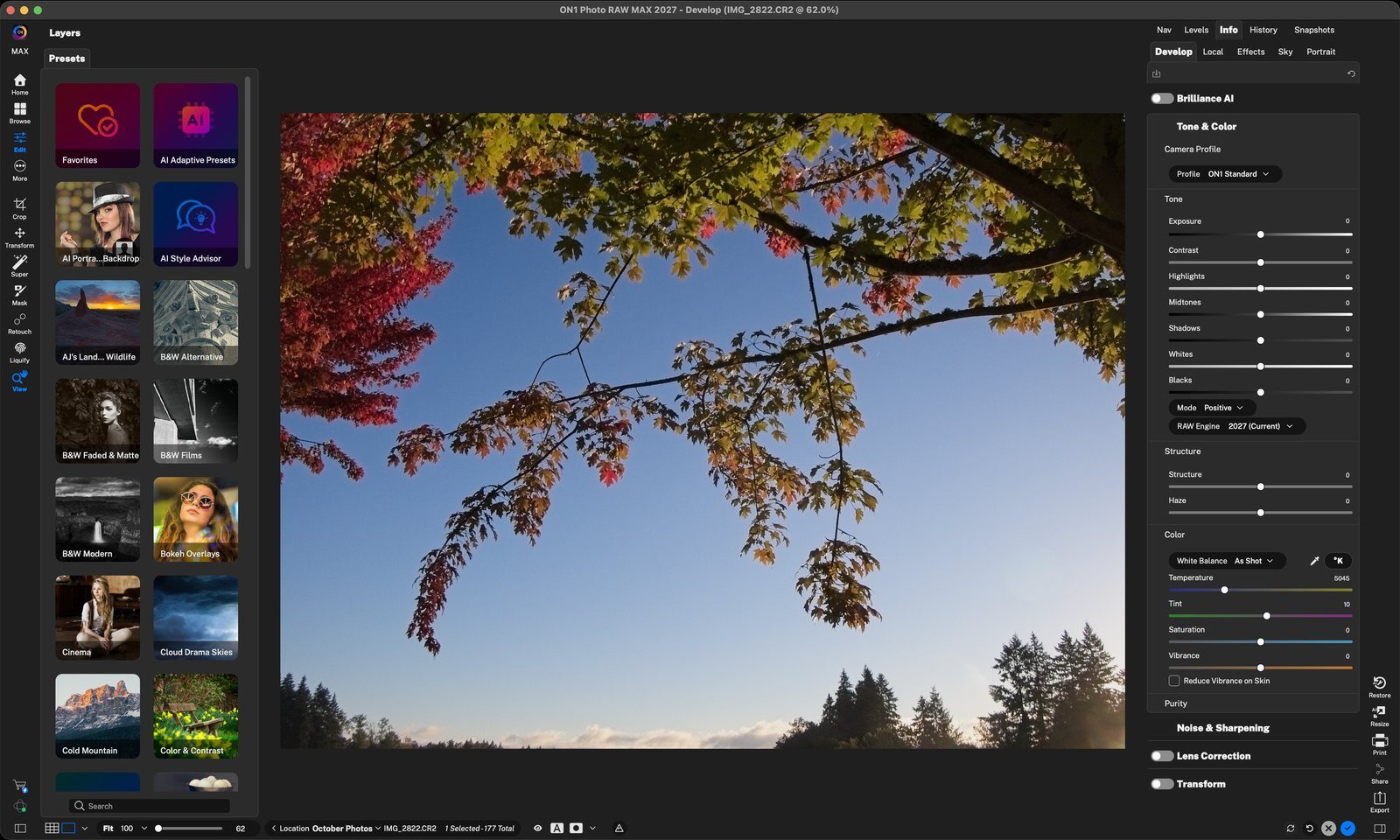
Press TabTab hides the left and right panes so your photo fills the screen. Click anywhere to continue
Panes hiddenPress Tab again to bring the panes back. Click anywhere to continue
Right pane: Command (Ctrl) + Right ArrowShows or hides the right pane, where the Develop, Local, Effects, Sky and Portrait settings live. Click anywhere to continue
Left pane: Command (Ctrl) + Left ArrowShows or hides the left pane with Layers and Presets. You can also click the pane icons at the bottom corners. Click anywhere to continue
Click a nameClick Local Drives, Albums, Metadata or any pane name to expand it. Click anywhere to continue
ExpandedHere Local Drives and Metadata are open. Click the name again to collapse it. Click anywhere to continue
H for HomePress H to go to the Home screen. Click anywhere to continue
G for Browse (Grid view)Press G to return to Browse in Grid view. Click anywhere to continue
D for DevelopSelect a photo and press D to open it in Develop and the other Edit modules. Click anywhere to continue
F for FilmstripPress F (or click the Filmstrip view button) to see one photo large with the rest of the folder in a strip below. Click anywhere to continue
Window › Layers › ShowBrings back the Layers pane. Click anywhere to continue
Window › Properties › ShowBrings back the Masking, Blending and Text pane. Click anywhere to continue
Panes backThe Layers and Masking panes are back on the left. Click anywhere to continue
Edit › Keyboard Shortcuts…Opens the full list of shortcuts in Photo RAW. Click anywhere to continue
Browse or searchExpand a group like Modules to see its keys, or type in Search to find a command. Click anywhere to finish
Tour complete
You learned to hide and show panes, expand pane contents, jump around with H, G, F and D, bring back missing panes, and found the full shortcut list.
Go deeper
- 1Tab
- 2Panes hidden
- 1Right pane
- 2Left pane
- 1Pane names
- 2Expanded
- 1Home
- 2Browse
- 3Edit
- 4Filmstrip
- 1Window › Layers
- 2Window › Properties
- 3Panes back
- 1Keyboard Shortcuts menu
- 2Shortcuts list