

ON1 Photo RAW 2027 Guided tour Step 1 of 5
Open the Local tab
Local adjustments change only part of a photo: darken a sky, lighten a subject, or add color to one area.
Darken and warm the sky
Start with the sky. One click selects it, and the sliders change only the sky.
Lighten the subject
Add a second adjustment for the rocks. Each adjustment is stacked in the panel and can be turned on or off with its switch.
Paint in more color
Use the Brush to paint the adjustment onto exactly the areas you want.
Refine the mask and finish
Every adjustment has a mask that controls where it applies. You can fine-tune it at any time.
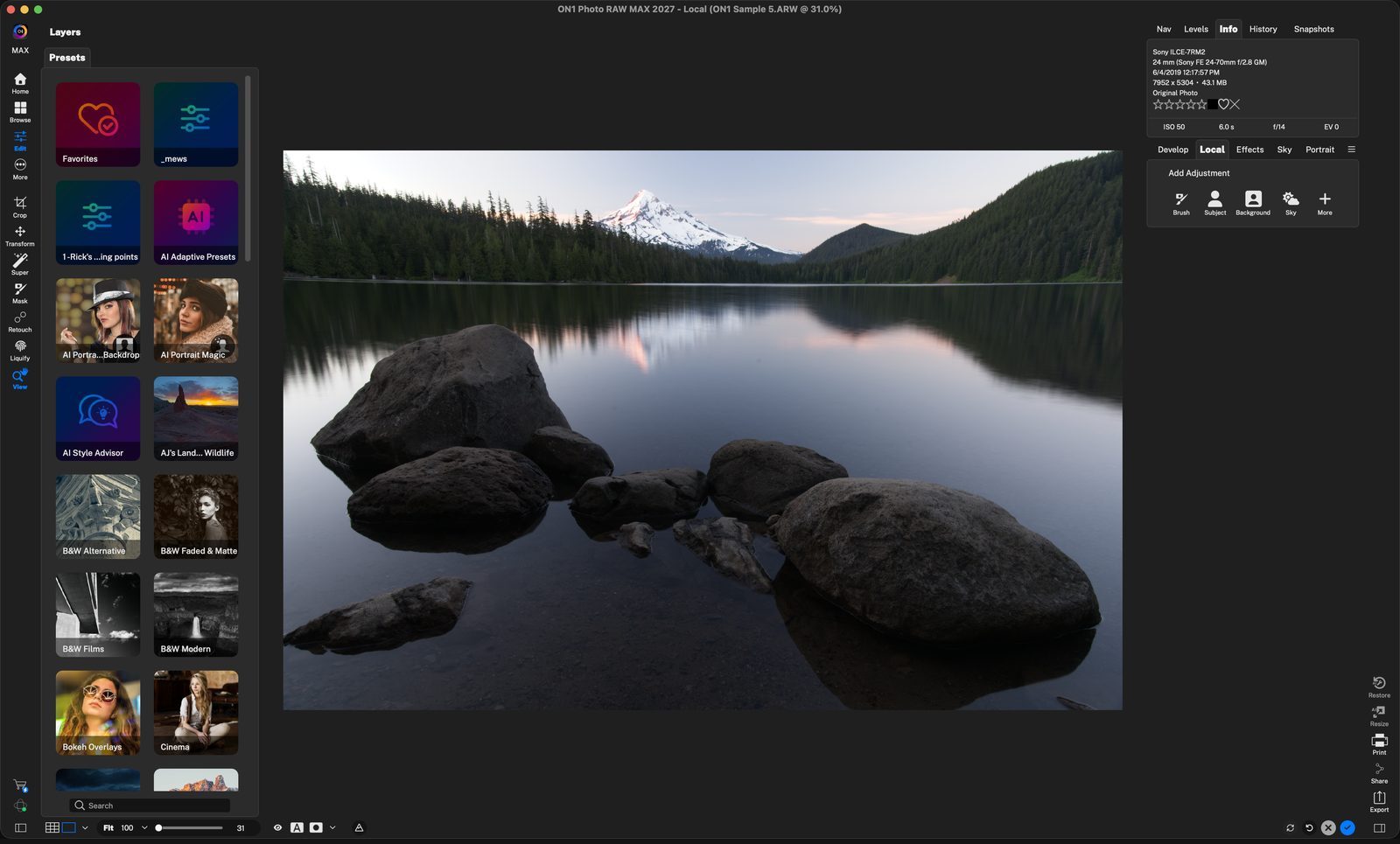
LocalClick the Local tab, next to Develop. Click anywhere to continue
Quick buttonsBrush lets you paint an area yourself. Subject, Background and Sky select that area for you with AI in one click. Click anywhere to continue
SkyClick Sky. A new Local Adjustment appears with its own sliders, all at 0. Styles like Lighten, Darken and Vibrance are one-click starting points. Click anywhere to continue
Make it darkerExposure -0.95 brings back detail in the bright sky. Click anywhere to continue
Add warmthTemperature 19 gives the sky a sunset glow. Only the sky changes; the rocks and water stay the same. Click anywhere to continue
SubjectClick Subject to select the main subject, here the rocks. The sky adjustment moves down the list. Click anywhere to continue
Make it lighterExposure 1.1 brightens just the rocks. Click anywhere to continue
Add detailStructure 60 brings out the rock texture. Click anywhere to continue
BrushSet Size, Feather and Opacity, then paint over the area. Switch to Erase to remove paint. Click anywhere to continue
Add saturationSaturation 45 and Vibrance 64 bring out the warm color in the rocks, only where you painted. Click anywhere to continue
MaskingOpen the Masking tab to see the mask. Feather softens its edge and Shift Edge grows or shrinks it. Add, Subtract and Intersect combine masks. Click anywhere to continue
MoreThe More menu adds other mask types, such as Luminosity, Color Range, gradients and Mask AI. Click anywhere to continue
DoneClick the blue check to keep your edits and return to Browse. Local adjustments are non-destructive, so you can change them later. Click anywhere to finish
Tour complete
You darkened the sky, lightened the subject and painted in color, each in its own local adjustment.
- 1Local tab
- 2Add Adjustment
- 1Sky button
- 2Darker exposure
- 3Warmer temperature
- 1Subject button
- 2Lighter exposure
- 3Structure
- 1Brush options
- 2Saturation and Vibrance
- 1Masking tab
- 2More mask types
- 3Done