

ON1 Photo RAW 2027 Guided tour Step 1 of 5
Open any folder from the Browse tab
The left panel has two tabs for finding photos. The Browse tab shows the folders on your computer, just as they are on disk.
Catalog the folders you use most
My Catalogs is for your main photo library. Photo RAW indexes a cataloged folder in the background, so it loads faster and can be searched across folders.
Your catalog fills in
Here the Pictures folder is cataloged. Its subfolders, Dates and Recent items now appear in My Catalogs.
Get to an image
All 291 photos from Pictures and its subfolders are now in one grid, ready to review.
Browsing a folder vs a cataloged folder
Both show the same photos. The difference is whether Photo RAW keeps track of the folder for you.
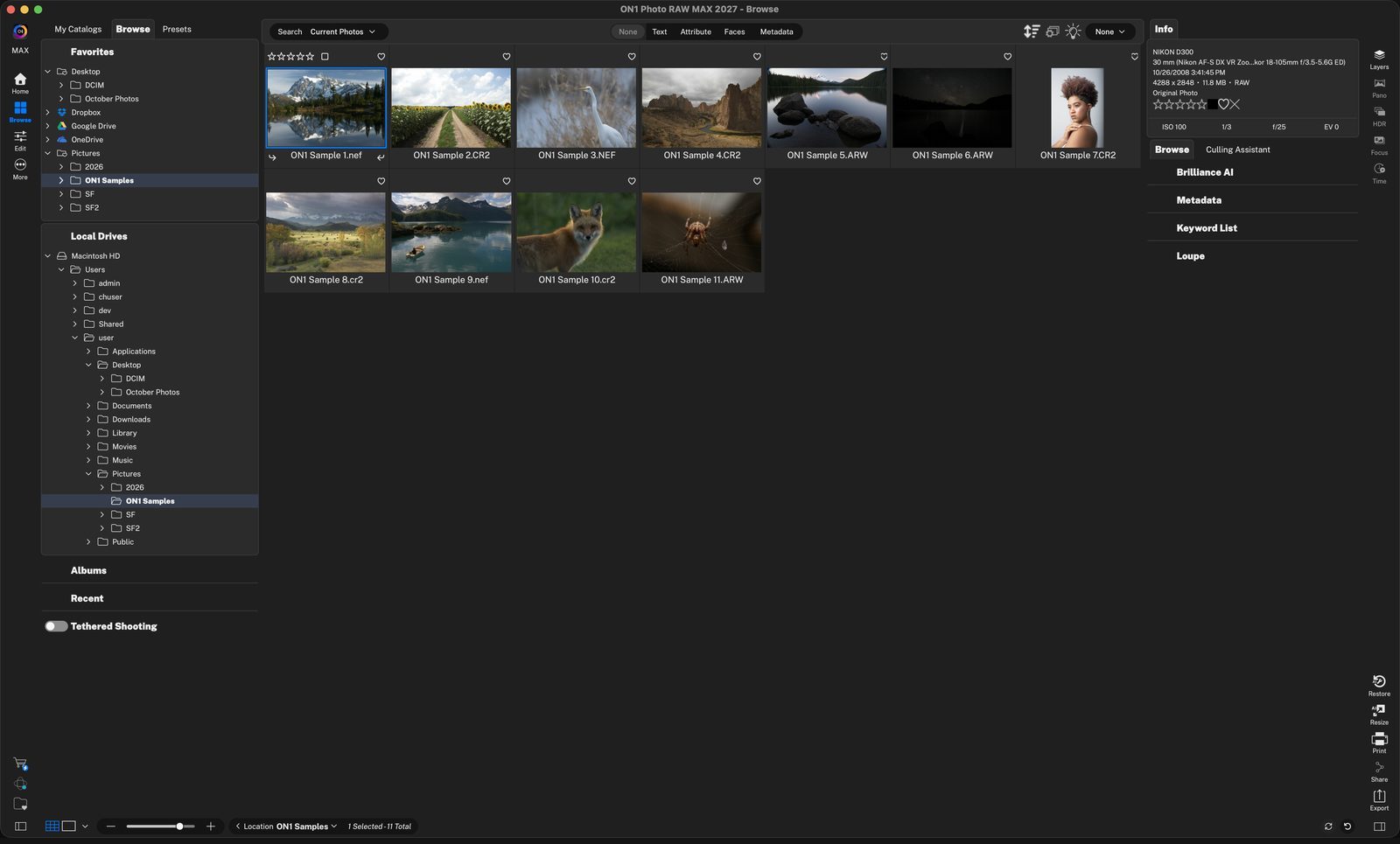
Browse tabClick Browse at the top of the left panel to see your drives and folders. Click anywhere to continue
FavoritesFolders you visit often, plus cloud services like Dropbox, Google Drive and OneDrive. Favorites are quick shortcuts, not catalogs. Click anywhere to continue
Local DrivesEvery drive and folder on your computer. Click a folder, here Pictures › ON1 Samples, to open it. Click anywhere to continue
Photos appear in the gridThe folder opens right away, with no importing. The bottom bar shows where you are: Location ON1 Samples, 11 photos. Click anywhere to continue
My CatalogsClick this tab to see your cataloged folders, Albums, Smart Albums and Dates. Click anywhere to continue
Add a folderClick +, or drag a folder onto it. Cataloging does not move or change your photos. Click anywhere to continue
Choose catalog optionsPreview Size, how often to scan for changes, Keyword AI and Cloud Sync. The defaults are fine to start; click OK. Click anywhere to continue
Cataloged folderPictures and all its subfolders are indexed. Click any of them to open it. Click anywhere to continue
Extra ways to find photosDates groups your catalog by capture date, Albums hold hand-picked sets like Fall Leaves, and Recent lists what you opened last. Click anywhere to continue
See everything at onceRight-click a cataloged folder and choose Show Subfolder Contents to view every photo in all its subfolders. Catalog Properties lives in this menu too. Click anywhere to continue
One grid for the whole catalogEvery photo from all the included subfolders, in one place. Click anywhere to continue
Select a photoClick a thumbnail to select it. It gets a blue outline. Click anywhere to continue
Check it before you editInfo shows the camera, settings and rating. Loupe shows a larger preview. Click anywhere to continue
Open itPress E to see the photo full size in Browse, or click Edit in the left rail to start editing. Click anywhere to continue
Browse a folderfor a quick look. Nothing to set up, just simple file browsing. Click anywhere to continue
Catalog a folderyou come back to often. It opens faster, shows all subfolder contents at once, and lets you search all subfolders, view date ranges and create Smart Albums. Click anywhere to finish
Tour complete
Browse opens any folder instantly. Catalog the folders you use most so they load fast and can be searched.
- 1Browse tab
- 2Favorites
- 3Local Drives
- 4Folder contents
- 1My Catalogs tab
- 2Add cataloged folder
- 3Catalog Properties
- 1Cataloged Pictures
- 2Albums, Dates, Recent
- 3Show Subfolder Contents
- 1All photos
- 2Selected photo
- 3Info and Loupe
- 4Open it
- 1Browse a folder
- 2Cataloged folder