The Best AI Photo Editors of 2026: Smarter, Faster, and Made for Creatives

Refreshed for 2026 with current pricing for every tool, a side-by-side comparison table, and what’s coming in ON1 Photo RAW MAX 2027.
The world of photo editing isn’t what it used to be. Gone are the days when perfecting an image meant endless layers, pixel-level tinkering, and cross-eyed squinting at curves and histograms. Enter the age of AI, where intelligent tools are not just speeding up the process but fundamentally changing the creative workflow.
Artificial intelligence has quietly become the engine behind some of the most powerful photo editing tools on the market today. In fact, the best AI photo editors are doing more than just applying filters. They’re learning your editing style, anticipating your next move, and automating the heavy lifting while still letting you stay in control.
So, what should you look for when trying to compare AI photo editors? It’s not just about flashy features or trendy tools. In this article, we’ll break down the top contenders, from professional-grade platforms to the best free AI photo editor options, and help you figure out which tool makes the most sense for your style, budget, and sanity.
The Best AI Photo Editors at a Glance
Short on time? Here’s the quick version. ON1 Photo RAW is the best AI photo editor for photographers who want pro-level results without a subscription. Luminar Neo is best for content creators who want fast, stylized edits. Photoshop is best for power users who need generative AI and full manual control. Photopea and Pixlr are the best free AI photo editors, and both run in your browser.
| Editor | Best for | Runs on | Standout AI tools | Price (October 2026) |
|---|---|---|---|---|
| ON1 Photo RAW | Photographers who want pro results without a subscription | Mac, Windows | NoNoise AI, Brilliance AI, Sky Swap AI, Portrait AI, Resize AI | One-time purchase from $99.99 |
| Luminar Neo | Content creators who want fast, stylized edits | Mac, Windows; mobile with All Platforms | EnhanceAI, GenErase, GenExpand, SkyAI | One-time purchase from $129, or by subscription |
| Adobe Photoshop | Power users who want generative AI and full control | Mac, Windows | Generative Fill, Neural Filters, Remove Tool | Subscription only, from $19.99/month |
| Photopea | Free editing in a browser, with PSD support | Web browser | Background removal, text-prompt replace | Free with ads; Premium from €5/month, no subscription |
| Pixlr | Quick, casual edits on any device | Web, desktop, mobile | Generative Fill, Generative Expand, AI Remove Background | Free; paid plans from $1.99/month (billed yearly) |
1. ON1 Photo RAW: Best for Photographers
While many photo editors are scrambling to bolt on AI features like it’s a seasonal trend, ON1 has been quietly (and effectively) integrating intelligent tools into its ecosystem for years.
ON1 is more than just a competitor in the space; it’s become a benchmark for what a modern AI image editor should look like: powerful, intuitive, and designed around the real needs of photographers. Our flagship, ON1 Photo RAW, keeps pushing the boundaries of automation, enhancement, and user control, and Photo RAW 2027 arrives this fall with an all-new raw processing engine, a remastered NoNoise AI, and a new AI Culling Assistant.

AI Features That Set ON1 Apart
ON1’s toolbox isn’t just smart. It’s incredibly useful, too. Instead of relying on quick gimmicks, ON1 leans into AI to solve real-world problems photographers face daily:
- NoNoise AI: Tames grainy high-ISO shots with intelligent noise reduction that preserves texture and detail. You get clarity without that waxy, over-processed look, and the 2027 version is remastered to handle even ultra-high ISO.
- Brilliance AI: Analyzes each photo and sets color and tone for you, so every edit starts from a strong, natural base.
- Resize AI: Uses deep learning to upscale images without sacrificing quality. It’s a godsend for anyone printing large-format or working with crops.
- Portrait AI: Automatically detects faces and applies natural-looking skin smoothing, eye enhancement, and subtle retouching in a few clicks. It’s like having a virtual beauty team on standby.
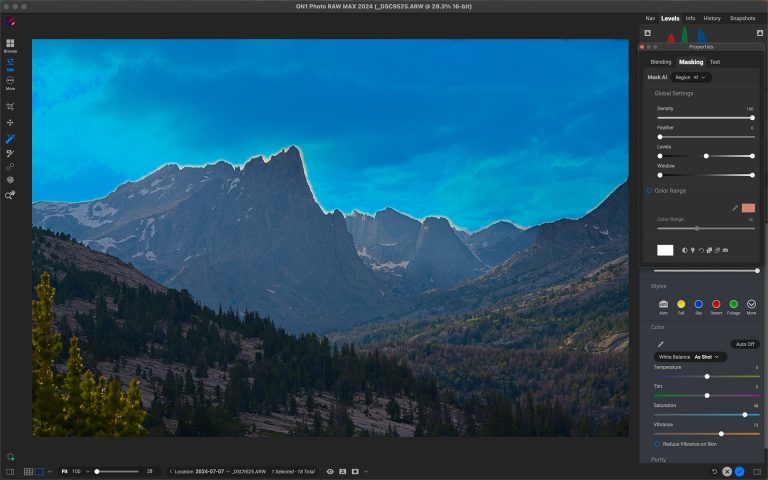
- Sky Swap AI: Instantly replaces dull skies with dramatic ones using edge-aware masking and lighting adjustments. It’s less “Photoshop trickery” and more “meteorological miracle.”
- Super Select AI: Offers brush-free object selection and targeted adjustments based on AI-driven image understanding. Tap, tweak, done.
- AI Culling Assistant (new in Photo RAW MAX 2027): Helps you sort a big shoot down to your keepers, saving hours of culling.
These tools are built into ON1 Photo RAW, a complete editor for Mac and Windows. Photo RAW MAX adds plugin support for Adobe Photoshop and Lightroom, so you can use ON1’s AI tools without re-learning your workflow from scratch.
See every ON1 AI tool side by side on our AI photo editing tools page.
Pricing and Value
One of ON1’s smartest decisions? Giving users a choice. Unlike platforms locked behind a subscription wall, ON1 offers both one-time purchases and a subscription, which makes it flexible for hobbyists and pros alike.
- ON1 Photo RAW: $99.99 one-time purchase. You own the version you buy, with no subscription required.
- ON1 Photo RAW MAX: $169.99 one-time purchase. Adds the Photoshop and Lightroom plugins, Restore AI, and the AI Culling Assistant in version 2027.
- ON1 Photo Studio (Subscription): $179.99 a year. A subscription with Photo RAW MAX plus every individual ON1 app, future apps and upgrades, 1 TB of Cloud Sync, and full ON1 Plus training.
Compared to Adobe’s recurring cost or other premium AI editors with limited functionality, ON1 delivers serious bang for your buck, especially when you factor in the all-in-one platform and consistent updates.
See ON1’s AI Editing Tools in Action
Check out this video to watch real-world editing workflows using ON1 Photo RAW. You’ll see exactly how all our AI tools speed up the process without compromising creative control.
2. Luminar Neo: Best for Content Creators
Luminar Neo has made a name for itself by walking the tightrope between artistic flair and technical intelligence. Developed by Skylum, Neo is designed for visual creatives who want to make bold, beautiful edits.
What sets Luminar Neo apart from many competitors is its emphasis on stylization and automation. It’s an expressive playground that encourages experimentation while using machine learning to take the guesswork out of editing.
Key AI Features That Make Luminar Neo Stand Out
If ON1 is your precision-engineered editing toolbox, Luminar Neo is your stylish sidekick with a flair for drama. Its AI features prioritize creative enhancement with minimal user friction:
- EnhanceAI: One slider that adjusts tone, color, and detail intelligently.
GenErase and GenExpand: Remove distractions or extend the edges of your scene with generative AI. - SkyAI: Instantly replaces skies, with lighting adjusted to match.
- Bokeh AI: Adds a soft, dreamy background blur. Great for portrait work without a fast lens.
- Face AI and SkinAI: Smooth skin and enhance facial features, and somehow don’t make everyone look like wax statues.
Pricing That’s Somewhere Between Hobbyist and Pro
Skylum still offers two paths:
- One-time purchase, in three tiers: Desktop Only ($129), All Platforms for desktop and mobile ($159), and Max ($199, with one year of Luminar Prime included). Each includes the AI tools for 365 days. After that, keeping the AI tools requires a Luminar Prime renewal.
- Subscription: Luminar Neo is also available as a subscription with ongoing updates.
There are also optional add-on packs and extensions, but beware: these can start to stack up like a guilty Amazon cart.
While Luminar isn’t the cheapest option out there, it delivers a lot of creative firepower for the price. Compared to ON1’s perpetual+subscription combo or Adobe’s subscription fortress, Luminar hits a sweet spot for hybrid users who want simplicity.
3. Adobe Photoshop with Generative Fill: Best for Power Users
Photoshop is probably the most well-known photo editing tool out there, the software that built an entire verb out of its name. Now, with the integration of Generative Fill powered by Adobe Firefly, it’s embracing the AI revolution.
Rather than reinventing itself, Photoshop is evolving: pairing traditional pixel-level precision with machine learning to deliver a hybrid editing experience that’s both powerful and relatively intuitive. If you’re looking to compare AI photo editors based on raw capability, this is the one that lets you do everything, as long as you know where in the menu to look.
The AI Features That Make Photoshop Stand Out
While other tools focus on speed and stylization, Photoshop’s AI features are for users who want control, nuance, and flexibility without losing efficiency. Here’s what makes it stand out:
- Generative Fill: Select an area, type what you want (e.g., “replace sky with sunset and add a hot air balloon”), and watch the AI generate it, fully editable and nondestructive.
- Neural Filters: A suite of tools powered by machine learning that lets you change facial expressions, lighting, skin texture, and even age.
- Object Selection AI: Smart object recognition for isolating subjects, cleaning up backgrounds, or masking elements without a pixel-hunting expedition.
- Remove Tool: Brush over a distraction and AI fills the area in. It makes manual healing brushes feel like a chore.
Photoshop’s AI tools don’t hold your hand; they partner with you. That’s ideal for users who need smart assistance but still want to steer the ship.
Pricing: Premium Power Has a Premium Price
Adobe, bless their monopolistic little hearts, offers no perpetual license. It’s subscription-only, starting at:
- $22.99/month for the Photoshop single-app plan (annual plan, billed monthly)
- $19.99/month for the Photography plan, which adds Lightroom, Lightroom Classic, and 1 TB of cloud storage
- $69.99/month for Creative Cloud Pro (20+ apps, including Illustrator and the rest of Adobe’s artistic empire)
That makes Photoshop one of the more expensive options on this list, especially compared to ON1’s one-time-purchase model.. But for users who need maximum flexibility and the full spectrum of editing tools, it’s an investment that’s hard to beat.
4. Photopea: Best Free AI Photo Editor in a Browser
Photopea is the software equivalent of that scrappy kid who learns karate from YouTube and somehow still wins the tournament. It runs entirely in your browser, looks suspiciously like Photoshop, and offers a shockingly capable set of tools, including some light AI features.
Is it the best free AI photo editor out there? It’s definitely a top contender, especially when you consider the price tag: exactly $0.00.
What It Can Actually Do
Photopea is more “Photoshop-lite with AI seasoning” than a fully AI-driven tool. Still, it holds its own with a combination of traditional editing features and smart automations:
- AI Object Selection: Quickly isolate subjects or elements with minimal effort.
- Background Removal: One-click background eraser that’s serviceable for most images, unless your subject has complicated hair.
- Text-Prompt Replace: Select an area, describe what you want there, and Photopea fills it in.
- Smart Clone & Healing Tools: Not branded as “AI,” but surprisingly intelligent in practice.
- PSD Support: Yes, it opens and saves layered Photoshop files. In a browser. For free.
Its AI tools are lighter than Photoshop’s, but it’s competent, consistent, and absurdly accessible.
Pricing: It’s Free.
No download, no account, no subscription. Every feature is in the free version. The only catch? It has ads. Photopea Premium removes them, starting at €5 a month, paid one time rather than as a subscription, and adds 3,000 AI credits a month and 5 GB of PeaDrive storage. But even in its free form, it’s completely usable, especially for students, hobbyists, or pros on a budget.
5. Pixlr: Best Free AI Photo Editor for Quick Edits
Pixlr is the overachiever of free online editors: faster and fancier than you’d expect, with a slick interface and AI tools that feel polished. Think of it as Photopea’s cooler, more style-conscious cousin.
There are two main editors: Pixlr Express (fast and simple) and Pixlr Editor (advanced and layered). Both are loaded with clever AI tools for the casual creative.
Features That Make It Click
Pixlr’s tools are geared toward accessibility and speed, but with a few surprise punches:
- AI Remove Background: One of the cleanest background removers for quick edits.
- Generative Fill and Generative Expand: Add, replace, or extend parts of a photo with a text prompt.
- AI Remove Object: Brush over a distraction and it’s gone.
- Super Scale: Upscales small images for sharper exports.
Notably, it runs on virtually anything: Chromebooks, ancient laptops, your phone, your cousin’s weird smart fridge, probably.
Pricing: Free, With Optional Premium Plans
- Free plan: basic tools, with ads
- Plus: $1.99/month billed yearly ($2.49 month to month). No ads, unlimited saves, and 80 AI credits a month.
- Premium: $7.99/month billed yearly ($9.99 month to month), with 1,000 AI credits a month and access to all of Pixlr’s AI models
For a budget tool, Pixlr is more polished than it has any right to be.
Choosing the Best AI Photo Editor for Your Creative Workflow
From lightning-fast retouching to surreal sky replacements, the tools we explored in this guide prove that artificial intelligence has fundamentally changed how we approach photography and post-processing. But with all these choices, how do you actually pick the best AI photo editor?
Well, it depends on who you are and what you need:
- If you’re a professional or hobbyist photographer who juggles hundreds of images, values speed without losing quality, and wants powerful AI tools that still let you call the shots, ON1 is the smartest choice. With its hybrid pricing, deep feature set, and tools like NoNoise AI and Resize AI, it delivers serious capability with a flexible footprint. It’s a powerful AI image editor that respects both your time and your creative process.
- If you’re a visual storyteller or content creator who loves expressive edits and eye-catching results with minimal effort, Luminar Neo offers a beautifully designed, automation-rich experience. Its templates and AI filters are made for creators who want speed and stylization with a creative edge.
- If you demand total control and need AI tools that integrate into a deep, manual workflow, Adobe Photoshop with Generative Fill remains a heavyweight. It’s expensive, but for power users who live and breathe in pixel layers, it’s hard to beat.
- If you’re on a budget or just testing the waters, Photopea and Pixlr are excellent places to start. They might not be full-featured pro tools, but for quick tasks and basic AI-powered edits, they’re surprisingly capable, especially for something that runs in your browser and doesn’t charge rent.
Ultimately, the best AI image editor is the one that scratches your creative itch without getting in your way. Whether you’re perfecting portraits, batch-processing a wedding shoot, or just cleaning up your cat photos for Instagram, AI is here to make the job faster, smarter, and yes, sometimes even fun. Want to see how photographers are using these tools day to day? Read our guide to AI tools for photographers.
Now go forth. Create something amazing.
Ready to See What AI-Enhanced Editing Really Feels Like?
Experience the power of ON1 Photo RAW for yourself with a free 30-day trial. Whether you’re batch-processing client shoots or perfecting your next gallery piece, ON1’s intelligent tools give you speed, control, and results that speak for themselves. Start your free trial today and edit like the future’s already here.
Frequently Asked Questions: The Best AI Photo Editors
What makes an AI photo editor different from a traditional photo editor?
An AI photo editor uses machine learning algorithms to automate complex editing tasks like object removal, portrait retouching, and color correction. This allows users to achieve high-quality results faster and with less manual effort than traditional editing tools.
Are AI photo editors good enough for professional use?
Yes. Many professional photographers now rely on AI-driven tools for workflow acceleration, especially in tasks like culling, noise reduction, and batch adjustments. The key is choosing software that offers precision and manual overrides when needed.
Can I use AI photo editors offline, or do they require constant internet access?
Many desktop-based AI editors like ON1 Photo RAW and Luminar Neo offer full offline functionality, as their AI engines run locally. However, some tools, especially browser-based or cloud-heavy ones, do require internet access to work.
What is the best free AI photo editor?
For editing in a browser, Photopea and Pixlr are the strongest free AI photo editors. Photopea is free with ads, includes every feature, opens layered PSD files, and has one-click background removal. Pixlr’s free plan covers quick edits, and its paid plans add AI credits for generative tools. If you edit RAW files from your camera, ON1 Photo RAW has a free 30-day trial with all of its AI tools.
How much does an AI photo editor cost?
It ranges from free to about $70 a month. Photopea and Pixlr are free, with optional paid plans that start at a few dollars a month. ON1 Photo RAW is a one-time purchase from $99.99. Luminar Neo is a one-time purchase from $129 with a year of AI tools included, or a subscription. Adobe Photoshop is subscription-only, from $19.99 a month with the Photography plan.