
 ON1 Effects
New ON1 Effects 2026
ON1 Effects 2026 adds powerful new creative filters, smarter AI masking for one-click subject and background selections, and more tools to bring your photos to life.
Buy Effects by itself and own it outright, or get it as part of Photo RAW 2026, the ultimate all-in-one photo editor.

Effects 2026
Use as a standalone app on 2 computers
Use as a Plugin for Adobe
Includes all the ON1 apps in a single editor
Includes Future Upgrades


Photo RAW 2026.5
Photo RAW MAX 2026.5
Use as a standalone app on 2 computersUse as a standalone app on 3 computers
Use as a Plugin for Adobe
Includes all the ON1 apps in a single editor
Includes Future Upgrades
Subscribe to Photo RAW MAX
/year
Use as a standalone app on 3 computers
Use as a Plugin for Adobe
Includes all the ON1 apps in a single editor
Includes Future Upgrades
30-Day Money-Back Guarantee
The ON1 Guarantee
Your Trust is Our Foundation
Every purchase is protected. Every photo is yours. No games, no surprises.
Frequently Asked Questions & System Requirements
What's new in ON1 Effects 2026?
Effects 2026 introduces powerful new creative tools and smarter AI masking that make it faster and easier than ever to transform your photos.
New features include:
- 1-Click Subject and Background Masks
- Mask Layers Depth Lighting Filter for foreground and background
- Split Field Filter to bring distant landscape objects closer Double Exposure Filter for blending photos
- Motion Filter for simulate camera movement Better quality masks for hair, foliage, trees
- Effects starting points ...and more
Is ON1 Effects 2026 a standalone application or a plugin?
Both! ON1 Effects 2026 can be used as a standalone application on Mac/Windows or as a plugin for Photoshop, Lightroom Classic, Capture One, Affinity Photo, Apple Photos, and Corel PaintShop Pro.
Is ON1 Effects 2026 a one-time purchase or subscription?
Both options are available:
- Perpetual License – Own ON1 Effects 2026 outright (for up to 2 computers).
- Photo RAW Subscription - Includes all the ON1 apps and plugins, ON1 Cloud Sync for sharing photos across your devices, and all future upgrades. You'll always have the latest version.
Is ON1 Effects 2026 included inside Photo RAW and Photo RAW MAX?
Yes! All of the Effects 2026 features are built into Photo RAW 2026 and Photo RAW MAX 2026. The MAX Edition adds the ability to launch Effects (and other ON1 apps) as a plugin from inside Adobe Photoshop, Lightroom, and other editors.
I have an earlier version of Effects (2025 or earlier). Is Effects 2026 a paid upgrade?
Yes. Effects 2026 is a paid upgrade from previous versions. Upgrade today and save!
What are the system requirements for Effects 2026?
| Operating System | macOS 12 and above Windows 10 version 22H2 or later, Windows 11 (current maintenance releases, 64 bit only) | |
| Processor | Four-Core Intel or AMD processor with 64-bit support; 2 GHz or faster processor with SSE 4.2 or better or Apple Silicon ARM processors are not supported | |
| RAM | 8 GB (16 GB if shared with the GPU) | |
| Hard Drive | 1.5 GB for installation | |
| Graphics | Windows - DirectX 12, DirectML, Vulkan 1.1, and OpenGL 4.2 compatible video card with 4GB VRAM, 1920x1080 resolution (at 100% scale factor) macOS - Metal, Vulkan 1.1, and OpenGL 4.2 compatible video card with 4GB VRAM, 1920x1080 resolution (at 100% scale factor) | |
| Optional Integration | Photoshop CC, Photoshop Elements, Photoshop Lightroom Classic, Apple Photos, Affinity Photo, Capture One (current versions for all) | |
| Internet | A high-speed internet connection and active account for installation, ON1 Cloud Sync, activation, auto-update checking, content downloads, and tutorials. | |
| Supported Options | Supports pressure-sensitive tablets for controlling brush size and/or opacity Supports ICC/ICM/DCP profiles for camera input, display, soft-proofing, and printing. Hardware display calibration tool is recommended | |
| Supported Languages | English, German, Spanish, French, Japanese, Korean, Simplified Chinese, Russian, Portuguese, Italian, Dutch | |
Why Choose ON1?
At ON1, we make powerful, AI-driven photo editing tools that are easy to use and built for real photographers. Whether you're editing RAW photos, reducing noise, retouching portraits, or enlarging images for print, ON1 gives you professional results without the complexity.
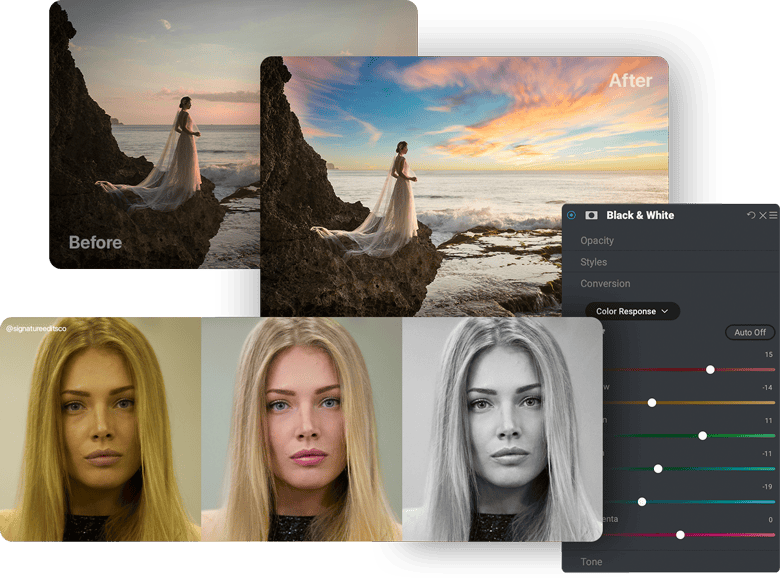
Easy, Powerful AI Photo Editing Software—No Subscription Needed
You can use ON1 as a complete alternative to Lightroom and Photoshop or as a plugin for Lightroom, Photoshop, and more to speed up your workflow. Whether you prefer a one-time purchase or a feature-packed subscription, ON1 has flexible options to fit your style.
AI Photo Editing That's Actually Easy
ON1's advanced AI tools make editing fast and intuitive—no steep learning curve required. Instantly swap skies, fix portraits, reduce noise, upscale for print, or apply precise edits with point-and-click masking. It's powerful, flexible, and designed for creative control.
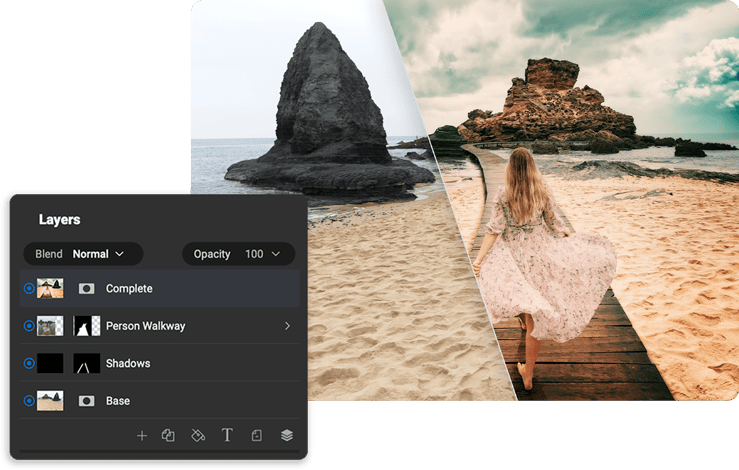
Made by Photographers Like You
We've been developing photo editing software for over 20 years, and we use these tools ourselves—so we focus on speed, control, and keeping your photos looking their best. Our team is based in the U.S. and proudly independent, and we rely on your feedback to keep making ON1 better.