ON1 Photo Studio
ON1 Photo Studio: Every Professional Tool ON1 Makes, One Subscription
Stop managing software. Every ON1 app, every AI tool, and every future release sent to you automatically. One subscription keeps your entire workflow current without a second thought.
What is ON1 Photo Studio?
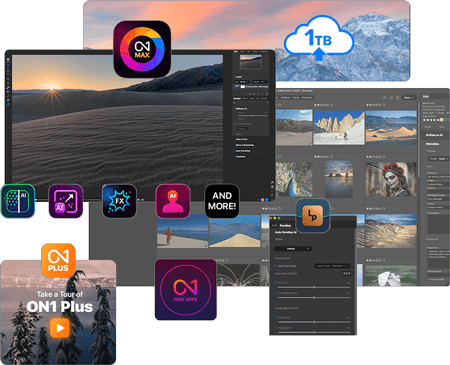
Most photographers piece together their editing workflow over time. You may buy a noise reduction tool here, upgrade your main editor there, you may even miss a new release because the timing was off. Photo Studio ends that. One subscription gives you Photo RAW MAX, every individual ON1 app, 1TB Cloud Sync, ON1 Plus training, and every new ON1 software title as it ships. Your workflow stays complete and current without you having to think about it.
Start ON1 Photo Studio
One price. Everything included. Cancel anytime.

ON1 Photo Studio
/year
Every ON1 app and tool, always up to date
All updates and upgrades included
All future ON1 software tools included
Cancel anytime
30-day money-back guarantee • Transparent pricing • Trusted by professional photographers
What's Included in Photo Studio?
Everything ON1 Makes, Included
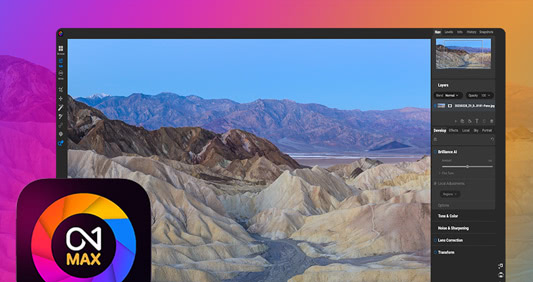
Core Editing Platform — Photo RAW MAX
Most photographers use two or three apps to get from a raw file to a finished photo. Photo RAW MAX replaces all of them. Raw processing, layers, advanced masking, color grading, retouching, and creative effects are all in one place. No Photoshop subscription. No Lightroom catalog. Import your photos, finish your photos, move on.
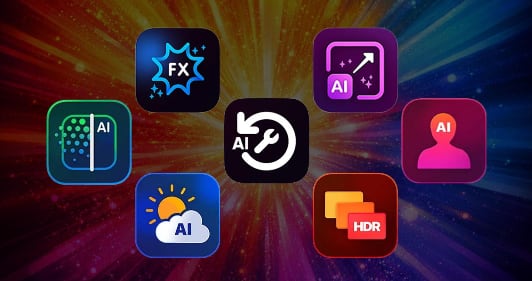
Individual Professional AI & Creative Apps, and Plugins
Every ON1 AI app is purpose-built to solve a specific problem. NoNoise AI recovers high-ISO shots without smearing detail. Resize AI delivers print-ready enlargements without artifacts. Restore AI repairs scratched, faded, or damaged photos. Effects gives you professional color looks and finishing. Portrait AI retouches faces without the plastic, over-processed result. Sky Swap AI fixes a flat sky in seconds. HDR balances exposure across bracketed shots naturally. Each one is also a standalone professional tool. With Photo Studio, you have all of them.
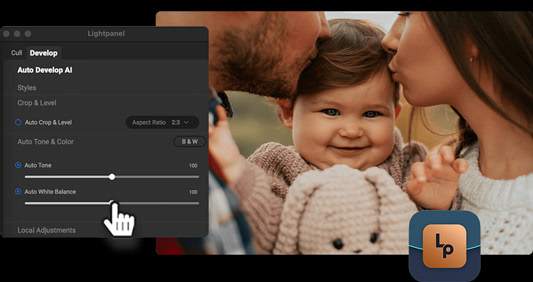
Automation & High-Volume Workflows — Lightpanel
If you shoot high-volume work and still use Lightroom Classic, Lightpanel cuts the time you spend on repetitive tasks. It culls, rates, and applies consistent edits automatically, so you get to the creative work faster. Consider it a bonus for photographers who haven't fully left Lightroom yet.
Photo Studio Subscription Benefits
When ON1 delivers something new, you get it without doing anything. Major upgrades to Photo RAW MAX, updates to every individual app, and brand new ON1 software titles all come to Photo Studio subscribers automatically. Run each app as a standalone tool when you need it. Sync photos and edits across devices with 1TB of Cloud Sync. Activate on up to five computers. Access the full ON1 Plus library for training, community, and creative extras.
Photo RAW MAX or Photo Studio: Pick the Plan That Fits Your Workflow
Photo RAW MAX gives you a complete professional editor for $89.99 a year. For $90 more, Photo Studio adds every individual ON1 app, 1 TB Cloud Sync, Lightpanel, ON1 Plus training, and every future ON1 release. If you have ever bought a standalone ON1 app separately, Photo Studio pays for itself quickly.
Billing Frequency

ON1 Photo RAW MAX
Billed Annually
/month
Billed Monthly

ON1 Photo Studio
Billed Annually
/month
Billed Monthly
Everything ON1 Offers
Photo RAW MAX (Full RAW Editor + Restore AI + Use Photo RAW as a Plugin) Always Up-to-date
Use ON1 Apps as Standalone Software (Resize AI, NoNoise AI, Effects, and More) Always Up-to-date
Full Access to ON1 Plus (Training, Community, Extras)
Get Any New Software Title Automatically
Cloud Sync & Mobile Integration
200 GB
1 TB
Number of Computers
3
5
Complete AI Editing Toolset (Masking, Generative Erase, Distraction Removal, Style Advisor, Brilliance AI)
AI Photo Restoration (Dust & Scratch Removal, Color Restoration, Damage Repair, Photo Enhancement)
Professional Retouching Tools (Brush, Perfect Eraser, Liquify, Healing, Clone Stamp, and More)
Layers & Non-Destructive Workflow
Advanced Photo Techniques (Panorama, Focus Stacking, Time-Lapse, HDR)
Presets, Effects, Skies & Textures (200+ Built-In Assets)
Batch Processing, Exporting & Printing
Photo Studio Is Built for These Photographers

Professional photographers and serious enthusiasts who need a complete toolkit

Wedding, portrait, and high-volume photographers managing large jobs

Photographers ready to leave Lightroom and Photoshop behind for good

Photographers who want powerful AI tools without giving up creative control

Photographers who want one predictable price with nothing held back

Every ON1 Tool. One Annual Price.
Start ON1 Photo Studio
ON1 Photo Studio
/year
Every ON1 app and tool, always up to date
All updates and upgrades included
All future ON1 software tools included
Cancel anytime
30-day money-back guarantee • Transparent pricing • Trusted by professional photographers
A Subscription You Can Trust
One annual price covers every professional ON1 tool, every update, and every future release. As ON1 ships new software, you get it automatically. No wondering what costs extra. No gaps in your toolkit.
Frequently Asked Questions & System Requirements
What is ON1 Photo Studio?
ON1 Photo Studio is a subscription that includes every professional tool ON1 makes. That covers Photo RAW MAX, every individual ON1 app and plugin, 1 TB Cloud Sync, ON1 Plus education, Lightpanel, and every future ON1 software release and update.
What's included with ON1 Photo Studio?
ON1 Photo Studio includes Photo RAW MAX, all ON1 plugins (NoNoise AI, Resize AI, Effects, Portrait AI, HDR, Sky Swap AI), ON1 Lightpanel, 1TB of Cloud Sync, ON1 Plus training and resources, activation on up to five computers, and all future ON1 software releases and updates while subscribed.
Is ON1 Photo Studio a Lightroom and Photoshop alternative?
Yes. ON1 Photo Studio is designed as a complete alternative to Lightroom and Photoshop, combining non-destructive RAW editing, advanced masking, layers, retouching, compositing, and AI-powered tools into a single workflow—without requiring Adobe Creative Cloud.
Can ON1 Photo Studio fully replace Lightroom and Photoshop?
For most photographers, yes. ON1 Photo Studio covers the full workflow from culling and RAW editing to retouching, compositing, resizing, and export. Many photographers use it as their primary editor, while others transition gradually from Adobe.
Why do I need the individual ON1 products if I already have ON1 Photo RAW MAX?
Photo RAW MAX already includes many of the core capabilities found in the individual ON1 products, making it a powerful all-in-one editor. The individual ON1 products, however, are purpose-built, specialized tools designed to go deeper in specific areas—such as advanced AI noise reduction, high-end image resizing, creative effects, portrait retouching, and automated workflows.
ON1 Photo Studio brings both together. You get the convenience of Photo RAW MAX for everyday editing, plus direct access to the individual products when you need their most advanced capabilities—without purchasing or managing separate licenses. In addition, new individual products and major feature updates are often released first as standalone tools. When that happens, ON1 Photo Studio subscribers receive immediate access to those updates, even before they are integrated into Photo RAW MAX.
Does ON1 Photo Studio include AI tools?
Yes. ON1 Photo Studio includes powerful AI tools such as NoNoise AI, Resize AI, Portrait AI, Sky Swap AI, AI masking, subject detection, and automated culling and editing through Lightpanel—designed to save time without sacrificing creative control.
Is ON1 Lightpanel included?
Yes. ON1 Lightpanel is included with ON1 Photo Studio and provides AI-assisted culling and automated editing for Lightroom Classic users handling large photo jobs, making it ideal for wedding, portrait, and high-volume photographers.
What is ON1 Cloud Sync?
ON1 Cloud Sync lets you sync photos, edits, presets, and albums across computers and mobile devices. ON1 Photo Studio includes 1TB of Cloud Sync storage to keep your workflow connected wherever you work.
Is ON1 Photo Studio a subscription?
Yes. ON1 Photo Studio is a subscription that gives you access to all ON1 software, cloud services, education, and every new tool and update as it's released—so your editing setup stays current without separate purchases.
What happens if I cancel my subscription?
Your original photos and exported files stay yours after canceling. Your edit history is not deleted. You lose access to the editing tools, Cloud Sync, and future updates once the subscription period ends.
What are the system requirements for ON1 Photo Studio?
| Operating System | macOS 13 and above Windows 11 x86 or ARM (Current maintenance releases, 64 bit only) | |
| Processor | macOS:
Windows:
| |
| RAM | 8 GB (16 GB if shared with the GPU) | |
| Hard Drive | 6 GB for installation | |
| Graphics | macOS:
Windows:
| |
| Optional Integration | Photoshop CC, Photoshop Elements, Photoshop Lightroom Classic, Apple Photos, Affinity Photo, Capture One (Current versions for all) | |
| Internet | A high-speed internet connection and active account for installation, ON1 Cloud Sync, activation, auto-update checking, content downloads, and tutorials. | |
| Supported Options |
| |
| Supported Languages | English, German, Spanish, French, Japanese, Korean, Simplified Chinese, Russian, Portuguese, Italian, Dutch | |