

New ON1 NoNoise AI 2027: AI Noise Reduction, TackSharp AI & Model Selector
- August 17, 2026
- 1,855 Views
Posted by Patrick Smith
Announcing ON1 NoNoise AI 2027, available for pre-order and shipping late September 2026. This release will include remastered AI noise reduction models at the core, upgrades TackSharp AI’s deblurring models, and adds a new model selector so you can match the right AI model to your subject, whether the subject is wildlife, a concert stage, the night sky, or scanned film from a decade ago.
Photographers who shoot wildlife, concerts under stage lighting, or the Milky Way know the tradeoff well. Raising the ISO enough to get the shot will introduce noise. When it comes to reducing that noise in your photos, often fine detail gets lost. The new ON1 NoNoise AI 2027 is built to close that gap.
Recover Detail Noise Would Otherwise Destroy
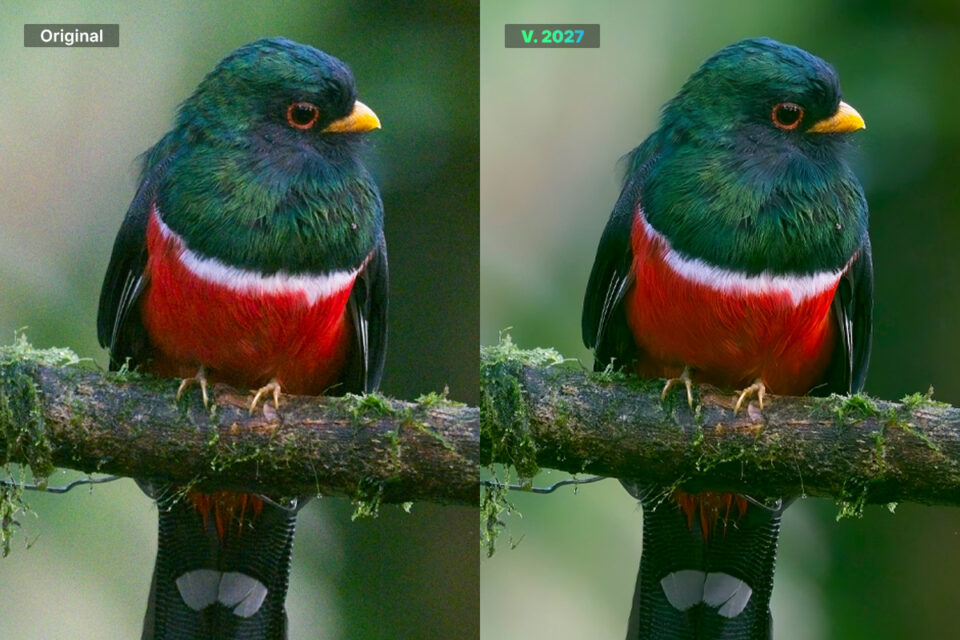
NoNoise AI 2027 will include remastered AI noise reduction models to remove more noise while keeping results looking sharper and natural, and not smoothed over. Shoot at ISO 6400 for a concert or ISO 12,800 for the Milky Way, and you still keep the texture and fine detail that makes the shot worth keeping.
“It is easy to remove every trace of noise, but that often leaves a photo looking flat and over-processed, more like a painting than a photograph,” said Dan Harlacher, VP of Product, ON1. “We built NoNoise AI 2027 to preserve the small details that make an image look real.”
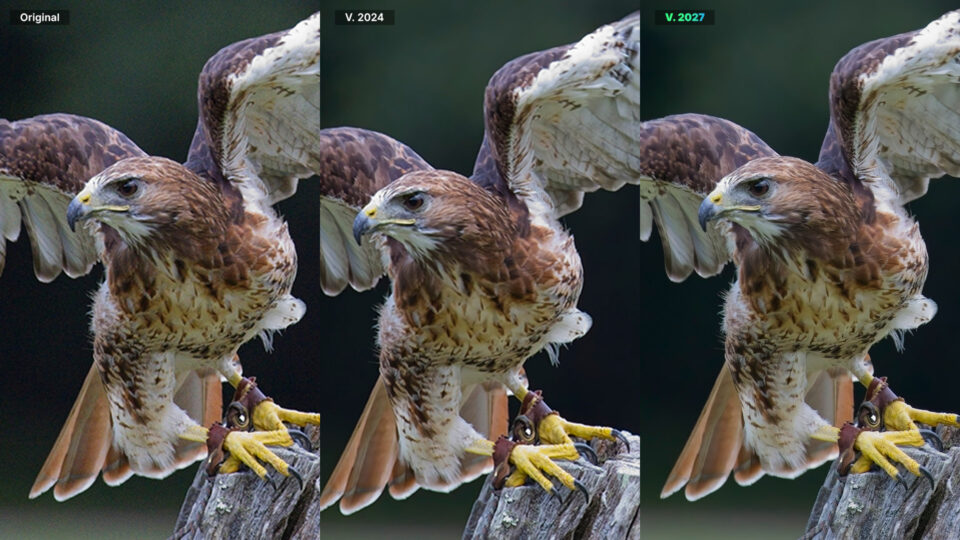
Match the Right AI Model to Your Shot
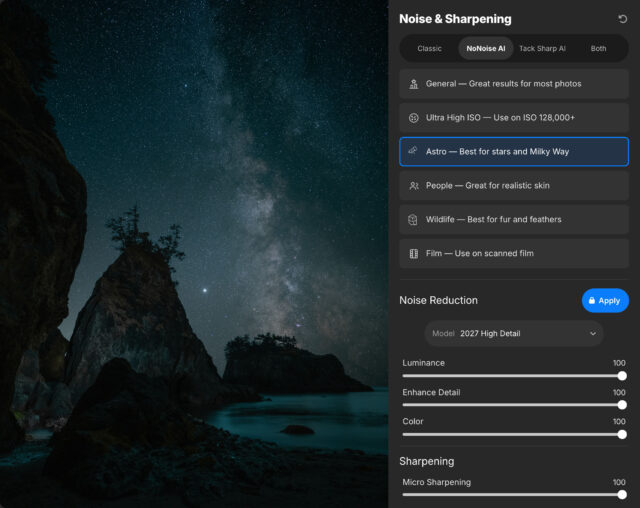
NoNoise AI has always offered a range of AI models developed over time, and some work better on different images. The new model selector makes it simple to pick the model built for your photo, whether the subject is wildlife, people, astrophotography, or scanned film, so you get the best result for that specific scene instead of applying one generic model to every image.
Bring Back Focus, Not Just Sharpness
This release also upgrades TackSharp AI’s de-blurring models, bringing photos that came out slightly soft back into focus without introducing new noise or artifacts. The result looks sharp, not over-sharpened.
Rescue Photos That Never Made It to a Print
Old digital camera files, high-ISO shots from ten years ago, and wedding albums you never printed all deserve another chance. Reprocessing them with current de-mosaicing and noise reduction models delivers results your original camera could not, whether that means finally printing a photo from your daughter’s wedding or revisiting a shoot you set aside years ago.
Fine-Tune Different Areas
NoNoise AI 2027 adds automatic subject and background masks, so a single button press creates an accurate mask for your subject or the background. Masking works in layers, so you can combine multiple versions of a photo and apply different noise reduction models and settings to each one, sharpening a bird’s eye while keeping a noisy background smooth, all in the same image. Mask quality has also improved, including tougher edges like hair and tree branches.
Edit Faster, Especially on Windows
A rebuilt AI inference engine takes advantage of the hardware already in your PC, including native support for Windows on ARM, so processing a batch of high-ISO shots takes less time out of your day. Point NoNoise AI to a folder, or trigger it directly from Lightroom Classic or Capture One, and come back to a batch of clean, detailed photos instead of processing them one at a time.
Stay in Your Workflow
NoNoise AI 2027 opens raw files from over 800 cameras spanning the past twenty years, plus DNG, JPG, TIF, and PNG, and saves results as an industry-standard DNG that keeps the full tonal and color range for whatever editor you finish in. Send a photo to NoNoise AI from Lightroom Classic and get a fully editable result back, so you can reopen it anytime and adjust your original settings.
Also New in ON1 NoNoise AI 2027
This release also includes a set of smaller updates that add up over a full editing session:
- Automatic distraction removal for sensor dust and power lines
- Generative Expand for extending a photo’s canvas with realistic detail
- Generative Erase for removing larger distractions like people or cars
- Depth masks for adjustments that respond to distance in a scene
- Auto Crop & Level for one-click cropping that respects your composition
- JPG-XL support, including lossless export
- Improved DNG support, including JPG-XL compression
- Grayscale support for old scans and black-and-white photos
- A modernized rendering engine for faster performance with complex stacks and masks
- Raw support for more than 30 additional camera models, including recent Canon, Nikon, Sony, Fujifilm, Panasonic, and Leica releases
Availability and Compatibility
ON1 NoNoise AI 2027 is available for pre-order now and ships in late September 2026 for Mac and Windows. It works as a standalone app and as a plugin for Lightroom Classic, Photoshop, Capture One, and more, so you can send a photo to NoNoise AI and get a fully editable result back without leaving your existing workflow.
Preorder ON1 NoNoise AI 2027 →