
 ON1 Photo Studio
Start ON1 Photo Studio Today
Every ON1 tool. All new tools. All future updates. One trusted subscription.
ON1 Photo Studio gives you complete access to everything ON1—now and in the future. It includes Photo RAW MAX, the full suite of professional ON1 applications, and every major upgrade and new software title we release, automatically included.
Work with powerful AI tools, use individual ON1 apps as standalone software or plugins, and keep your photos and edits synced across devices with 1TB of Cloud Sync. Activate on up to five computers and unlock full ON1 Plus access, including training, community resources, loyalty rewards, and creative extras.
Simple. Complete. Built to move your photography forward—without limits.

ON1 Photo Studio
/year
Every ON1 professional app and feature
All updates and upgrades included
All future ON1 software tools included
Cancel anytime
30-day money-back guarantee • Transparent pricing • Trusted by professional photographers
Frequently Asked Questions & System Requirements
What is ON1 Photo Studio?
ON1 Photo Studio is a complete professional photo editing subscription that includes every ON1 software tool in one integrated ecosystem. It combines Photo RAW MAX, all ON1 individual standalone products and plugins, Cloud Sync, ON1 Plus education, and access to all future ON1 software titles and updates—giving photographers everything they need in one place.
What's included with ON1 Photo Studio?
ON1 Photo Studio includes Photo RAW MAX, all ON1 plugins (NoNoise AI, Resize AI, Effects, Portrait AI, HDR, Sky Swap AI), ON1 Lightpanel, 1TB of Cloud Sync, ON1 Plus training and resources, activation on up to five computers, and all future ON1 software releases and updates while subscribed.
Is ON1 Photo Studio a Lightroom and Photoshop alternative?
Yes. ON1 Photo Studio is designed as a complete alternative to Lightroom and Photoshop, combining non-destructive RAW editing, advanced masking, layers, retouching, compositing, and AI-powered tools into a single workflow—without requiring Adobe Creative Cloud.
Can ON1 Photo Studio fully replace Lightroom and Photoshop?
For most photographers, yes. ON1 Photo Studio covers the full workflow from culling and RAW editing to retouching, compositing, resizing, and export. Many photographers use it as their primary editor, while others transition gradually from Adobe.
Why do I need the individual ON1 products if I already have ON1 Photo RAW MAX?
Photo RAW MAX already includes many of the core capabilities found in the individual ON1 products, making it a powerful all-in-one editor. The individual ON1 products, however, are purpose-built, specialized tools designed to go deeper in specific areas—such as advanced AI noise reduction, high-end image resizing, creative effects, portrait retouching, and automated workflows.
ON1 Photo Studio brings both together. You get the convenience of Photo RAW MAX for everyday editing, plus direct access to the individual products when you need their most advanced capabilities—without purchasing or managing separate licenses. In addition, new individual products and major feature updates are often released first as standalone tools. When that happens, ON1 Photo Studio subscribers receive immediate access to those updates, even before they are integrated into Photo RAW MAX.
Does ON1 Photo Studio include AI tools?
Yes. ON1 Photo Studio includes powerful AI tools such as NoNoise AI, Resize AI, Portrait AI, Sky Swap AI, AI masking, subject detection, and automated culling and editing through Lightpanel—designed to save time without sacrificing creative control.
Is ON1 Lightpanel included?
Yes. ON1 Lightpanel is included with ON1 Photo Studio and provides AI-assisted culling and automated editing for Lightroom Classic users handling large photo jobs, making it ideal for wedding, portrait, and high-volume photographers.
What is ON1 Cloud Sync?
ON1 Cloud Sync lets you sync photos, edits, presets, and albums across computers and mobile devices. ON1 Photo Studio includes 1TB of Cloud Sync storage to keep your workflow connected wherever you work.
Is ON1 Photo Studio a subscription?
Yes. ON1 Photo Studio is a subscription that gives you access to all ON1 software, cloud services, education, and every new tool and update as it's released—so your editing setup stays current without separate purchases.
What happens if I cancel my subscription?
If you cancel, your original photos and exported files remain yours. Your edits are not deleted—you simply lose access to active editing features, cloud sync, and ongoing updates once your subscription term expires.
What are the system requirements for ON1 Photo Studio?
| Operating System | macOS 13 and above Windows 11 x86 or ARM (Current maintenance releases, 64 bit only) | |
| Processor | macOS:
Windows:
| |
| RAM | 8 GB (16 GB if shared with the GPU) | |
| Hard Drive | 6 GB for installation | |
| Graphics | macOS:
Windows:
| |
| Optional Integration | Photoshop CC, Photoshop Elements, Photoshop Lightroom Classic, Apple Photos, Affinity Photo, Capture One (Current versions for all) | |
| Internet | A high-speed internet connection and active account for installation, ON1 Cloud Sync, activation, auto-update checking, content downloads, and tutorials. | |
| Supported Options |
| |
| Supported Languages | English, German, Spanish, French, Japanese, Korean, Simplified Chinese, Russian, Portuguese, Italian, Dutch | |
Why Choose ON1?
At ON1, we make powerful, AI-driven photo editing tools that are easy to use and built for real photographers. Whether you're editing RAW photos, reducing noise, retouching portraits, or enlarging images for print, ON1 gives you professional results without the complexity.
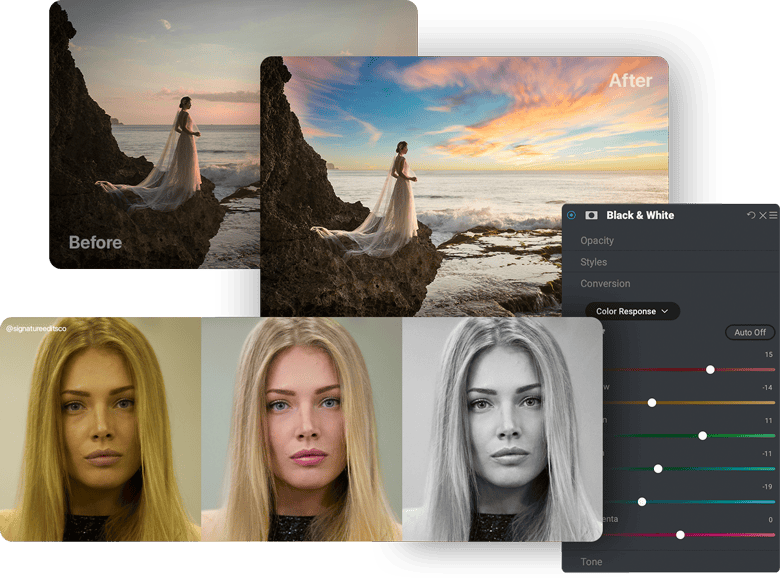
Easy, Powerful AI Photo Editing Software—No Subscription Needed
You can use ON1 as a complete alternative to Lightroom and Photoshop or as a plugin for Lightroom, Photoshop, and more to speed up your workflow. Whether you prefer a one-time purchase or a feature-packed subscription, ON1 has flexible options to fit your style.
AI Photo Editing That's Actually Easy
ON1's advanced AI tools make editing fast and intuitive—no steep learning curve required. Instantly swap skies, fix portraits, reduce noise, upscale for print, or apply precise edits with point-and-click masking. It's powerful, flexible, and designed for creative control.
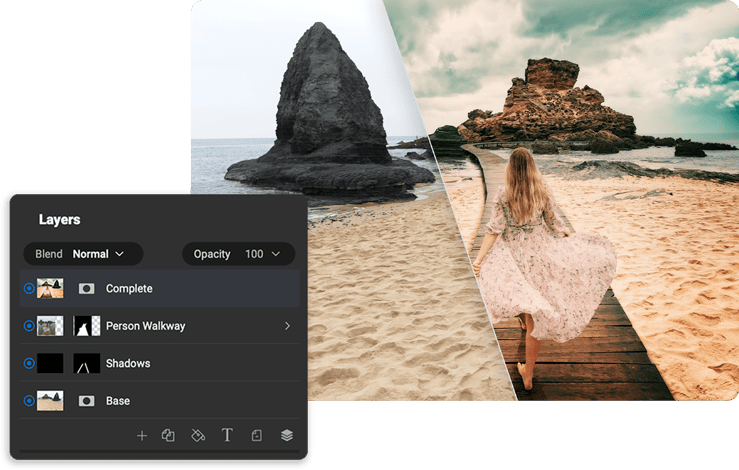
Made by Photographers Like You
We've been developing photo editing software for over 20 years, and we use these tools ourselves—so we focus on speed, control, and keeping your photos looking their best. Our team is based in the U.S. and proudly independent, and we rely on your feedback to keep making ON1 better.