

Announcing ON1 Photo RAW 2026.4: Restore AI, New Home Module & Faster Performance
If you’re looking for AI photo restoration software that can bring old, faded, and damaged photos back to life, ON1 Photo RAW 2026.4 delivers the most meaningful update in the 2026 lifecycle. Available today as a free update for all Photo RAW 2026 and 2026 MAX owners, this release introduces Restore AI, a powerful new module in Photo RAW MAX that lets you restore old photos with AI in seconds, not hours. Whether you’re rescuing scanned film prints from a shoebox, recovering soft or noisy shots from an old smartphone, or trying to colorize black and white photos with realistic results, Restore AI handles it automatically inside ON1 Photo RAW MAX.
2026.4 also redesigns the Home experience to get you into your work faster, delivers meaningful performance improvements throughout the app, and rounds out the update with new lens profiles and targeted bug fixes. If you’ve been using ON1 Photo RAW 2026 as your primary photo editing software, this update makes it better in ways you’ll feel every time you open the app.
Just launch ON1 Photo RAW 2026 to get the update, or download it from your ON1 account.
“This is the kind of update we set out to build this year. Meaningful new capabilities alongside the steady refinements that make the software easier to rely on every day,” says Dan Harlacher, VP of Product at ON1.
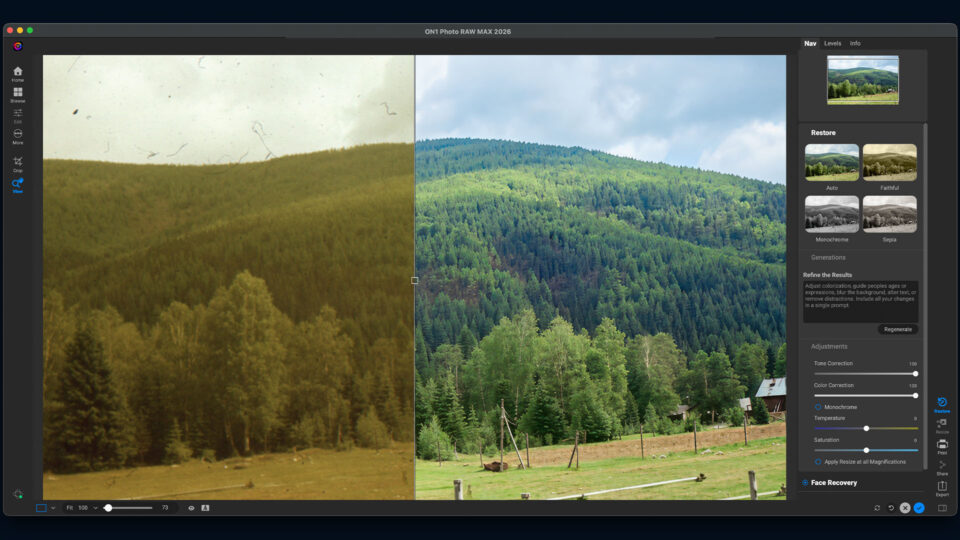
Restore AI: Every Photo Has a Second Chance
You have photos you never open. Some came from your first smartphone, a starter DSLR, a point-and-shoot from fifteen years ago. The moments were real, but the cameras couldn’t do them justice. And somewhere in a closet, there are shoeboxes of prints and negatives from your film days.
Restore AI, a new module inside ON1 Photo RAW MAX, fixes that. It sharpens soft images, recovers lost detail, corrects faded and shifted color, and removes noise that made you shelve the shot. It works on scanned prints and old film, but most of the photos it will improve are ones you shot yourself in the last twenty years. What used to take hours of retouching now takes seconds.
What Restore AI can do:
- Rebuilds lost detail, improves clarity, and reduces noise in soft, grainy, or poorly digitized images, with the option to add natural film grain back in.
- Transforms black-and-white photos into realistic color images and restores natural tone to photos affected by fading or color shift, with full user control over the result.
- Detects faces and restores lost facial detail while maintaining recognition.
- Steers the restoration with natural language prompts. Improve colorization, fix or add text, blur backgrounds, adjust ages, and more.
- Fine-tunes tonal correction, warmth, saturation, and tint, including monochrome photos.
- Restores entire albums automatically and supports negative conversion, organization, metadata, and easy export and sharing.
- Cloud-powered processing handles complex restoration tasks that go beyond what desktop computers can manage on their own.
Restore AI is fully included with ON1 Photo RAW MAX or ON1 Photo Studio with no credits or tokens required.
What to Expect from Restore AI
Restore AI does work that used to require hours of careful retouching. Most photos will come out looking good. But results vary depending on the condition of the original, and it’s worth being honest about that.
Faces are the hardest part, and an area we’ll keep improving over time. Restore AI detects and enhances facial detail, but it won’t be perfect every time. A photo that would have taken hours of manual work may now be 90 percent of the way there in seconds. From that point, you can refine using the full power of ON1 Photo RAW MAX. The goal is to save you hours, not to make every decision for you.
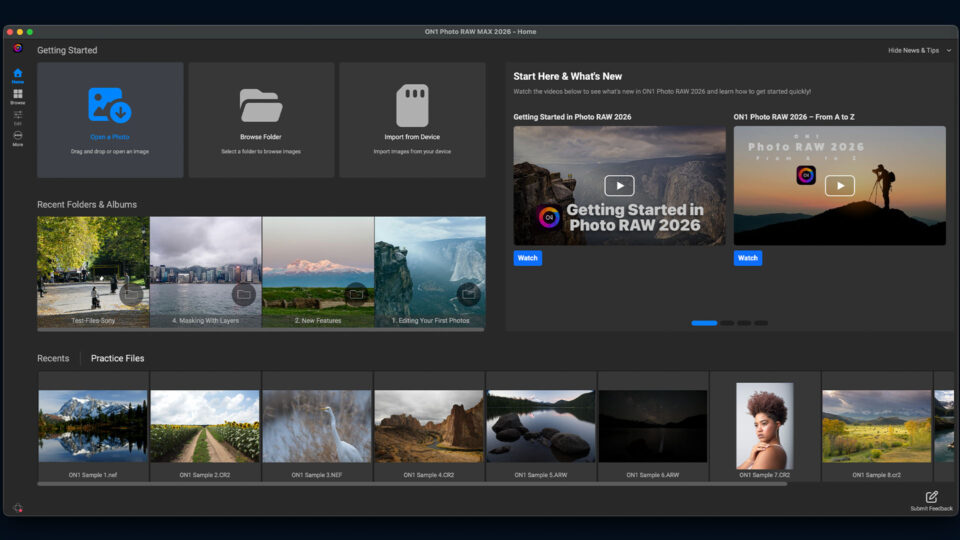
A New Home Experience
The 2026.4 update introduces a new Home module that serves as the default starting point when you open ON1 Photo RAW. It’s built to help you get into your work faster and make more of the app discoverable over time.
- Quick shortcuts to Open a Photo, Browse a Folder, and Import from Device.
- Access to Recent Edits, folders, and albums so you can pick up right where you left off.
- What’s New and Training content to help you get more out of the software over time.
Faster Performance in ON1 Photo RAW
Browsing a large library in Browse is faster in 2026.4. Thumbnails populate almost instantly when you open a new shoot, and scrolling is noticeably more responsive. We’ve also tuned the number of thumbnails displayed so you can see more images at once without extra clicks. The right-click context menu has been cleaned up too so it’s shorter and easier to scan.
Editing with many local adjustments is faster as well. Moving sliders and painting uses less memory and responds more quickly.
More Lens Support, Bug Fixes. and Stability Improvements
2026.4 includes new lens profiles, a targeted set of bug fixes, and under-the-hood stability improvements. These are the refinements you may not notice individually, but they add up to a more reliable, consistent editing experience across macOS and Windows.
Trusted Innovation, Built for Photographers
2026.4 is one more step in a year of steady, purposeful progress. Not features built for headlines, but improvements photographers feel in their daily work.
Since October 2025, we’ve delivered consistent updates across performance, AI tools, compatibility, and workflow. Each release builds on the last. Raw processing is an area we are actively working on and are excited to show these results soon. Your photos will look more accurate straight out of the camera and respond faster in the Edit module. More tools are coming that simplify everyday editing without taking control away from you. Updates will keep arriving more frequently, so fixes and improvements reach you sooner.
The goal stays the same: give you outstanding results while keeping you in control. Photo RAW should be a tool you can trust and rely on, year after year.
If you haven’t read our vision for what’s next, it’s worth a few minutes. It explains why we’re focused on faster releases, practical AI, and improvements that compound quietly over time. Every update in the 2026 cycle is included at no additional cost for Photo RAW 2026 owners. Subscribers to ON1 Photo RAW MAX and ON1 Photo Studio receive the latest updates and major releases automatically. More is coming in 2026.
Available Now for macOS and Windows
ON1 Photo RAW 2026.4 is available today for macOS and Windows. If you own ON1 Photo RAW 2026, just launch the app to get the update.
Restore AI is available exclusively inside ON1 Photo RAW MAX. If you own ON1 Photo RAW 2026 and want access to Restore AI, you can upgrade to Photo RAW MAX to unlock it.
Not yet an ON1 user? Try ON1 Photo RAW free for 30 days.
More is coming in 2026.