Real Photographers. Real Results. Real Reasons to Choose ON1.
When you're close to choosing your editing software, hype doesn't matter. Proof does.
We've brought together honest ON1 reviews from industry experts, real-world ON1 Photo RAW testimonials from working photographers, and proof from our global community. Get an idea of how ON1 performs in real-world use, across real workflows, and in the hands of people who rely on it every day.
Fstoppers
“ON1 Photo RAW 2026 has evolved into the most direct Lightroom replacement on the market.”
In its roundup of subscription-free creative tools, Fstoppers highlights ON1 Photo RAW as the top choice among alternatives that unify image browsing, raw processing, masking, and effects, all without monthly fees. The reviewer points out that the interface will feel intuitive to anyone moving from Lightroom and that this version adds sophisticated AI-driven masking and resizing built right into the workflow.
tuxoche (Peter Marbaise)
“ON1 Photo Raw does a pretty good job and there is a lot of potential in the images, which can be further improved with appropriate post-processing.”
This one is a pure ON1 use-case comparison: Photo RAW 2026's Resize feature versus Lightroom, Photoshop, and Luminar. The verdict is nuanced in a good way. He calls the results usable, but flags processing time as the main drawback, which is exactly the sort of detail people want before buying.
Silent Peak Photo
“The interface and tools are edging toward perfection.”
This ON1 review underlines how far Photo RAW has come as a full-featured photo editor. While the depth of tools means there's a learning curve, the author emphasizes that the overall package combines powerful core editing with flexible masking and layer workflows. For photographers willing to invest a little time, ON1 rewards them with flexibility and results that simpler editors cannot match.
Sam Davis Photographer
“I've used ON1 for years, and nothing has persuaded me to switch.”
On his personal blog, Sam talks about why ON1 Photo RAW 2026 stands out: its one-time purchase model, effective tools across the board, and a workflow that's both logical and intuitive. After trying Lightroom, Photoshop, and other editors, he says ON1 remains his go-to.

One Camera One Lens Photography
“I use it for my professional work.”
After hours of hands-on testing with the Photo RAW 2026 beta, this reviewer points to tangible improvements in masking precision and workflow efficiency. The emphasis here is not on theory, but on daily usability. A recurring theme across ON1 reviews is how quickly the software fits into real production environments.
ON1 Community Showcase: Before & After
ON1 reviews from the press matter, but there's a different kind of confidence to gain from seeing what happens when real photographers sit down with their own files and start editing. These images come straight from the ON1 community; check them out for yourself.
Countdown to Launch Challenge
When ON1 Photo RAW 2026 launched, the community didn't just download it. They put it to work. The Countdown to Launch Challenge featured winning edits that leaned hard into specific ON1 use cases: complex sky replacements that hold detail, heavy tonal recovery without halos, and layered edits that stay clean at full resolution.
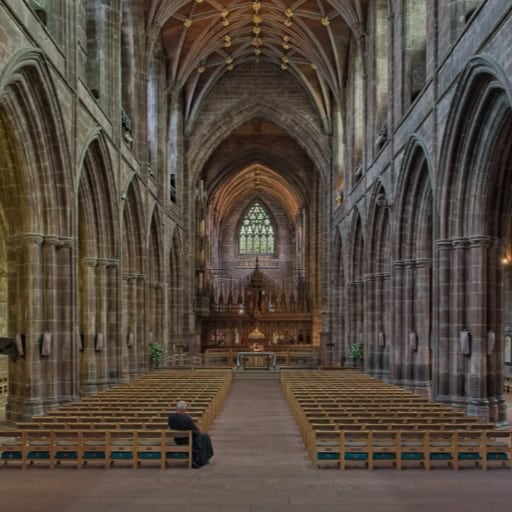
Mike Hardisty - Stillness in the Cathedral
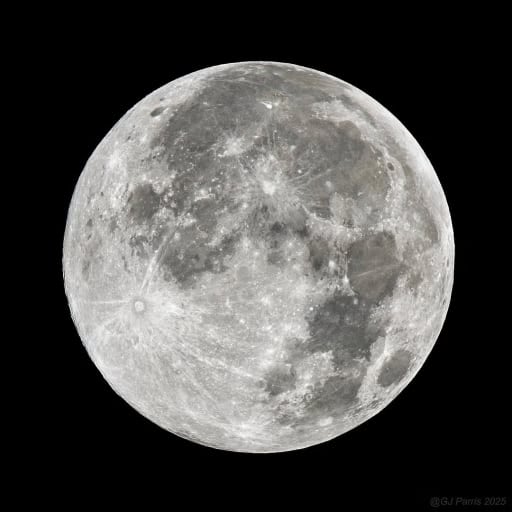
Gabparris - Harvest Moon 2025

Adrien Patané- Epic Views & Windy Landscapes
Best of ON1 Through the Years
For ON1's 20th anniversary, the company stepped back and let customers speak for themselves. These aren't polished testimonials. They're candid reflections from photographers who changed tools and stuck with the decision. One quote in particular sums up what many users echo:
"I was able to move to ON1, which became my main software. I am perfectly satisfied with ON1 Photo RAW MAX..."
That quote mirrors the same theme running through many ON1 reviews. People don't just try ON1. They commit to it, build workflows around it, and stop looking for replacements.
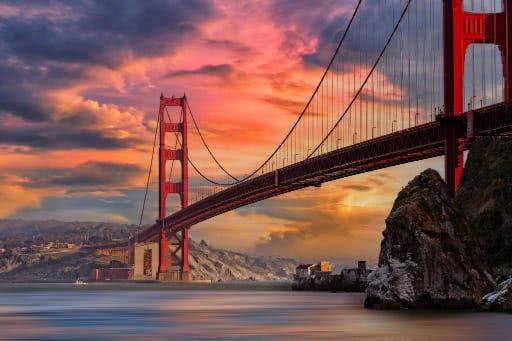
Jean-Yves Monard - Golden Gate

Len Greene - Frog Sleeping On an Orange
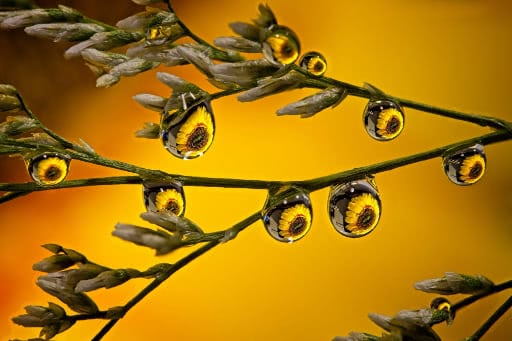
Al Stegeman - These Eyes Are Watching You!
Real-World Results: A Deep Dive into Our Tools
If you've made it this far, you're probably past the question of whether ON1 works at all. The real question is more specific: Does it hold up in the situations that usually break editing software?
Large prints. Heavy crops. High ISO files. This is where independent testing matters most, and where ON1's tools have been put under real pressure.
NoNoise AI
Noise reduction without color damage.
Capture the Atlas
“ON1 NoNoise AI is a powerful software to reduce noise and enhance detail in digital images.”
This review walks through NoNoise AI as part of a real editing workflow, not a one-click fix. The focus is on high-ISO images, where noise reduction usually destroys detail first. The takeaway is practical: NoNoise AI works best when applied selectively, preserving texture while cleaning up noise in challenging files.
PetaPixel
“ON1 NoNoise AI is by far superior... with its minimal use of color.”
In a head-to-head comparison with Topaz DeNoise, PetaPixel highlights color handling as the key differentiator. While the article is older, the observation still matters. NoNoise AI reduces noise without aggressively shifting or oversaturating color, which is a recurring concern in noise-reduction workflows.
Resize AI
When files need to go bigger without falling apart.
Lenscraft (Robin Whalley)
“So, does it deliver? In most cases, yes.”
Lenscraft approaches Resize AI the way photographers actually use it: enlarging real images for real print sizes, including aggressive crops. The review walks through multiple scenarios and concludes that Resize AI holds detail where many upscalers start to smear texture or introduce artifacts. It's framed as a practical tool for photographers who regularly print large or need flexibility when framing isn't perfect in-camera.
Silent Peak Photo
“ON1 Resize AI 2026 is a top-tier upscaler... vastly outperforming Lightroom's Super Resolution...”
Silent Peak's review is a true head-to-head benchmark, comparing Resize AI 2026 to Lightroom Super Resolution, Gigapixel, and other well-known upscalers. The conclusion places Resize AI firmly in the top tier, with results that can be competitive with Gigapixel depending on the image content.
ON1 Blog
“We tested Resize AI 2026 against our older version and a leading competitor...”
ON1's own comparison uses real photo examples to show how Resize AI 2026 improves on previous versions and stacks up against a major competitor. While on-brand, the value here is visual clarity. Side-by-side results make it easy to see where detail retention and edge quality have improved. This is especially useful context alongside third-party testing.
Frequently Asked Questions
Does ON1 Photo RAW require an internet connection to edit photos?
No. Once installed, ON1 Photo RAW works fully offline. This matters for photographers who travel, work on location, or simply prefer not to rely on cloud connectivity.
Is ON1 Photo RAW a good fit if I already use multiple editing tools?
Yes. Many photographers use ON1 Photo RAW alongside other software rather than replacing everything at once. It works well as a primary editor or as a complement for specific tasks like masking, resizing, or noise reduction.
How customizable is the ON1 Photo RAW workspace?
Very. Panels, tools, and layouts can be adjusted to match how you like to work. This is often mentioned in ON1 reviews from photographers who want control without being locked into a fixed interface.