
ON1 Photo RAW 2027 is coming this fall.

What's new:New in 2027: RAW Processing Engine, Enhanced Masking Experience, NoNoise AI, Tack Sharp AI Deblurring, Enhanced Brilliance AI, AI Culling Assistant in MAX, Light Theme, Faster AI Tools, and much more.
Loading...
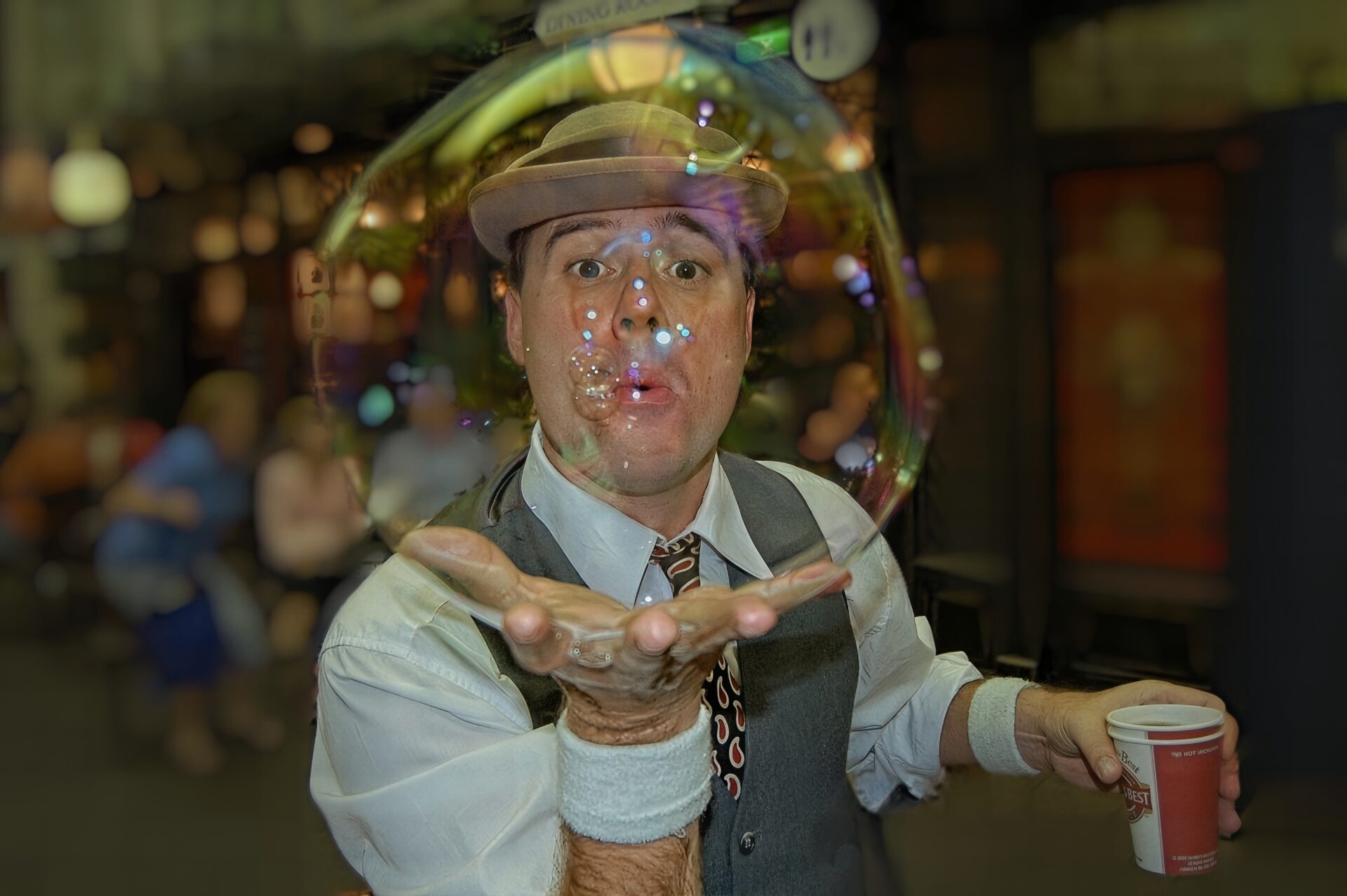
Head in a Bubble

Head in a Bubble

I captured this image in 2005 with my very first DSLR (Nikon D50 & 18-55mm kit lens). It was the 34th picture I had taken with my new camera. The subject was a street performer that I saw as I walked around looking for things to take pictures of with my new camera.

I snapped this picture just as the bubble reached its peak and before it popped. I used the on-camera flash to light the scene, which help highlight and define the bubble.
Because I shot it at 18mm, everything was pretty much in focus, from the subject to the background. I like the original unedited image, which I shot as an in-camera JPG, but the background was distracting to me. So I decided to revisit it using On1 RAW to see what improvements I could make.

Editing notesI opened the 5MP jpg in On1 Develop and leveled and cropped it, using Canvas Extension to keep the ratio I wanted. I also used Transform to correct distortion. I applied NoNoise A.I. and then I used the Generative Eraser to remove a ladder that was against the wall in the scene, and part of a chair that was protruding from behind the subject. I used Brilliance A.I. and adjusted the individual regions to taste using Local Adjustments. I made some global adjustments using Tone. Then I opened the Effects tab and selectively applied some Dynamic Contrast to the subject for a little extra detail and make the bubble "pop" (pun intended). I really like the way it looked at this point, but the background was still distracting to me. So using Layers I applied a Depth Mask which I used to add the Lens Blur Effect to everything behind the subject. I adjusted the parameters of the blur to match my vision. The tricky part was getting the Lens Blur Effect to be visible through the transparency of the bubble, without making the actual "structure" of the bubble look blurred. I did that by zooming in and selectively removing the blur using the perfect brush tool and feathering the effect of the brush around the edge of the bubble, as well as on the reflection at the top of the bubble so it would be sharp, since it was on the same plane as the subject and not in the background. I then applied a faint vignette. Since the original un-cropped image was only 5MP to start with, I then opened the image in ReSize A.I. in enlarged it 400%

  • NIKON D50
  • ƒ/3.5
  • 18mm
  • 1/60 sec

The ON1 Guarantee

Your Trust is Our Foundation

Every purchase is protected. Every photo is yours. No games, no surprises.

×Shopping Cart

Your cart is empty.

ON1 Photo RAW 2027

New ON1 Photo RAW 2027

Save Up To 20% Now!

Please enter a valid email address.

By submitting, you agree to the ON1 terms. Opt out any time. Protected by reCAPTCHA; Google Privacy and Terms apply.