AI Photo & Technology Insights
The 5 Best AI Image Upscalers in 2026

Refreshed for 2026, with Topaz Gigapixel’s move to subscription, current pricing for each tool, and Upscayl as a free option.
Ask any photographer or photo editor: achieving a high-resolution final image without losing detail has always been challenging, especially when upscaling photos for print, creating digital art, or restoring old images. Thankfully, advancements in AI upscale software have refined the process, making it faster, smarter, and far more accessible.
Gone are the days when increasing resolution meant sacrificing quality. Modern AI upscale software like ON1 Resize AI analyzes images intelligently, filling in missing details and ensuring clarity that holds up even at large sizes. This article explores the best AI image upscalers available today, focusing on tools that combine cutting-edge technology with practical results.
What Makes a Great AI Image Upscaler?
Not every AI-powered tool provides the same type of results. While most will do a decent job of at least enlarging images with minimal loss of quality, the best AI upscalers take your editing a step further. Here are the features that separate the best tools from the rest:
- Exceptional Detail Preservation: The primary measure of any image upscaler is its ability to improve resolution without introducing artifacts like blurring, halos, or pixelation. Advanced AI models can intelligently analyze image data, reconstruct lost details, and produce sharper, more natural-looking results, even when scaled up to 4x, 8x, or beyond.
- Speed and Scalability: Efficiency matters. The best AI upscalers combine accuracy with speed, delivering high-resolution outputs in seconds. Tools optimized for batch processing further streamline workflows, saving valuable time when dealing with large image libraries.
- Flexibility With File Types: From RAW files to compressed formats like JPEG and PNG, the best AI upscale software should be able to work with a variety of image types. That means compatibility across all your photography, design, and digital workflows.
- Intuitive User Experience: A clean, user-friendly interface reduces the learning curve and keeps your workflow smooth.
- Support for High-Resolution Outputs: For print projects, digital art, or large-format displays, an upscaler needs to handle high-resolution output. Look for tools capable of delivering results well beyond standard HD to meet your creative demands.
Ultimately, a great AI upscaler should be precise, fast, and reliable. These qualities ensure that your images look stunning at any scale, whether you’re restoring photos, printing large visuals, or enhancing digital artwork.

The 5 Best AI Image Upscalers in 2026
AI-powered image upscalers are pushing the boundaries of what’s possible in digital resolution. Here are the five best AI image upscalers of 2026, each offering powerful features to meet a range of creative and professional needs.
Comparison Chart
| Tool | Key Features | Upscaling Power | Integration | Pricing |
|---|---|---|---|---|
| ON1 Resize AI | AI-driven detail reconstruction, batch processing, and Genuine Fractals technology | Up to 10x | Standalone, ON1 Photo RAW, Lightroom Classic, Photoshop | $99.99 one-time purchase |
| Topaz Gigapixel | High-end detail preservation, nine AI models, Face Recovery | Up to 6x | Standalone, or plugin for Photoshop and Lightroom Classic | $149/yr subscription |
| Adobe Super Resolution | Quick AI upscaling integrated into Adobe workflows | 2x (doubles resolution) | Photoshop (via Camera Raw), Lightroom, Lightroom Classic | Adobe subscription plan required (Lightroom $11.99/mo) |
| Let’s Enhance | Web-based, cloud processing, fast results | Output up to 256 megapixels on personal plans | Cloud-based | Free tier (watermarked); paid plans from $9/month billed annually |
| Upscayl | Free, open-source desktop app with multiple AI models and batch upscaling | Up to 16x | Standalone (Mac, Windows, Linux) | Free (desktop app) |
1. ON1 Resize AI
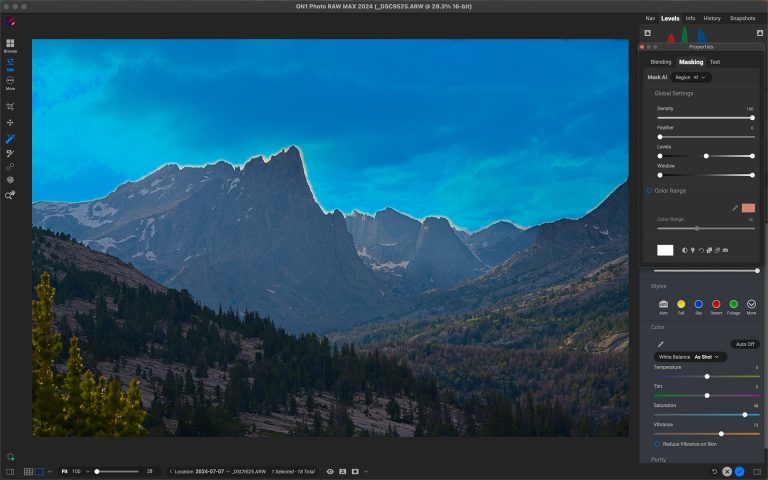
ON1 Resize AI is our pick for the most comprehensive AI image upscaler in 2026. Built with photographers and creatives in mind, ON1 Resize AI delivers industry-leading results paired with AI detail reconstruction with ON1’s interpolation engine to enlarge images and rebuild detail.
Key Features:
- AI-Powered Upscaling: ON1 Resize AI intelligently analyzes your images, enhancing
textures, sharpness, and details as it upscales. - Large-Format Ready: Upscale images for prints, posters, and billboards without loss of
quality. Perfect for projects demanding high-resolution outputs. - Integrated Workflow: Works as a standalone tool, inside ON1 Photo RAW, or as a plugin for Photoshop and Lightroom Classic.
- Batch Processing: Upscale multiple images efficiently, saving time for photographers working with large collections.
- Genuine Fractals Technology: Leveraging decades of experience, ON1’s renowned technology delivers clean, crisp results at large print sizes.
ON1 Resize AI is a must-have for professionals and enthusiasts looking to maximize image quality without hassle. Its precise output and user-friendly interface make it the go-to solution for upscaling in 2026, and it’s a one-time purchase, not a subscription. Preparing large prints? Our guide to the best AI image resizers covers Resize AI’s print prep tools, including gallery wrap, crop presets, and tiling.
2. Topaz Gigapixel
Topaz Gigapixel AI continues to impress with its deep-learning technology that enhances resolution while preserving natural details. It’s particularly adept at upscaling photos with fine textures, such as hair, fabric, or foliage, making it a strong choice for intricate images.
Key Features:
- Up to 6x upscaling with minimal loss of quality
- Advanced noise reduction and sharpening tools
- Ideal for photographers restoring older or low-resolution images
Gigapixel AI excels at recovering lost detail, ensuring images look crisp and realistic, even when scaled up dramatically.. While it’s one of the best AI upscalers, it can be resource-intensive, requiring high-performance systems for optimal speed. Gigapixel is now sold by subscription ($149/yr), or as part of Topaz Studio ($399/yr).
3. Adobe Super Resolution
Built into Photoshop (through Camera Raw), Lightroom, and Lightroom Classic, Super Resolution uses AI-powered upscaling to double images’ resolution with a single click. It’s ideal for photographers already working within Adobe’s Creative Cloud.
Key Features:
- 1-Click Upscaling within Photoshop, Lightroom, or Lightroom Classic
- Produces sharp results by doubling image resolution intelligently
- Excellent for on-the-fly enhancements
Super Resolution is a convenient, reliable tool for Adobe users who need quick, high-quality results without adopting additional software. Although effective, it lacks the advanced customization and noise reduction features offered by dedicated upscaling tools like ON1 Resize AI.
4. Let’s Enhance
Let’s Enhance is a cloud-based AI upscaler focusing on simplicity and performance. It’s particularly popular with creators who want fast, high-resolution results without dealing with complex settings or installations.
Key Features:
- Cloud-Based Processing: Upscale images without installing software
- Output up to 256 megapixels on personal plans
- AI-driven features include noise cleanup and color enhancement
Let’s Enhance delivers quick, high-quality upscaling while keeping the process user-friendly, making it ideal for creative professionals who value efficiency. It’s quick and simple, but it runs in the cloud and uses a credit system, with a watermark on the free tier.
5. Upscayl
Upscayl is a free, open-source AI image upscaler for Mac, Windows, and Linux. It runs on your own computer, with multiple AI models to choose from for different types of images.
Key Features:
- Up to 16x upscaling
- Multiple AI models for different needs
- Batch upscaling for several images at once
Upscayl is a solid free option for quick enlargements. It doesn’t include print prep tools or plugins for Photoshop or Lightroom. Upscayl also offers a separate paid cloud service, Upscayl Cloud.
Check Out the Extraordinary AI Face Recovery Tech in ON1 Resize AI
The latest update to ON1 Resize AI includes Face Recovery, a powerful machine-learning model that detects and enhances small faces with stunning, lifelike detail. Whether restoring old group photos or cropping a single person from a larger image, Face Recovery ensures every face looks clear and natural. Watch this quick demo to see it in action!
Try ON1 Resize AI for Free
Image quality matters, and with ON1 Resize AI, achieving stunning, high-resolution results has never been easier. Whether working on a large print, a detailed crop, or bringing old images back to life, you’ll see the difference the best AI image upscaler can make. Try it for free today and see how your images transform with just a few clicks.
Frequently Asked Questions: The Best AI Upscaler Software
Looking for more tips and answers about finding the best AI upscaler software? Check out our FAQ section for expert insights and solutions to common questions.
What is AI upscale software, and how does it work?
AI upscale software uses advanced machine learning models to analyze and enhance images during enlargement. Instead of simply stretching pixels, it intelligently reconstructs details, textures, and edges, resulting in sharper, clearer images at higher resolutions.
Is AI upscaling better than traditional upscaling methods?
Absolutely. Traditional upscaling methods rely on simple interpolation, often leading to blurry or pixelated results. AI upscaling leverages machine learning to predict and recreate missing details, delivering far superior quality with clean, realistic enhancements.
Does AI upscale software work on all image types?
Most AI upscale tools support common file formats like JPEG, PNG, and TIFF, but some can also handle high-quality RAW files. It’s always best to check your software’s supported formats to ensure compatibility with your workflow.
Is ON1 Resize AI a subscription?
No. ON1 Resize AI is a one-time purchase. It works as a standalone app and as a plugin for Photoshop and Lightroom Classic. You can try it free for 30 days.