


Every improvement we make to ON1 Photo RAW starts with photographers. By listening, observing, and acting on feedback, we build tools you can trust in your everyday photography workflow.
At ON1, we believe the best ideas do not come from a conference room. They come from photographers.
They come from the professional trying to get through a client gallery faster. From the hobbyist who wants powerful tools without a steep learning curve. From the longtime customer who has trusted us for years and is honest enough to tell us where we can do better. They come from people who rely on their photos to deliver for clients, build a portfolio, or preserve something that matters.
That is a big part of my role at ON1.
My name is Nathan Keudell, and I serve as the Senior Product Marketing Manager at ON1. A core part of what I do is represent the voice of the customer internally. I spend my time listening to photographers, understanding their needs, identifying patterns in their feedback, and working closely with our product and development teams to help shape our future roadmap. That work is not separate from innovation. It’s how we build with a purpose and deliver photo editing software tools photographers can rely on.
Over the past year, we have made a deeper commitment to meeting photographers where they are and involving them earlier in the process. That means more one-on-one interviews, more web-based surveys, more small group meetups, more roundtable discussions, and more in-person usability sessions where we can observe how people actually work. We are not just asking what photographers want. We are seeing where workflows break down, where time is lost, where tools feel unclear, where they hesitate, , and what matters most in a photo editing workflow. These moments reveal more than a survey alone.
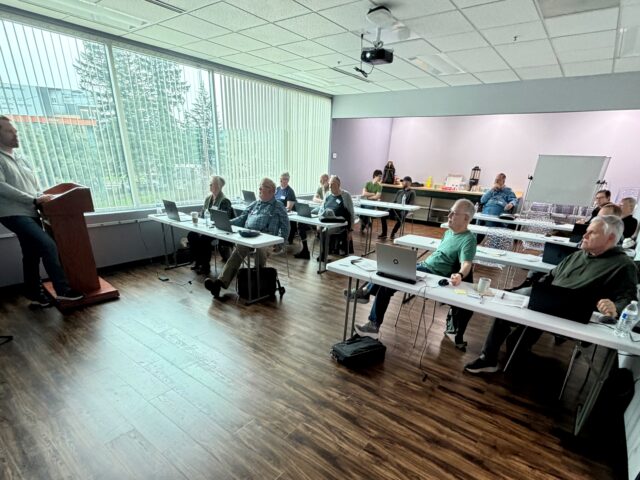
In March 2026 we held a usability session with local photographers to understand key pain points in the workflow. We were blown away, some users drove over 4 hours to attend this session. Those conversations have been incredibly valuable.
Some of the clearest themes we continue to hear are around raw processing improvements, performance and stability, and ease of use. Photographers want software that consistently delivers results they can trust. They want great image quality. They want speed and consistency. They want powerful tools, but they also want a workflow that feels intuitive and approachable. These priorities directly shape how we develop ON1 Photo RAW, from core performance improvements to new AI-drive capabilities. These are not side conversations for us. They are central to how we think about the future of ON1.
That is why customer feedback is not something we collect and set aside. It is something we act on.
That can mean validating new ideas through surveys, sharing early concepts with customers, or looking over the shoulder of photographers as they edit to see where things break down… And sometimes it means hearing the same feedback over and over again until it becomes clear that it needs to move higher on the priority list. That consistency in feedback is often what drives our most important product decisions. It’s also where frustrations turn into opportunities for improvement.
This kind of work helps us make better decisions. It helps us avoid developing tools based on assumptions and focus on what actually improves the ON1 editing experience. . It also keeps us grounded. We are not building for an abstract user. We are building for photographers withdeadlines, and creative goals.
That is also why you will continue to see us show more of our work earlier, talk more openly about where we are headed, and create more opportunities for photographers to participate in the process. We want feedback before a release, not just after. We want to test assumptions. We want to learn sooner. And we want the photographers who use ON1 to know that their voices genuinely help shape what comes next. That level of transparency is a key part of how we’ve built and are continuing to build trust over time.
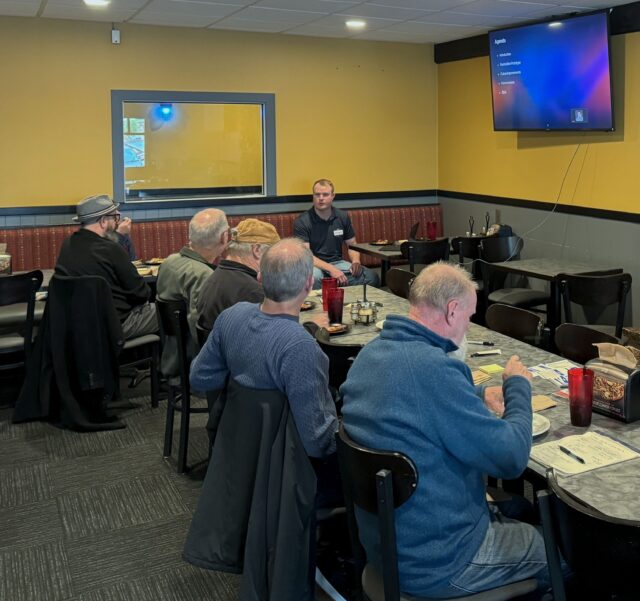
The events and meetings we have been holding are a reflection of that mindset. Whether it’s a one-on-one conversation, a virtual feedback session, a local meetup, a roundtable discussion, or full usability testing. Every interaction helps us better understand the needs of how photographers work. These insights directly influence how we build and prioritize what comes next.. These are not just marketing activities. They are a core part of our product development process.
For me personally, one of the most rewarding parts of this role is being able to bring those insights back to our internal teams and advocate for the customer in the decisions we make. When photographers share what is working, where they are getting stuck, or what they wish existed, that feedback has a path inside ON1. It is heard. It is discussed. And it helps influence the direction of our products. Connecting customer insights to product execution is where innovation happens.
We know trust is earned over time. It comes from listening, improving, and following through. That is the standard we are working toward every day.
If you have participated in a survey, joined a meetup, submitted a feature request, taken part in a virtual conversation, or sat down with us for a usability session, thank you. Your feedback matters, and it is helping shape the future of ON1.
And if you are interested in providing feedback, whether in person or through a virtual meeting, I would love to hear from you. Please fill out this form.
61 comments on “Listening to Photographers and Building What Comes Next”
On May 7, 2026 at 1:15 pm Paul Lafortune wrote:
Thank you for this information. It is quite interesting to see a software/app company using feedback and information sessions to improve a product.
On my side my use of ON1 Raw is quite simple. I purchased a smart telescope about 9 months ago and have used it 2 months in the Fall of 2025 and started again in April of this year (cold and ski-slopes lighting prevent Winter astrophotography to take place). I have tested several software to improve images of Deep Sky objects and since I am more of an amateur in the field and not wanting to become Mr. Hubble, then I simply placed my Winter focus in finding the best app to improve captured imaged from the Fall. To date ON1 Raw is tremendously # 1 over many other layer-based software or other providing many AI features but not improving images that much or at all. I was able to re-process Tiffs and stacked jpeg images and suddenly galaxies and nebulas have started to appear and pop-up from images that seemed helpless. Thanks for your great product.
Paul L.
On May 8, 2026 at 10:55 am Michael Smith replied:
It seems that is the process Adobe went through when they developed Lightroom and separated it from Photoshop. I used it for years before they went to the subscription business model, and I discovered ON1
On May 7, 2026 at 1:15 pm Mark Hardy wrote:
As a participant of one of your group meetups, I greatly appreciate that ON1 cares not only about their product but in the success the product has with the various photographers using it. The support has been responsive and show s a level of concern regarding addressing issues that few companies actively participate in. Thank you.
On May 7, 2026 at 1:17 pm Christopher Fidoe wrote:
I still have not started using it as I am overwhelmed as it looks complicated
On May 8, 2026 at 4:24 am Dave Kelly replied:
take it slowly, think develop the overall image, then local dodge, burn etc, then effects if you need it.
On May 8, 2026 at 4:06 pm Leslie Boucher replied:
I have been an On1 user for many years after giving Adobe the flick when they started getting greedy. Like you I was a bit overawed by the program to start with, but if you take your time and watch the tutorials that On1 supply, I’m sure that you will grow to love it.
The only gripe that I have is that the prices keep going up and, as an aged pensioner, money is tight. All that we can hope for is that On1 listen to their customers and don’t go the same way as Adobe with subscription payments…
On May 28, 2026 at 6:47 am william stafford replied:
me also
On May 7, 2026 at 1:21 pm DAVID SIGETICH wrote:
I completed the form you linked to. Thank you VERY MUCH for soliciting feedback and providing assurance that you will at least read it. You folks are really good at this!
On May 7, 2026 at 1:24 pm mintos@me.com wrote:
Very disappointed in this purchase. While I see the benefits of some of the processing of images, I needed to utilise an auto import function. Currently, I import into PhotoMechanic from a SD card, add the relevant caption from pitch side then auto import into Lightroom for processing (with very little editing apart from levelling and colour push) and export to an FTP site. ON1 does not seem to have this auto import.
On May 7, 2026 at 10:07 pm Philip Grant replied:
Bingo
On May 8, 2026 at 1:19 am andre.de.locht replied:
Try ´option-key I’ on Mac. That is the import module for ON1.
On May 7, 2026 at 1:33 pm Jeffrey Ferguson wrote:
I think I may be like many hobbyists whose photography goes in spurts, not only in taking pictures, but using ON1 to make them better. Therefore I really appreciate all the instructive videos you maintain, so if I’ve been away for few months, I can quickly brush up/refresh/learn what ON1 can do for my photography. Using customer feedback during the development process tells me that you are really geared to producing a useful photography software that will continue to grow and evolve in a living process. Thank you for actually listening to your customers – a real rarity these days!
On May 7, 2026 at 1:48 pm Dick Whittington wrote:
Have you thought/talked about creating two levels of on1 Photo Raw…one for professionals and experienced amatuers with high end cameras, lenses and equipment, and a second for newcomers and occasional or phone photographers that just want to make their snapshots look better? When you first launched Photo Raw it was positioned as an easier to use and less complicated alternative to Lightroom and Photoshop and I jumped at it because it was just that. Over the years, however, and with the each annual version, Photo Raw has become more and more complex and time consuming for those of us who just want a quick and easy way to make our photos look better. It’s gotten to the point that I don’t use it any more because I don’t know how…and I don’t have the time or the desire to learn how to use each new version. Photo Raw has become more and more like Lightroom and Photoshop…and less and less like it’s original positioning and purpose. And it’s become more of a chore than it is worth trying to keep up.
dick whittington
On May 8, 2026 at 4:17 pm Leslie Boucher replied:
I couldn’t agree more Dick. It is becoming more and more like Adobe which leaves the average photographer scratching their head with every new version that comes out. On1 started out as a simpler processing unit than Adobe but, over the years, it has been falling closer and closer into the same mold as they did.
Don’t get me wrong, I appreciate all of the work that On1 put into their product on behalf of photographers of all levels of experience. I still like On1, but I’m not sure that I love it as much as I used to.
On May 11, 2026 at 9:29 am Karl Nyhus replied:
Dick Whittington wrote: “When you first launched Photo Raw it was positioned as an easier to use and less complicated alternative to Lightroom and Photoshop and I jumped at it because it was just that … Photo Raw has become more and more complex and time consuming … ”
Have you tried ticking the Brilliance AI panel and moving its slider left or right to adjust it? And then maybe grabbing the Crop tool, which also straightens? After these two steps, for many of my photos, that’s all I need to do. Then I press SHIFT+E to export the JPEG. Couldn’t be simpler.
On May 28, 2026 at 6:48 am william stafford replied:
I agree
On May 7, 2026 at 1:50 pm David Price wrote:
I absolutely love Photo Raw. It just does what I want.
Also, every year the new version is so much better than the one that came before it. Yes, it is now quite a big program, with real capabilities. So naturally it has become a little more complex. But the only way to make it less complex, would be to make it less capable. Given that choice, I am happy to put in the effort to learn.
I appreciate also the way in which ON1 genuinely does listen to it’s Users. And ON1 has been prepared to execute major changes in direction, after listening to it’s Users.
Despite what is said above, (in one of the comments), Photo Raw does have an ‘auto import option’, and it is very easy to use. But, ON1 also listened to it’s Users who did not want to auto import. (I myself tend to copy and paste in Windows directly to a folder. It is the way that I like to work, and unlike other rather bossy software companies, ON1 changed tack and allowed us to work in the way that works best for us).
Then, having my raw files in the folder, I use the Browse Module in Photo Raw to sort, view, rate, and select images for editing. 🙂
On May 7, 2026 at 1:54 pm Haig Hovaness wrote:
I have just started using ON1 and I value its powerful features, but there is an annoying interface issue that could easily be fixed. When using the transform mode, there is no way to lock the reference grid in place while applying the changes. The grid appears only when there is mouse motion, but the mouse may not have enough resolution to make fine adjustments. There should be a way to turn the grid on and off independently of the transform adjustment action.
On May 7, 2026 at 2:04 pm Christian Schmitt wrote:
That’s now several months i’am using ON1, almost every week. I love it as it does a good job to get the look I want to my images. I would like to suggest however to improve the geometry tool by making some IA on it to buildings straight and horizon horizontal ! It is sometimes painful to get things done with the multiple cursors. to set. Something like LR does would be much appreciated !
On May 7, 2026 at 2:21 pm Julian Weitzenfeld wrote:
Consulting users is a great idea, but I see (almost ?) all males with baggy clothes and no hair on the top of their heads. For product development purposes, you should consult non-users as well.
On May 28, 2026 at 6:53 am william stafford replied:
yea to those of us with hair. BTW I have high end equipment and use other software as well.
On May 7, 2026 at 2:34 pm Piotr Kisielewicz wrote:
I use ON1 for so many years now ;-). I think version 10 was first that I purchased.
There were ups and downs during that period but overall I think that product developed into a shape that can easily compete with other products on the market.
After so many years of working with ON1 I can easily list its strengths against other competitors.
What I like the most is that it has tools for both quick and easy photo fixes as well as more difficult and sophisticated tools for more demanding photographers. And all of this in a very much affordable price and in the form or perpetual license.
And as you wrote in this article – every time when I upgrade I feel that ON1 listens to me as buyer.
I dont remember any other company, whose products I bought, sending me very detailed survey for which I need to dedicate min 30 minutes to complete ;-).
Thinking only about the fact that someone wants to read these responses makes me fill good that ON1 cares about the clients.
Keep going like this guys. You make a difference in this space on the market !
On May 8, 2026 at 12:12 am Robert Grant replied:
My biggest gripe about ON1 is the same gripe I have about all editing software and it’s that the UX/UI is terrible and really hard to use and understand. They’re all just a sea of black with nested tabs and grey sliders and the labels are hard to read text or a mass of impenetrable acronyms. Why hasn’t anyone ever thought to use a bit of colour-coding to separate out the various sections, maybe in a way that shows a good workflow to follow? Also make things bigger and easier to read, with explainer rollovers to help understand what things do without having to leave the app and go online to read a help file. Honestly there’s so much that could be done to simplify the interface and make it easier to understand and use.
On May 9, 2026 at 6:44 am David Price replied:
Yes, the UI in almost every post processor could be and probably should be simplified. Colour coding sounds good too. But, if Adobe ON1 DxO did all of this, there would almost certainly be loads of complaints. As year after year, Users demand more real estate for the images that they are developing. Which is why we have tool palets that can be moved, hidden, then summoned, etc, etc,.
In short anything that makes things clearer, but that also reduces the space for editing in, …. is likley to cause big, big trouble.
On May 9, 2026 at 3:25 pm Piotr Kisielewicz replied:
I agree Robert that UI is different than in other SW. But I dont find it terrible. As a long time user I got used to it and I think you can work out a workflow scheme in this SW which is quick and easy to reproduce for other edits.
After many years of using ON1 I decided to make a try with DxO PhotoLab.
I red and heard that its best in color management so I decided to give it a try.
And honestly – maybe DxO gives more control over colors, but other functions I found much less advanced than in ON1 and interface to me seems much behind ON1 as well.
After few months of using both SW products I think that interface is something you can learn. End result of the photo is something that counts.
On May 7, 2026 at 2:41 pm Retha Moulder wrote:
Thank you for the free training videos. Since I am older , things do not come as easily as they used to be. Many times I c
Go back and rewatch training sessions as I work with my pictures. I have used Lightroom and photoshop for years, but there’s something about On1 that seems to make editing more exciting. I am glad that Scott Kelby is also working with On1, I have followed him since the beginning of his career. I love to listen to and follow your training videos. They are providing me with great ideas .
On May 7, 2026 at 3:05 pm Greg Boyle wrote:
When I first started using ON1 Photo raw, I was also using three other software applications. Through the years I have zeroed in on ON1 Photo raw as my “go to” application and have not used the others much at all. ON1 Photo raw is the best all round app that I have ever used with regard to photo editing. The other applications either do not have the ability to make my photos look like I want or do not have the features I look for in a photo editor. I’ve also been very lucky with respect to the stability of On1 Photo raw.
Greg
On May 28, 2026 at 7:06 am william stafford replied:
I have been using since the GENUINE FRACTELS era [still have the disc] and I use it for primarily going larger. I would like to use it more BUT find it very complicated to use.
On May 7, 2026 at 3:10 pm Rex Hoss wrote:
As a part time photographer, I wanted an alternative to Lightroom that didn’t require subscriptions. I found PhotoRAW and really liked it a few years ago. However, with each new version it seems to get slower. Initial start time of the program is abysmal. It takes almost 5 minutes to where I can just start editing. Granted I do have tens of thousands of catalogued pictures but I don’t recall Lightroom taking that long to load. My other major complaint is that while I’m intrigued by some of your AI tools, plenty of them are just terrible. I DON’T want a subscription and the non-subscription AI tools honestly suck. The auto fill (has gotten better) but it still awful. I don’t want a program telling me I can’t edit a picture because a model might be scantily clothed or nude! That’s straight up censorship. I won’t stand for it. To be honest I still like and use the program but I’m getting annoyed that the editing tools, other than spot removal, are pretty bad. I think you need to spend more time refining and “fixing” your existing features rather than trying to pack a bunch of pretty-much-useless AI “features” in that don’t work right. I’ll stick with On1 a few more upgrades, but if things don’t get better, faster and more usable, I’ll be looking for alternatives.
On May 7, 2026 at 3:52 pm Erik Fransman wrote:
Like I wrote in your survey, I wish the software was more stable, no crashes. I wish that the “new” features worked better. Generative AI and Stability AI give in more than 75% of the time, really bad results. Same for No Noise. Sometimes good results but as soon as there are people in the shot, faces, it looks awful.
I wish it was faster. I have a 16GB NVidia graphic card (NVIDIA GeForce RTX 5060 Ti (16 GB), 32 GB Ram, the fastest Samsung SSD’s (Samsung 990 PRO – Interne SSD with
Heatsink) – and still re-opening an image that was slightly edited takes way too long. You alway advertise with blazing fast. Not here.
So please, if you listen to your customers: Stable and fast are my priority, second that the features do what they promise.
Note: Your helpdesk is great. Unforyunately they cannot solve the problems discribed.
On May 7, 2026 at 4:03 pm Keith Neff wrote:
I used Photoshop for 20+ years before a friend suggested On1. At first it was a challenge to understand the work flow, I was so used to using layers and more layers to accomplish anything. I don’t know what did it but there was a aha moment where it suddenly made sense. What a difference, in PS it was a struggle just to add a gradient where in On1 it was just simple and actually fun.
Keep up the great work.
On May 7, 2026 at 4:09 pm John Meyer wrote:
I’ve been using ON1 Photo Raw Max 2026 and earlier versions for a number of years and am struck at the quality of the results. However, I noticed that as your software grows, so does its complexity. As such, I wondered how to simplify the workflow at least with the exercise of moving my eyes all over the main interface (something that may intimidate new users). My thoughts are that the main tools, not layers or masking panels, that are listed down the left side of the editing interface should have a subpanel pop out with a list of different iterations of the one main tool. When you select that tool from the popout, the fine tuning of that particular tool would also popout instead of looking across the top of the window. Too many glances to top, to right side, to left. My point is to make the screen less cluttered; have your eyes focused to one side, etc. Now you may ask, what about the preset panel. Does it always have to be displayed all the time, or can it be hidden behind the tools? Bottom line, less cluttered, and less intimidating. Just a simple suggestion.
On May 7, 2026 at 4:12 pm eric jones wrote:
I have been with on1 for years. I have seen a lot of changes, and some missteps. Several years ago, you ran a video for ” On1 VIDEO”, fast easy video editing within On1, That never happened. It went away quietly without any explanation. I am really hoping that restore A.I. happens. I have a lot of very old B&W negatives i would like to restore and additionally for some colorize.
Perhaps restore A.I. is not playing well with PR, I am not a software engineer but if that is the case perhaps a standalone app could be included ? I believe that there is a genuine effort to make this the best app out there and i appreciate the effort.
Earliest i remember is on1 photo 6, a long time ago……
Eric
On May 7, 2026 at 4:41 pm Juan Mesia wrote:
Buenas Noches.. Estoy con ON1 Photo Raw desde hace muchos años y si bien no lo utilizo al 100 % , si me ayuda para mejorar mis fotos. Quiero hacer algunas sugerencias ( que se lo tomaran a bien ).
1. Trato de asistir a los Zooms que convocan , algunas veces no he podido asistir, recibo su mensaje que lamentan no haber asistido y que esta colgado en los videos del portal. Me doy con la sorpresa de que no aparecen.
2. A veces recurro a ver Videos que han colgado y los interesantes solo pueden verlos los de On1 Photo Plus , para mi no veo la necesidad de pasarme a On1 Photo Plus oor lo que me encuentro en desventaja. Una sugerencia liberen los videos de años anteriores de On1 Photo Plus para poder acceder.
3. Hace poco me suscribi al On1 Photo Raw por lo que ofrecian y hasta el momento ( lo de las fotos antiguas ) no esta disponible y me siguen llegando ofertas para suscribirme a otras alternativas ( Kit de fotos.. ) es decir pagar mas y mas. Lo tomo como una falta de respeto mientras no cumplan con lo ofrecido. Ya se estan pareciendo a algunas proveedores de Software ( ejemplo antivirus AVAST ) que te enganchan con un aplicativo y lanzan mas productos para que te suscribas y creo da una mala imagen.
No se si otros usuarios sentiran lo mismo.
Saludos desde Peru.
On May 7, 2026 at 4:45 pm trochte wrote:
This is great stuff and a continuation of what I’ve liked about On1. Keep it up.
A thought though: How to communicate on roadmap items and changes to plans is something that could be a little better. In particular the significant promotion of the AI repair functions coming in April. Hmmm. I did see the update and that was generally good transparency. And I certainly understand how dev cycles drift sometimes, and having and LISTENING to late input is a good idea and probably worth the delay. But with all the early promotion it would have been good to get that a bit earlier and for the update to be a bit more precise in the forward timing. Just a thought for improvement, not a complaint.
On May 7, 2026 at 4:53 pm Richard Zimmerman wrote:
On1 has been my one-and-only post-processing software for the past 10 years after dropping Photoshop. I am an advanced hobbyist and a volunteer photographer for the National Park Service with over 500 images in use by the Park I support. I am also the photographer for a local Nature Preserve group for the past 15 years. I like watching the various videos on ON1 to see the depth and expanding capabilities of the software. However, I rarely venture into applying what they show as it conflicts with the documentary-style end products of the organizations I support.
I am grateful for the latest releases of ON1 as it has shortened my post-processing time.
I might start with over 150 images from an event. I start by rating the likely candidates for post-processing. I am not a big user of the latest AI. However, I do use Noise & Sharpening and Brilliance AI. I use the Effects tab’s Dynamic Contrast and the Local tab’s Brush – Lighten / Darken / Detail functions the most. The requested image sizes are restricted to 8×10, 10×8, or 16×9 16, at 300 dpi. My images come from either my Fujj camera or Google phone. I do not plan on post-processing images on my phone. I do not save my images to the Cloud. I like watching the various videos on ON1 to see the depth and expanding capabilities of the software. However, I rarely venture into applying what they show on images provided to others. I do however try to apply them on my personal use images on rare occasions.
On May 7, 2026 at 5:47 pm Lindsay Parker wrote:
I have always seen the range of masking capabilities in ON1 as the strongest element. With the latest changes in 2026 the interface for masking has for me become more complicated and confusing. Often I want to modify or combine masks and that now seems very complicated to do. Knowing where to click to pop up the modification adjustment you are looking for is hard when there are so many potential candidates.
At a simpler level, even when tweaking a single mask, it is often a case of fiddling with sliders without being sure what will change when you do. The luminosity mask is a case in point. If I want to increase the contrast between light and dark areas and have less mid-grey in the mask what slider buttons should I move and in what direction? Highlight and Shadow sliders have names that indicate what they are meant to, but sliders labelled Level and Window don’t.
On May 7, 2026 at 6:38 pm Brad Cherson wrote:
would like to see ability to export to canon professional layout function
On May 8, 2026 at 10:14 am David Price replied:
I don’t kow what the ‘canon professional layout’ is. But, make it a sugestion in the Photo Raw Project, and if enough people like it and vote for it. Then it could well happen. 🙂
On May 7, 2026 at 8:14 pm Jeff Real wrote:
I have been with you guys almost from the beginning! I am an all-in fanboy!
Old fanboy but still a fanboy!
On 1 Everything plus. Now Studio. I am like a kid at Christmas waiting for each new major upgrade!
As photo raw advances I enjoy the learning. You guys do a great job of providing resources and training. I really appreciate on 1 plus and just wish I had more time to edit and learn. It is nice to know that every month more new assets will be available. It is very impressive how you are, in my opinion, quickly reacting to any issues and bringing out updates to deal with those issues. I enjoy reading the comments. I feel that I learn from even the somewhat negative ones about the possibilities. On the other hand I am confident that you will be responding in the best way possible. I just want to say thank you for all of the good times I have had and continue to have with your products. I have watched Dylan and Dan so much I feel like a friendI
On May 7, 2026 at 8:50 pm george mazar wrote:
Being a wildlife photographer, I photograph animals and birds at night using flash and/or spotlights so there is eyeshine / steel-eye in the photos. Your red-eye reduction tool is great for humans but we nature photographers would love a similar tool for birds and mammals. In addition to ON1 I have Photoshop, Lightroom, Topaz, DXO and Luminar Neo – none of them provide this solution so I think it would be a great opportunity for ON1 to be the leader with this tool.
On May 7, 2026 at 10:02 pm Friedrich Luethi wrote:
I switched from Capture One to ON1 a long time ago. For my work as a product photographer, tethering is essential. Currently, this is only possible with Canon and Nikon cameras. However, product photography also requires many macro shots, so it should be possible to use cameras from Olympus (OM system) and Fujifilm as well.
On May 7, 2026 at 11:53 pm Richard Marsh wrote:
I use ON1 almost daily and overall I think it is a great product with good tech support and a large range of tuition videos. It is good to see and hear the commitment to listen to customers and to continue to improve the application. My concern is priorities. ON1 committed to improving the RAW processing engine quite some time ago, since when we have seen all sorts of AI developments (some more useful than others) but no real improvements to the underlying RAW processing. As a result ON1 is falling behind the competition, such as Capture One and DXO, in terms of RAW processing capabilities. Does ON1 have a time frame for releasing enhanced RAW processing? Indeed would it be possible to share a software development roadmap that indicates time horizons for such developments?
On May 8, 2026 at 1:15 am Claire Jones wrote:
I have filled in the feedback form. I’d like to be able to use Photo Raw natively on my Hasselblad Raw files.
On May 8, 2026 at 3:31 am Barnard W wrote:
Thank you for the feedback Nathan. ON1 has indeed come a long way and I am glad that users of the product is being listened to.
What would be a great feature is the provision of an API so that the Tourbox console can be used to it’s full potential with ON1, like users of LR can. I realise it is a bit more than the robust keyboard shortcuts that already exist within ON1. Perhaps reaching out to Tourbox won’t do any harm.
On May 8, 2026 at 4:32 am tomi rovira wrote:
Hello. I’m not your customer yet but I’ve tried your program a couple of times with the same result, I have to go through a new learning curve.
I’ve been a Photoshop user since version CS1 and Lightroom since its inception, so I have my workflow very close to hand. For me, it’s the main drawback to joining you definitively. That’s all the bad news.
I receive your articles and advertising with interest and I always take a look at them or read them carefully depending on the topic. I’m very attracted by your treatment of users, the willingness to help and improve your application to facilitate and improve the results of your users’ work. And also, I find your pricing policy more than right, I would even say noble. And let it be known that this is the first time I’ve said it.
You do a very nice job and very well done, I congratulate you with all my heart.
On May 8, 2026 at 5:02 am Clyde Cooksey wrote:
My hope is the next version will solve my sign in problem. Every time I open On1, it deactivates and I have to sign in every time.
On May 8, 2026 at 12:17 pm Nathan Keudell replied:
Please contact our support team. This experience should not be the case.
On May 8, 2026 at 6:05 am Karin Sherman wrote:
I started as a B&W printer in a darkroom. I progressed to Digital and started with Photoshop, then Lightroom and then On1….I still use all three. Each program has improved with subsequent versions, but some programs do certain jobs better or more easily than the others.
My goal is to keep Lighroom as my base. I import to this site but develop on On1 for most tasks. I find the organization of Lightroom files to be more friendly and easier to find files.
Sometimes it is hard to transfer images between programs after working on an image in one site and want to save it in another….I sometimes loose the image in??? and spend too much time looking for it…..
I hope you are working on ways to just make it easier to move from one to another without too much hassle.
On May 8, 2026 at 7:56 am David Ausman wrote:
I finally have had enough. I have been using your software daily for at least 15 years and I can no long take the constant changes you make that upend everything I spend time learning how to do. I will not be renewing my ON1 Plus membership when it expires at the end of May.
Here is the latest example of my workflow that you just destroyed: on the left hand side of a picture I have finished editing are three dots with the word “More” underneath them. You removed the Export option which I used to create a web sized version of the image I edited because I want to make it easier to upload to social media. I do this because if I were to upload the full sized version most social media platforms transform it to a smaller size automatically that becomes pixelated and fuzzy if the user enlarges it on their screen. But if I shrink it first then the social media software does not have to make it smaller and then when the user enlarges the image on their screen it does not get fuzzy an pixelated.
You replaced it with the weird extremely slow AI Resize command that take two to three minutes per image and before it only took 3 seconds. I HATE this “improvement”.
On May 8, 2026 at 9:18 am David Price replied:
Sorry to see you go, but before you do.
I just checked my copy of PR 2026, and I can still see the “… More Option,’ and it still leads to Export.
Can I suggest that you check WINDOW and make sure that your have not accidentally unticked one of the Show Labels, and thereby Hidden one of the side panels?
On May 8, 2026 at 12:16 pm Nathan Keudell replied:
Please contact our technical support team and include a screenshot. The Export option should still be available. Perhaps you have hidden it.
On May 8, 2026 at 8:54 am Leslie Hall wrote:
Photographers are a funny bunch. I’m always amazed at how many ‘used’ Leicas are for sale never having shot more than 100 frames. There’s no denying that many photographers are in it for the gear. And even busy ‘real’ photographers are often gear-heads swapping one system for another.
This love of the aesthetics of photography extends to the software we use. And I feel that ON1 has a solid piece of software that is let down by its interface. When I sit down to edit images I want to see a well organized UI that engenders craft and professionalism. Adobe products tend to do that. When I use Lightroom I feel like I am using something that will get the job done. This could be erroneous, but the way the app is laid out, the icons, the borders and the type give me a feeling akin to sitting in front of an aircraft cockpit. Everything is in its place and I ‘generally’ know what’s going on. In ON1 I never really know what I’m doing.
For example I use a preset, but it’s also made up of filters and I can adjust them here and I can adjust them somewhere else. There doesn’t feel like there’s a logic to that. Less is often more and being able to change things in so many ways, for me, complicates the process the flow if you want. Masking is another example of an area that confuses. Instead of having a masking environment where I know I am doing just masking, I feel like it’s sort of thrown in there with everything else.
Honestly though, I haven’t spent enough time with your apps as I get frustrated. Not spending enough time using it is obviously an element here. But if I can’t get a grasp of what happens where and how, that’s why I fall back to software I like and understand. I think you have powerful apps that can maybe do things others can’t but by pandering to the needs of those that want a simple way of filtering an image you might not be satisfying the beginner or the advanced camps.
I realise you don’t have the budget of Adobe but an overhaul of the interface might promote you to the upper echelons.
Best wishes, Les Hall.
On May 8, 2026 at 10:43 am Cathy wrote:
I really like ON1 except for a couple of annoyances. I agree with what Lindsay Peters said in her comment above about masking now being too complicated. The 1-click background or subject module almost always gives a ‘not found’ error which then results in a longer process to select what is wanted. It is much easier just to go to adobe which has a fast & very accurate capability for doing this.
I would also like to see a red eye removal tool added to the left panel so I don’t have to open the ‘Portrait’ module to use it. I would like to see the ability to set a preference to be able to keep a previous setting until reset (ie border setting etc).
Would I give up ON1? Not for a moment! I love way more things than I dislike. Especially the training videos, webinars, etc. I wish there was an easier & less complex way to get support when needed. It is intimidating for non-techy types to be asked to provide so much computer-related info before support has even ascertained if it is needed. It discourages people from using Support.
Thanks to the ON1 team!
On May 9, 2026 at 7:44 am Richard Marsh wrote:
Hi Nathan,
How does this feed back route fit / integrate with the ON1 Project page?
It would be better if there was a single feedback route that was frequently reviewed. Unfortunately the Project page appears to be checked about once two or three months, which isn’t exactly encouraging.
Regards,
Richard
On May 10, 2026 at 1:19 pm Bernd Meyer wrote:
I really like ON1 Photo RAW. I never tried Adobe products due to the subscription. However, I would like to have more possibilities to configure the product. I only use a subset of effects filters, and I have the feeling that many of them are just there for backwards compatibility. I really would like the possibility to hide effects from the effects window. I also would love to be able to create my custom menus with only the features I use.
On May 16, 2026 at 8:05 am Yvan wrote:
Personally, I would love to have the AI capability to replace some faces/heads by anonymous faces/heads on street photographs.
On May 23, 2026 at 3:26 pm Sam Brown replied:
This sounds like a great idea, if the “anonymous” faces are AI generated non-real people. This is easily done with modern technology. This would allow commercial use of many street scenes where only an intentional subject has a model release signed, or there is no specific subject. on a shot depicting a crowded place.
On May 20, 2026 at 7:41 pm Reed Wilson wrote:
I’d like to see the ability to create separate databases / catalogs for different shoots. It would likely speed up performance and limit potential damage if some minor disk corruption occurs by potentially limiting the damage to a single or a few catalogs vs. the entire catalog of everything since the dawn of time.
For example, when I used to shoot weddings and edit in Lightroom (older desktop versions, dropped them once they went to the subscription model), I’d create a separate catalog for each wedding. Seemed to improve performance vs. having a single system-wide catalog and I felt better about not having all of my eggs in a single basket.
Maybe store all the stuff like presets and configuration in one database / catalog and allow individual databases / catalogs to be set up for image editing data.
And yes, I do back up my systems pretty frequently…
On May 20, 2026 at 7:44 pm Reed Wilson wrote:
I’ve been looking in Photo RAW 2026 for a way to display the focus point used when the image was taken (like Nikon’s NX Studio does for Nikon images). I realize this is a pretty big ask given all of the camera manufacturers and models in the market, but it would be very helpful and appreciated.
On May 21, 2026 at 10:50 am Steen Hansen wrote:
I would like to see improvement to how Photoraw creates panorama pictures. I unfortunately too often experiences a message saying that Photoraw is unable to create a panorama even when the pictures make up a true panorama. I use an Olympus camera that support panorarma-mode pictures that later can be stitched together to create a full panorama picture. This is fully supported in Olympus’s own software and Photoraw fails.
I wonder if a possible solution could be to somehow visually stitch the pictures together and then let Photoraw take care of the rest.
Please review our our privacy policy for information about how we use the data we collect.