

One of the most common questions photographers ask when starting with ON1 Photo RAW is: “Do I need a catalog to organize my photos?”
If you’re coming from Adobe Lightroom, this question makes sense. Lightroom relies heavily on a catalog database to manage and organize images. In Lightroom, photos must be imported into a catalog before editing can begin.
ON1 Photo RAW works differently.
Instead of forcing photographers into a single workflow, it allows you to work directly with your existing folders on disk while also supporting catalog-based organization if you want it. This flexibility is one of the biggest differences between Lightroom catalog vs folder workflow systems. Understanding how Browse and Catalog workflows work in ON1 Photo RAW will help you manage your photos more efficiently and avoid confusion like:
- Do I need a catalog?
- Why are my photos missing?
- What’s the difference between Browse and Cataloged photos?
How Photo Organization Works in ON1 Photo RAW
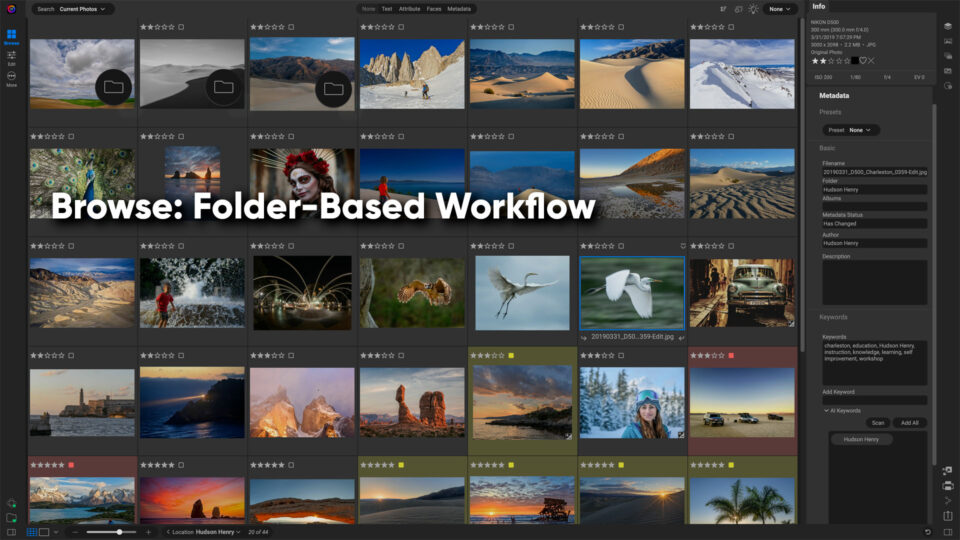
ON1 Photo RAW is designed to provide flexible photo management software for photographers. Unlike catalog-only applications, it allows photographers to work directly with their existing folder structure while still offering catalog tools for faster searching and organization.
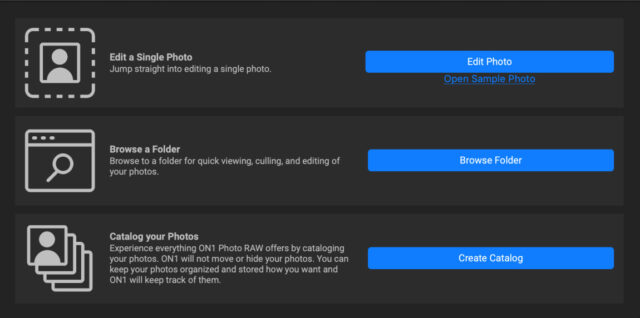
Inside the Browse module, ON1 Photo RAW provides two primary ways to view and organize images:
- Browse — navigate folders directly on your drives
- My Catalogs — view folders that have been cataloged
These two approaches allow photographers to work with their images in the way that feels most natural, whether they prefer direct folder navigation or database-powered searching. Many photographers will even use a combination of both workflows.
Browse Mode: Editing Photos Directly from Folders
Browse mode is the simplest way to manage photos in ON1 Photo RAW. Instead of importing images into a catalog database, you can navigate directly to folders on your hard drive and begin working with them immediately. ON1 Photo RAW reads the images directly from disk and generates previews so you can view and edit photos without any import step.
This approach is often described as photo organization without a catalog, and it’s one of the reasons many photographers choose ON1 Photo RAW as a Lightroom alternative. Your folder structure remains exactly as you created it, and your photos are accessible outside the software. Edits are stored next to the original images using small .ON1 sidecar files, which store all of the editing adjustments for a complete non-destructive workflow. This design allows photographers to back up their photos easily and move folders between drives or computers without losing any of their edits. Just remember to keep the sidecars in the same folder as your images.
Cataloged Folders: Faster Searching for Large Photo Libraries
While ON1 Photo RAW works perfectly fine without having to catalog photos, it also supports cataloged folders for photographers who want faster browsing and searching. When a folder is cataloged, ON1 Photo RAW creates preview files and metadata indexes for the photos inside that folder. This allows the software to browse and search those images much faster.
Cataloging is especially helpful when working with very large libraries because it enables features like searching by: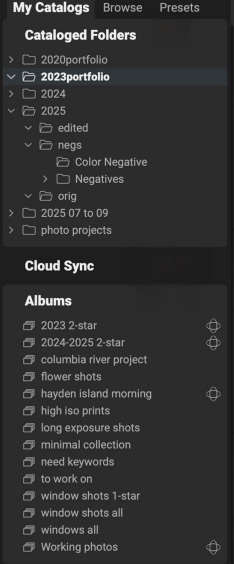
- keyword
- rating
- color label
- capture date
- camera or lens
For example, wedding photographers or event photographers who manage hundreds of thousands of images often catalog their main archive so they can locate photos quickly. It’s important to note that folders are cataloged, not individual photos. The original image files still remain in their existing folders on disk.
How Cataloged Folders Update Automatically
When a folder is cataloged, ON1 Photo RAW continues to monitor it for changes. If new photos are added to that folder, ON1 can update the catalog and generate previews for those images. This ensures the catalog stays synchronized with the actual contents of the folder. Because ON1 Photo RAW always keeps the original files in their folders on disk, photographers maintain full control over their image organization. This hybrid approach gives photographers the flexibility of a folder workflow with the performance benefits of a catalog database.
Lightroom Catalog vs Folder Workflow
Many photographers researching ON1 Photo RAW are comparing Lightroom catalog vs folder system workflows. Lightroom requires photos to be imported into a catalog database before editing can begin. The catalog keeps track of file locations, edits, and metadata.
ON1 Photo RAW offers more flexibility because it allows photographers to work directly with folders on disk without importing images first.
Here is a simple comparison.
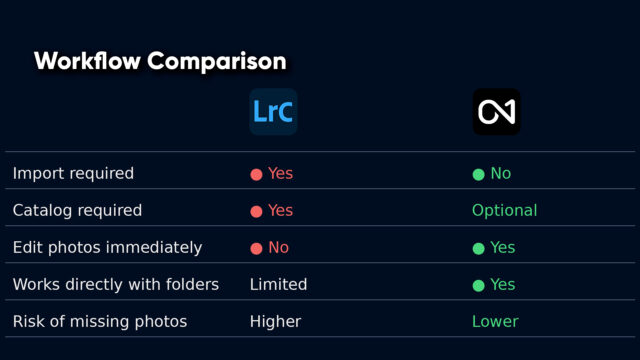
Because ON1 Photo RAW supports photo organization without a catalog, photographers can start editing immediately while keeping their files organized exactly how they want on their hard drive.
Why Do Photos Sometimes Appear Missing?
Another common question photographers ask is:
“Why are my photos missing?”
This usually happens when folders or files are moved outside the software. If the catalog no longer knows where a folder is located, it may temporarily show those images as missing. In ON1 Photo RAW, this issue is easy to fix in most cases. This is because the software can read images directly from folders on disk, navigating to the new folder location will allow ON1 to locate the photos again. This is another advantage of a folder-based workflow, since your images remain accessible through your operating system even if the catalog reference changes.
Do You Need a Catalog in ON1 Photo RAW?
The short answer is no. You can use ON1 Photo RAW entirely with a folder-based workflow if you prefer. Many photographers choose this approach because it allows them to organize photos exactly as they want on their drives. However, catalogs can still be helpful if you want faster searching across large image libraries or advanced filtering options. ON1 Photo RAW supports both workflows so photographers are free to choose the approach that best fits their needs.
A Recommended Workflow for Most Photographers
Many photographers find the best results by combining both approaches.
A common setup might include:
- using Browse mode for everyday editing
- cataloging large archive folders
- using catalog search tools to locate images quickly
This approach combines the flexibility of a folder-based workflow with the speed of catalog searching.
Final Thoughts
Understanding the difference between Browse and Catalog workflows removes one of the biggest points of confusion for photographers new to ON1 Photo RAW. Remember, unlike traditional catalog-only software like Lightroom, ON1 Photo RAW allows photographers to organize photos using either a folder-based workflow and/or a catalog system.
Whether you prefer photo organization without a catalog or want the performance benefits of indexed searching, ON1 Photo RAW gives photographers the flexibility to manage their images in the way that works best for them. Learn more about the photo organization features in ON1 Photo RAW.
Please review our our privacy policy for information about how we use the data we collect.