

ON1 NoNoise AI – The First In-Depth Look
- 17,640 Views
 Posted by Dan Harlacher
We’ve talked a lot about the upcoming release of ON1 NoNoise AI, the best photo noise reduction software, and are very excited for you finally see it in action. ON1 NoNoise AI will work as a standalone or plugin for popular photo editing software applications like Adobe Photoshop and Lightroom, Capture One, Affinity Photo, and more. It’s super easy to use and produces truly amazing results. Enjoy!
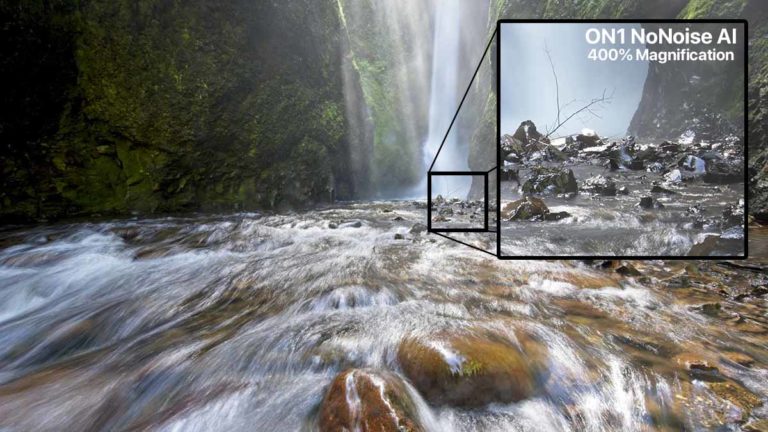
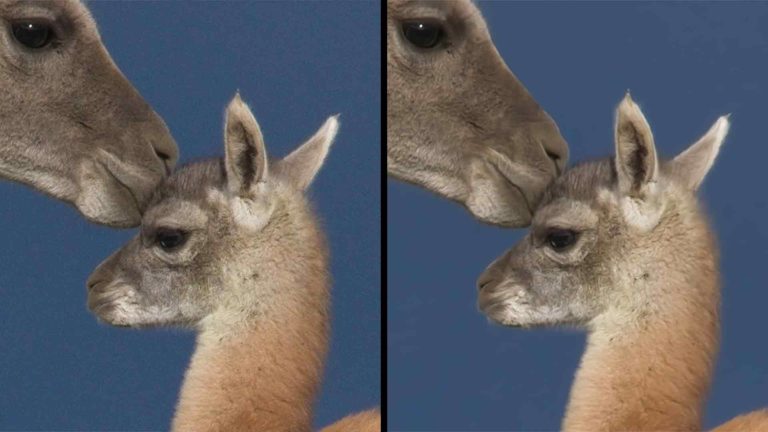
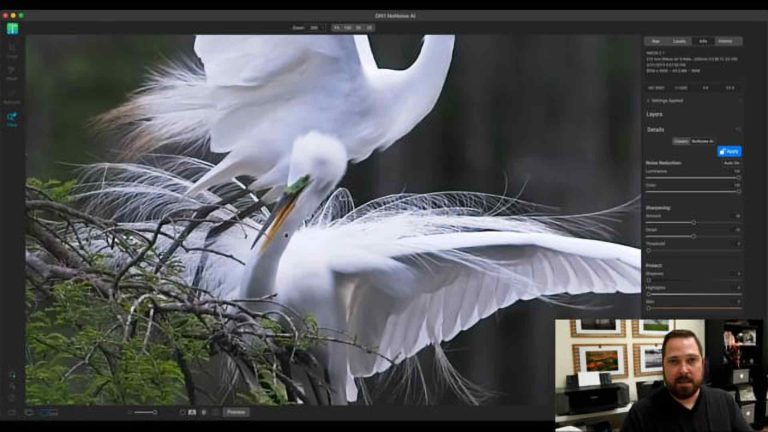
ON1 NoNoise AI is an all-new state-of-the-art photo noise reduction software application. ON1 NoNoise AI aims to give better results than any other noise reduction application on the market today. The app will intelligently remove image noise by leveraging ON1’s AI-based machine learning to remove luminance and color noise while maintaining the ultimate amount of details in photos. It will separate itself from other noise reduction applications by producing ultra-fast results, along with recovering and enhancing an amazing amount of detail.
ON1 NoNoise AI will be available as both a standalone application and plugin for Adobe Lightroom Classic, plugin for Photoshop, plugin for Affinity Photo, Corel Paintshop Pro, Apple Photos, and plugin for Capture One.
Product Updates & NewsLightroom PluginsPhotoshop PluginsAffinity Photo PluginsCapture One PluginsPhoto Noise Reduction SoftwareON1 News
32 Comments
Tawfik MohammedJune 17, 2021
Will this tool be built in to PhotoRaw 2021 as well?
Patrick SmithJune 17, 2021
Yes, it will be in the fall release.
Tod McKennaJune 17, 2021
So in order for NoNoise to work within the PhotoRaw eco system, this will be a paid upgrade to PR2021? Also, will the DNG’s exported be recognized as true DNG’s by PR2021 if I do not upgrade? (Currently, ON1 PR2021 does not treat linear DNG’s as true raw).
Patrick SmithJune 18, 2021
Yes, usually at a discount upgrade price every fall. It’s going to be much more than just NoNoise integration. Much much more! I’m not sure about the second question, but let me check with Dan.
Yvon GervaisJune 18, 2021
Why did I buy ON1 NoNoise AI if it will be in the new update of Photo Raw?
Wendy ArbeitJune 18, 2021
So why should I pay extra for it now when I can just wait for the new ON1 release?
And can I cancel my pre-release order
Patrick SmithJune 18, 2021
If you want to use it before then, otherwise you can definitely request a return through our support.
Michael AndersonJune 18, 2021
Which likely be PR 2022 and not PR 2021.x?
Doug WelchJune 19, 2021
I have pre-ordered On1 NoNoise. Does that mean when PhotoRaw 2022 upgrade is released in the fall, ON1 will compensate users that have purchased ON1 NoNoise with a discount?
Does ON1 foresee NoNoise standalone app. being updated to include refinements and will those refinements be reflected in the integrated version ie. both will be in step?
The app. looks well thought out, can’t wait to try it.
David PriceJune 17, 2021
The ‘first in depth look’, looks pretty good, well done to all at ON1 who have been working on NoNoise AI.
The fact that it will be possible to layer in different levels of noise control and/or sharpening into different parts of an image, sounds very interesting. Also, thank you ON1 for allowing photographers to have a lot of manual control over the final results. Rather than just having a range of ‘click and then accept what you get’ controls. This is very much in the established ON1 pattern of allowing photographers to develop their work, in their own way, (if they want to). Of course, one can always use the default settings, (if you want to). i.e., this is sounding like it could be the best of both worlds.
Of course, the potential downside to this, is that as individuals we all have individual tastes/likes. (Dan’s point about film grain, was spot on). So, one photographer might think that an image is absolutely perfect, whilst another objects to either the lack of grain/noise or that the image has, (in their personal opinion), too much noise/grain. So sadly, the unproductive/unwinnable arguments could go on forever.
But well done ON1 and I am looking forward to using NoNoise Ai. 🙂
Best wishes David Price
Sifat SyedJune 17, 2021
If I buy On1 PR 2021.5 + The Ultimate On1 Bundle — will I get this included in future update & be able to keep all the presets, LUTs, textures that I’m receiving with the bundle?
Sorry for the inconvenience, I’m new & not sure how updates work with On1…
I know Topaz Labs software includes 1 year of updates from purchase date, so I’m confused as On1 doesn’t show how long I’m able to receive free updates. ??
Patrick SmithJune 18, 2021
ON1 NoNoise AI will be included in the fall release of Photo RAW which will be considered a major upgrade. The fall release will also include a lot more than just NoNoise integration. It will be a substantial feature set. If you were to buy today, the preset, LUTs, textures etc would transfer to the next version as well. There will be more updates coming for RAW 2021.5. One in June and another likely at the end of the year for compatibility etc.
gunther geeraertsJune 17, 2021
While using Raw format mostly for landscape , I use Jpeg in my street photography as well.
Can NoNoise be used for Jpeg format as well?
Patrick SmithJune 18, 2021
Yes, it can be used on jpeg as well.
Robert BenyonJune 17, 2021
It looks impressive. For my taste I would back off the denoise and add more detail. These photos look a bit smooth to me. I use topaz denoise but would be happy to move to on1 to keep an all raw worjkflow.
marc labroJune 17, 2021
Looks amazing !
It would be nice to have a brush to sharpen the eye (or to remove the denoise locally).
It seems interesting to start processing the raw in nonoise before launching the resulting dng to PR2021…
However, we have no control on exposure, … so if the picture is dull when we apply nonoise we can’t do anything.
My feeling is that we need a min raw develop tools to boost image before applying nonoise. This is the big advantage of DXO photolab 4 and future PR2021 with nonoise.
David PriceJune 18, 2021
Hi Marc
I am looking forward to the arrival of a copy of the standalone, but being able to adjust tone and colour would make things better. However, it could, (by now), be just a little too late for the standalone to include any tone and colour controls. But, once this is built into Photo Raw, and it’s non-destructive work flow, I would expect that all of the tools should be available.
Looking forward to the Autumn/Fall releases already 🙂
marc labroJune 19, 2021
Hi David,
i agree it would be stupid to migrate PR2021 in nonoise standalone but I think we need a minimum raw develop in nonoise to make it standalone. If WB is not good, picture is too dark or histogram too narrow, we need to tune it before applying denoising. so a copy paste of PR2021 basic panel would help.
I think, as explained by Matt Kloskowski recently, we need to launch camera raw (or C1) before launching denoising plugins. We cannot start by denoising.
Adam RubinsteinJune 19, 2021
It appears to have the brush tools integrated into the app. Look at the left pane.
Edmund RuttledgeJune 18, 2021
Looks like the the On1 team has been at work during the pandemic! Many thanks for developing this feature.
Gerry FraibergJune 18, 2021
Looks great! NoNoise AI will be a welcome addition to ON1.
When is the best time to apply NoNoise – before or after the photo edit?
Roy MedinaJune 18, 2021
Looks great so far and excited to test it for myself. I was just wondering if you would consider having a “sort” function built into the interface that would allow us to show only ISO similar images, like say, show only ISO 640 images. That would allow us to batch process a wide range of images much quicker. Maybe even the ability to save Presets for our particular camera models at different ISO values?
John ScottJune 18, 2021
This seems like a very reasonable request. min/max of raw ISO settings. I would think an algorithm based on a profile of different ISO settings would also be nice, predicting the noise by pattern/ISO.
Brian BochicchioJune 18, 2021
Very nice! The layers and built-in retouching capabilities are a nice touch to help set it apart from similar products.
David BleazardJune 18, 2021
Dan mentioned “select the sync option’ to apply to all photos, where is the sync option button?
Robert ShraderJune 18, 2021
It looks to be very good. Congratulations, Dan and your team.
William H WatsonJune 18, 2021
I used a product called, “NOISLESS CK” fo many years. It was my secret ingredient to produce better/cleaner images. Sadly, when switching computers, I lost the license. Your offering reminds me of that product (that’s a complement). And with the integration to the ON1 universe, it will be my go-to tool for better images. Waiting patiently for the release.
Alan BrownJune 19, 2021
As ON1 NoNoise Ai is to be integrated into the Autumn/Fall release then for those of us who currently own PR2021 and have pre-purchased the stand-alone version can I suggest/request ON1 offer a double discount upgrade to reward their loyal customers.
Robert BenyonJune 19, 2021
I’m hoping the final integrated nonoise in PR2022 will have brush options like the Filters. Using the layers method to make adjustments selective is a bit clunky.
Adam RubinsteinJune 19, 2021
Brushes appear to be integrated into the app – look at the left tool pane.
William WesterhoffJune 19, 2021
Dan,
You have renewed my faith in ON1!
I have pre ordered NoNoise and I will be delighted to see it included in 2022.
I have loved ON1 since my first look a few years ago. I have abandoned Lightroom completely and now only use Photoshop for Content Aware features and to Replace Skies. I was disappointed with 2020 and 2021, but I am VERY excited about 2022. I can’t wait to show our DIGITS image editing group the new features in 2022.
Thanks for all that you do.
You and your team are great!
Jeffrey KingJune 20, 2021
Well done, ON1 Development Team! An outstanding addition to the ON1 post-processing arsenal! (With this AI refinement capability, I now expect that I will need to also ensure my corrective eye lens, as well as, my computer display resolution are also upgraded and synced so as to see (no pun intended) the full discrete effects of ON1 NoNoise AI? lol)
Comments are closed on this post.