
Create a Workflow You Can Trust

New ON1 Photo Kit The Perfect Workflow in ON1 Photo RAW 2026
A complete, repeatable editing system for ON1 Photo RAW 2026 — built for photographers who want faster edits, confident decisions, and consistent results.
You Own ON1 Photo RAW, But Do You Have a System?
ON1 Photo RAW 2026 is incredibly powerful — masks, AI tools, presets, layers, effects — everything you need to create stunning images. But power without structure often creates friction. Where do you start? What order should you edit in? How do you know when to stop? Why does one image look great, yet the next feels inconsistent? This new Photo Kit by master educator Anthony Morganti gives you what most photographers never intentionally build: a clear, repeatable editing workflow you can rely on every time you sit down to edit.
The Perfect Workflow in ON1 Photo RAW 2026
9 Focused Masterclass Lessons
PDF Outlines of Every Workflow
All Raw Files Used in the Lessons
20 ON1 AI Adaptive Presets
Preset Installation Video
What's Included
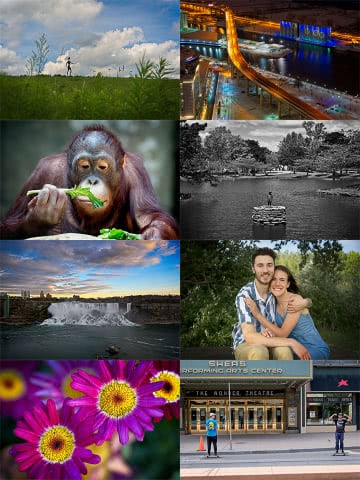
Video Masterclass - 9 Focused LessonsA complete workflow training system covering a base editing structure plus eight genre-specific workflows, including landscape (color and B&W), travel, street, wildlife, macro, portrait, and night photography. Learn a repeatable editing sequence developed by master photography educator Anthony Morganti that you can apply to every image. |
PDF Workflow OutlinesPrintable step-by-step workflow guides for every lesson so you can reference the structure while editing your own images. |
20 ON1 AI Adaptive PresetsA curated set of adaptive presets designed to support the workflow system and accelerate your editing process with intelligent adjustments. |
All RAW Files Used in the LessonsFollow along using the exact RAW files used in the masterclass so you can practice the workflow in real-world scenarios. |


From "Where Do I Start?" to Confident, Repeatable Results
Instead of bouncing between features and guessing what to do next, you’ll follow a clear, logical flow that guides every edit. Build a strong foundation first — tone, color, contrast — then refine with intention.
The result is a flexible editing framework you can apply to any genre, so you stop reinventing your process and start editing with confidence, clarity, and consistency.
Workflows Included:
- Color Landscape
- Black & White Landscape
- Travel
- Street / Urban
- Wildlife
- Macro
- Portrait
- Night Photography
Made for Every Level of Photographer

Beginners
If you've ever opened ON1 and thought, "Where do I start?" — this course gives you the answer.

Intermediate Users
If your edits feel inconsistent or slow, this gives you structure.

Advanced Photographers
If you want refinement, efficiency, and consistency across genres — this sharpens your system.
Trust Your Workflow. Trust Your Results.
ON1 is built on two pillars: Trust and Innovation. Innovation delivers powerful AI tools, while Trust gives you control. This masterclass brings both together, showing you how to use modern features within a structured, intentional photo editing workflow. By the end, you won't just understand ON1 Photo RAW 2026. You'll have a workflow you can trust.
Buy Today and Save!
The Perfect Workflow in ON1 Photo RAW 2026
9 Focused Masterclass Lessons
PDF Outlines of Every Workflow
All Raw Files Used in the Lessons
20 ON1 AI Adaptive Presets
Preset Installation Video
About Anthony
Anthony Morganti is a professional photographer and photography educator from Buffalo, New York. In the 1980s, he established a thriving Wedding, Portrait, and Stock Photography business called, Creative Edge Photography also in the Buffalo, New York area. He now spends his time teaching photography through workshops and YouTube Videos found on his website and YouTube channel which currently has over 400,000 subscribers. Anthony is a member of the Professional Photographers of America (PPA).

Frequently Asked Questions
Who is this Photo Kit for?
This masterclass is designed for ON1 Photo RAW 2026 users at all levels. Beginners gain clarity and direction. Intermediate users gain consistency and speed. Advanced photographers refine and strengthen their editing structure.
Is this just a feature tutorial?
No. This is not a feature walkthrough. It teaches a structured, repeatable workflow you can apply to any genre. You’ll learn how to approach an edit with intention, not just which tools to use.
Will this work for the type of photography I shoot?
Yes. The workflow adapts across multiple genres including landscape (color and black & white), travel, street, wildlife, macro, portrait, and night photography. The core structure stays consistent while adjusting to the subject.
Do I need to be advanced to benefit from this?
Not at all. If you’ve ever wondered where to start when opening an image, this course provides clarity. More experienced users often find it helps refine and simplify their process.
What makes this different from free YouTube tutorials?
Free videos often focus on isolated tips or tools. This masterclass teaches a complete editing system. How each step builds on the next and how to create consistent results across your portfolio.
What’s included in the Photo Kit?
You receive the full 9-lesson video masterclass, PDF workflow outlines, all RAW files used in the lessons, 20 ON1 AI Adaptive Presets, and a preset installation walkthrough video.
Will this help me edit faster?
Yes. A clear workflow reduces hesitation and second-guessing. When you know what comes next, you move through edits more efficiently and confidently.
Do I need any additional plugins or software?
No. Everything is built specifically for ON1 Photo RAW 2026. No additional tools are required.
Is this included in ON1 Plus?
No. This is a standalone premium Photo Kit available separately.
How quickly can I start applying what I learn?
Immediately. The structure is practical and designed to be implemented on your very next edit.